What are podcast knowledge panels? Google began showing a specific podcast knowledge panel on October 12, 2021. It displays the podcast name, image, and description on the right sidebar. As of October 25, there is no link within the knowledge panel to listen to the podcast.
Which podcasts got a knowledge panel? Over 50% of podcasts got a knowledge panel overnight. And they sprang from the Google Podcast Knowledge Graph vertical. RSS seems to be the key: Your feed into Google Podcasts is key. Google applied new, stricter rules for podcast feeds a couple of months ago, and Mordy Oberstein suggested that was the precursor to what happened on the 12th of October.
It seems that podcasts that adhere to those rules have gotten a knowledge panel. That’s not firm data, it’s an observation, but it seems fair enough to assume. In sum, this is a promotion for Google Podcasts, putting it on a par with Google Books and Google Scholar for triggering knowledge panels.
Before this update, about 10% of podcasts had a knowledge panel. That’s according to data from Kalicube Pro (which tracks about 500 podcasts). Now they all trigger thanks to other sources, such as Wikipedia, or IMDB. And the podcast knowledge panels that existed before have largely stayed the same.
If my podcast didn’t get a knowledge panel, how can I get one? Make sure that your RSS feed adheres to Google’s rules. If you do that, you will probably trigger a knowledge panel at some point. Also, it won’t happen immediately: there will be a process of digestion from Google before it will give you that knowledge panel. So be patient. I also advise that you create an Entity Home.
You need to provide an Entity Home so that Google can reconcile all of this information about your entity (the podcast being the entity). If you want to know more, check out this article on Entity Home SEO to help you understand the concept of Entity Home and its role in knowledge panel management.
Do knowledge panels always appear for a search on the podcast name? No. Even if it doesn’t appear, that doesn’t mean to say your podcast doesn’t have a knowledge panel you might want to search for “SEO podcasts,” for example (or whatever category your podcast falls under). Then you can look at the carousel that might actually show you the knowledge panel.
Examples of podcasts where the knowledge panel does appear directly on the name of the podcast: Edge of the Web, Search Off The Record, With Jason Barnard, and more.
This seems to be linked to having a clear Entity Home that isn’t on Google Podcasts. But also based on ambiguity: for example, Everyone Hates Marketers doesn’t trigger the knowledge panel, even though they have one. I think because the name is ambiguous.
About 30% of podcasts currently trigger a knowledge panel on a search on the podcast name. That is according to Kalicube Pro data.
Can I claim my podcast knowledge panel? No, you can’t unless it was triggered by another source. So if yours has been triggered by something other than the Google Podcasts update from October 12, you can probably claim it. If you can’t, just wait – it will come.
Where does the description for a podcast knowledge panel come from? It is taken from the description you provide in your feed. This means you have total control over the description that appears in your knowledge panel for the moment. So make sure that description is great!
Can I enrich the contents of my podcast knowledge panel? Yes! Right now, the knowledge panels that have been triggered by this Google Podcasts update on October 12 have not been enriched, but it’s very early yet. If you create an Entity Home, you can provide additional information above and beyond what’s included in the RSS feed.
By providing that information on the Entity Home and getting corroborative information all around the web, you will be able to push additional information into your knowledge panel. I would suggest you start now because even if you can’t enrich it right away, you will be able to enrich it over time. So, now is the time to start!
This is really big news in the knowledge panel world that I live in, and I’m really excited. It’s the biggest news of 2021 so far for knowledge panels. Expect more in 2022 !
Your opportunity to create higher performing PPC campaigns, prepare for looming algorithm updates, and take your search marketing career to the next level is here: Attend SMX, online November 9-10, to learn actionable, trusted tactics that will give you an edge over the competition and set you up for a winning 2022 and beyond — all for just $289.
It’s all available both live and on-demand — and it’s all 100% virtual — so you can train at your convenience from the comfort and safety of your own computer.
Keep reading for a rundown of everything your $289 All Access pass unlocks…
Broaden your horizons with two forward-thinking keynotes
Describe how and why your marketing should appeal to Gen Z’s values
Understand how to tailor your content to appeal to Gen Z’s goals
Design your creative strategy to appeal to Gen Z’s preferences
Unlock two days of tactical sessions + live Q&A (Overtime!)
Attend nearly 50 experts-led sessions — available both live and on-demand — that deliver actionable tactics, trusted advice, and reliable insights that you can implement immediately. By the end of the event, you’ll be ready to:
Leverage AI and machine learning to automate content quality audits
Forecast spend, revenue, and other KPIs based on historical data and industry trends
Write copy for your audience, regardless of where they are in the funnel
Develop content that will drive your audience to act
Implement proven tactics and tips to drive more traffic from Google Discover
…and that’s just the beginning. Live Q&A (a.k.a. Overtime) follows every session on the SEO, PPC, Content, and Career tracks so you can ask speakers your questions live and get specific answers in real-time.
Learn from Google, Microsoft, and other leading solution providers
Go under the hood of Google’s new Performance Max campaigns with Global Product Lead of Google Ads, Rodney Ip — and stick around for the live Q&A where you can get your burning ads questions answered by Google in real-time.
And be sure to check out these two exclusive Microsoft Advertising sessions:
Tuesday’s virtual fireside chat features insights on honing your search and data strategies, plus a look at some new product updates.
Check out all of the participating solution providers here.
Soak up actionable best practices during live clinics
Attend your choice of live clinic on SEO copy, PPC landing pages, or GA4 accounts to watch as a panel of experts audit peer-submitted assets in real-time.
You’ll walk away with fresh inspiration and actionable insights to improve your own assets. (All clinics will be available on-demand so you can watch and rewatch!)
Meet the 2021 Search Marketers Of The Year!
Don’t miss your opportunity to connect with the four winners of the Search Engine Land Awards’ Search Marketers of the Year during two live AMAs on Wednesday afternoon!
Showcase your commitment to continued training
When you attend SMX, you’re making a commitment to further your career. That kind of initiative deserves recognition. Attend any track in its entirety to receive your very own Certificate of Completion and a digital badge, perfect for posting to your social profiles and website.
Use your Certificate of Completion to:
Verify to your manager that you attended the event
Demonstrate your knowledge of the latest industry topics and trends
Beef up your CV and resumé
Showcase your involvement in the search marketing community
Dive deep into your search marketing specialty (additional fee applies)
Two days of tactic-packed training not enough? SMX workshops were designed for insatiable search marketers like you. Complete your training with a live, two-day, deep-dive workshop on your search specialty:
TL;DR: This is your final chance to attend two days of actionable, expert-led SMX training in 2021.
What are you waiting for? You and your career deserve this. Register now to get your All Access pass for just $289 — or bundle with a two-day workshop for $459 — and join us online in two weeks!
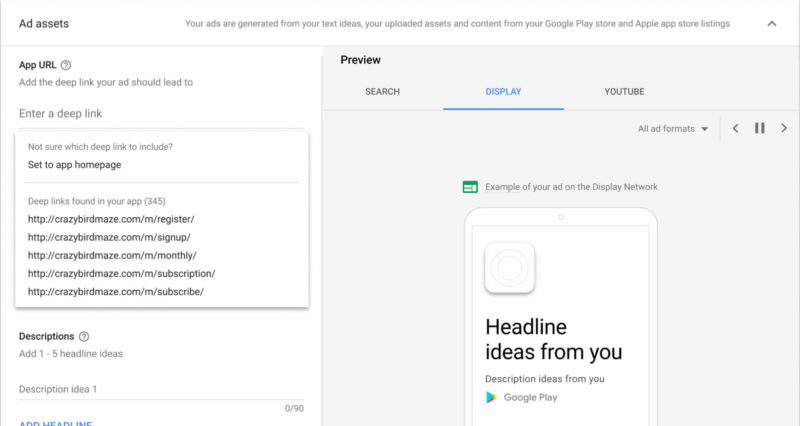
App advertisers are no longer required to implement deep linking to run App campaigns for engagement, Google Ads announced Monday. As a new option, advertisers can select “Set to app homepage” during ad group creation to direct users to the app homepage.
Image: Google.
Why we care
Implementing deep links typically means getting developer support, which may be a limited resource in your organization. This new option enables app advertisers to utilize App campaigns for engagement without having to request that support, which may mean that your campaign can get off the ground faster. Deep linking, however, remains useful as it enables this ad type to take users to a specific part of your app, which may translate to better conversion rates than simply sending them to the app homepage.
More on App campaigns for engagement
App campaigns for engagement are designed to target an app’s existing users to bring them back to the app and foster loyalty and engagement.
To use this campaign type, advertisers must provide text, images, video and designate a starting bid and budget. Google Ads’ automation then designs a variety of ads in different formats. These ads can appear across Google Search, YouTube, Google Play and within other apps on the Google Display Network.
App campaigns for engagement were first announced in March 2019 and rolled out globally in December 2020.
This past Friday a New York judge unsealed previously redacted documents in the lawsuit against Google led by the State of Texas. One of the main allegations of the antitrust lawsuit is that Google and Facebook colluded to rig ad prices and “kill header bidding” (the attempt by competitors to make the ad market less Google-centric).
“The lawsuit claims that when Facebook began to gain traction as a rival advertiser, Google made an agreement with Facebook to reduce competition in exchange for giving the social media company an advantage in Google-run ad auctions. The project was called ‘Jedi Blue,’” we wrote in April of this year.
The newly unredacted information shows just how deep the alleged agreement went between Facebook and the search engine giant.
Jedi Blue and Facebook/Google ad exchanges. Code-named “Jedi Blue,” the arrangement between Facebook and Google meant that Google would “charge Facebook lower fees and give Facebook information, speed and other advantages in header bidding auctions in exchange for Facebook’s support of Open Bidding, Google’s header bidding alternative,” wrote Allison Schiff for AdExchanger.
Some suspect that Facebook initially backed header bidding in order to force Google’s hand in the arrangement and force a mutually beneficial deal. “Partnerships like this are common in the industry, and we have similar agreements with several other companies. Facebook continues to invest in these partnerships, and create new ones, which help increase competition in ad auctions to create the best outcomes for advertisers and publishers. Any suggestion that these types of agreements harm competition is baseless,” Facebook said in a statement.
The internal documents at Facebook reveal that the company had “four options: to ‘invest hundreds more engineers’ and spend billions of dollars to lock up inventory to compete, exit the business, or do the deal with Google.”
Meanwhile, Google’s main goal was to figure out any way to stop header bidding from gaining steam in the industry.
What is header bidding? “Header bidding helped website publishers circumvent Google’s exchange for buying and selling ads across the web. The exchange auctions ad space to the highest bidder during the split second it takes a webpage to load. Header bidding allowed the publishers to directly solicit bids from multiple ad exchanges at once, leading to more favorable prices for publishers,” explained Ryan Tracy and Jeff Horwitz for the Wall Street Journal.
Google worried, according to court documents, that having a large ad rival (like Facebook) embracing header bidding would disrupt what was essentially their monopoly on the ad market. “Header bidding was bad because it allowed publishers to bypass fees which we now learn ranged between 19-22% of revenues,” said Jason Kint in a tweet thread analysis of the court docs.
How Project Jedi worked. In order to win in the exchange, Google created the Open Bidding program. This program, in theory, let publishers display their inventory to multiple ad exchanges at once. This was presented as a competitor to header bidding. However, the lawsuit alleges that Google manipulated Open Bidding to give Facebook’s Ad Network (FAN) an unfair advantage. “Jedi’s success was measured not by financial targets or output increases, but by how much it stopped publishers from using header bidding,” said Janice Tan with Marketing Interactive after an assessment of the documents.
From there, the partnership with Facebook meant the social media giant also threw its weight behind Open Bidding over header bidding. In exchange for backing Google’s open bidding over header bidding, Facebook received “information, speed and other advantages in the auction it runs in the US,” added Tan.
“Both companies also had an illegal advertising deal that allowed the social media company to appear more in Google Ads. Google did this by fixing bids in ad auctions to Facebook’s favor,” alleges Nalin Rawat for FossBytes.
Why we care. Well, firstly, it’s a lot to digest. There is potential that publishers and advertisers have been overpaying and missing out on placements due to Google’s alleged collusion with Facebook to essentially rig the ad market.
According to the unredacted documents, Jedi “generates suboptimal yields for publishers and serious risks of negative media coverage if exposed externally.” Also with Google promoting FLoC, FLEDGE, and the rest of their sandbox as a privacy solution for the open web, these revelations call into question their motives (especially if the company is sharing sensitive data with other firms that have agreed to terms with them for ads). Many advertisers complain about the lack of reach with other competitive ad networks and the revelations in the unredacted Google lawsuit show that the tech giant’s leadership worked diligently to ensure that competition was squashed.
Search Engine Land’s daily brief features daily insights, news, tips, and essential bits of wisdom for today’s search marketer. If you would like to read this before the rest of the internet does, sign up here to get it delivered to your inbox daily.
Good morning, Marketers, and Google Ads (the artist formerly known as AdWords) turned 21 this weekend.
Did you know that Google Ads started as a service where marketers paid a monthly fee and Google would set up and manage the ad campaigns? Quite ironic considering many advertisers today are lamenting the loss of control and data as Google Ads invests in more automation and is managing many elements of ad campaigns itself. The company offered a self-service option for small businesses “who wanted to manage their own campaigns,” which is the foundation of our current Ads platform today.
What was AdWords like when it first ramped up? “The AdWords program provides low-cost exposure on one of the industry’s leading search engines with CPMs from $15 or 1.5 cents an impression, $12 or 1.2 cents an impression, and $10 or 1 cent an impression, for the top, middle, and bottom ad unit positions, respectively,” stated the announcement.
Not only that but, “Google’s quick-loading AdWords text ads appear to the right of the Google search results and are highlighted as sponsored links, clearly separate from the search results.” It seems a lot has changed with Google’s ads product since inception, and yet we’re almost coming full circle in many ways too.
Carolyn Lyden,
Director of Search Content
How to solve the marketing reporting conundrum without being a magician
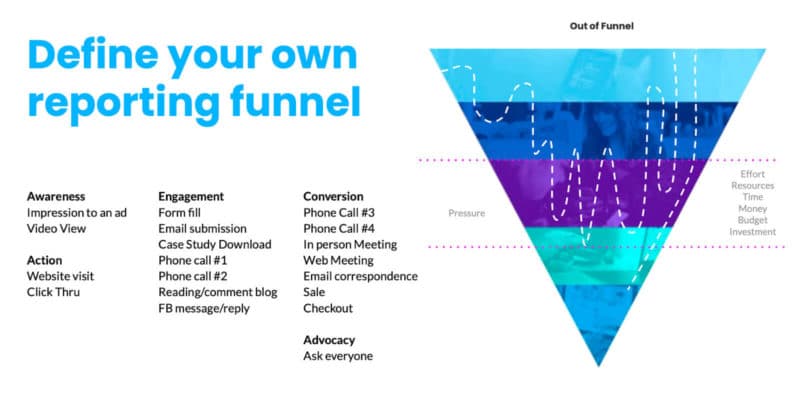
In a recent survey shared at SMX Report, C-Suite executives said sales and leads are top performance indicators for marketing teams. If sales and leads are what our leadership teams, whether internally or externally, care most about, what does this mean for PPC marketers?
Such preferences can lead to a level of expectation that marketers are going to create a magic sales faucet, a fountain of fortune, or that there’s a secret Google leads button hidden in our toolbox somewhere.
And hey, PPC marketers can help make some pretty magical things happen, but we’re definitely not magicians, at least not in the Gandalf the Grey or Albus Dumbledore kind of way. In this how-to, SMX speaker and Aimclear’s VP of Growth, Amanda Farley deep-dives into the steps to get reporting and measurement right for your audience.
Navigating Google’s title changes: The rollout, what’s happening now and what you can do about it
In August, Google introduced a new system for generating title links (the title of a search result in Google Search). “This is because we think our new system is producing titles that work better for documents overall, to describe what they are about, regardless of the particular query,” the company explained.
However, during the new system’s initial rollout, SEOs provided example after example after example of titles that not only failed to describe what the page was about, but may also confuse users and deter them from clicking through. Fortunately, the situation has since improved, but placing blind faith in Google’s new system can mean that you’re ceding control over a crucial aspect of your content, which could ultimately affect your business. Below, you’ll find a synopsis of how Google’s title changes have evolved, how you can verify whether your titles have been changed and what you can do to regain control over them.
In this in-depth analysis, editor George Nguyen covers what’s changed, what to do if you suspect Google is changing your titles, what to do if you dislike the changes Google is making, and what these changes mean for the future.
How to fix the SEO issues that keep you from achieving your goals
At this year’s SMX Report, JR Oakes, Senior Director of Technical SEO at Locomotive, provided an overview of SEO Issues that hold us back from achieving our goals. He took a holistic look at resources, communication and mental constructs around SEO that often hinder progress. Oftentimes we look for the quick fixes that drive major ranking improvements. These still exist, but the relationships involved with connecting us to clients, and the website to users are where the most sustained value can be found.
In this article, Oakes goes through the 8 ways that SEO teams can break through major issues and reach their KPIs and achieve their goals:
Companies need the team buy-in and resources to succeed with SEO.
SEO teams should focus on clarity of communication and efficient prioritization.
The key areas to consider in SEO strategies are Links, Content (page satisfaction), Experience, and Relevance.
GIGO is a real thing. Taking time to go slow with accurate XML sitemaps, custom metrics, user feedback mechanisms, etc can make your life easier and give you data to inform growth.
Spend some time watching user sessions. You will thank me.
Work hard to ensure your pages solve a problem or provide the right answer.
Look at how your page’s content aligns with user searches provided by Google.
Write to support and build your site’s subject matter expertise. Credibility is key.
Support our existing and future Clients with Ecommerce consultancy services – concentrating (albeit not exclusively) on new product development, roadmap definition, experience management and support in the creation of business cases
Have in depth experience of eCommerce tactics and how to influence the physical and digital journeys.
Develop a master content plan that meets lead generation and strategic brand goals; translate this plan into an editorial calendar and manage the workflow to execute
Create short-form and mid-length direct response content for lead generation including native articles, landing page copy, and paid social advertisements
What We’re Reading: What does “shoppable” content mean for the upcoming holiday season?
We’ve mentioned it a thousand times, probably, but the pandemic has accelerated e-commerce and online retail. It’s a fact of life that the trends of COVID shopping have just become a way of life now. People expect to find what they need online (whether they plan to have it delivered or pick it up on location), and that reality coupled with advances in AI and VR technology means retailers are looking to “shoppable content” to boost their online sales this holiday season.
Pinterest. “Pinterest recently rolled out the ability for merchants to automatically create videos from the products they’ve already displayed on their accounts. This creates a slideshow that taps into the demand around videos and stories-based formats in social feeds. The videos also link directly to merchant check-out pages.” Along with this Pinterest Creators can tag brands in their pins which is a useful addition for affiliate and influencer marketers.
TikTok. TikTok is continuing to expand their shopping options, ads, and integrations. One example is TikTok Shopping, which “lets Shopify merchants that have a TikTok For Business account add a ‘Shopping’ tab to their TikTok profiles. That in turn lets them sync product catalogs and create mini storefronts on TikTok. So the integrations continue to expand in several directions,” said Boland.
YouTube. “YouTube just this week announced that it’s expanding its program for live shopping. This gives merchants a QVC-like format to stream product demonstrations. It’s rolling the whole thing out through a week-long event called ‘YouTube Holiday Stream and Shop’ starting November 15.” The move elevates YouTube to a shopping destination.
Shopping doesn’t just happen on e-commerce sites anymore. Social and streaming platforms are becoming retail destinations (especially as we near the holiday season) with shoppable content. Retailers will have to take advantage of the integrations to ensure they’re found across channels this shopping season.
Google has added new support, data and features to the Google Search Console Search Analytics API. The API now supports showing data for Google Discover, Google News and also supports Regex commands – all of which was supported already in the web interface.
Google announced this morning this support has been added to the
Search Analytics API after many requests from the industry to add it.
API updates. Google said “the searchType parameter, which previously enabled you to filter API calls by news, video, image, and web, will be renamed to type and will support two additional parameters: discover (for Google Discover) and googleNews (for Google News).” Google is still supporting the old name searchType for the time being, so it is backwards compatible.
Also, Google explained that “some metrics and dimensions are compatible only with some data types; for example, queries and positions are not supported by the Google Discover report.” This would also apply with the API and the API would thus return an error message.
Regex API support. Google has adde Regex support to the API, specifically to the query and page dimensions. Two new operators have been added to the existing match operations, they are includingRegex and excludingRegex.
Already in web interface. Like we said above, these features have been in the web interface for a while. Google has now brought support to the API. Google News performance reports were added in January 2021, Google Discover performance reports gained full data in February 2021 and Regex support was added in April 2021.
Why we care. Many of you use APIs to help automate and streamline your day-to-day SEO practices and reporting. Having access to these additional data points and adding in Regex controls, should make these reporting tasks easier and more automated.
This should save you time to do other SEO related tasks, tasks you might have a harder time automating.