Saturday, December 5, 2020

Best Auto Dialer Software

Disclosure: This content is reader-supported, which means if you click on some of our links that we may earn a commission.

You’re making a lot of calls, but leads aren’t converting and agents are losing track of conversations.

These are just two of the reasons that any business looking to grow should get auto dialer software. It automates thousands of repetitive manual tasks—not just dialing—and optimizes the experience of everyone involved.

That way, agents can focus totally on customers.

Managers get real-time KPIs at a glance.

And customers never get another 2 a.m. phone call.

What I’m saying is: everyone loves these products. 

Here are the top six auto dialer software options on the market. They’re helping companies revolutionize outreach and connecting agents with a higher number of high-quality leads every hour. 

Which one is right for you? Let’s find out.

The Top 6 Options For Auto Dialer Software

  1. Phoneburner – Best for Remote Teams
  2. VanillaSoft – Best for Outbound Sales
  3. Voicent Cloud – Best Standalone Auto Dialer Software
  4. Mojo – Best for SMB Sales
  5. RingCentral – Best for Compliance
  6. Kixie – Best for Local Presence

How to Choose the Best Auto Dialer Software for You

Auto dialers call a list of numbers from a preset contact list. As soon as a call is answered, the auto dialer plays a pre-recorded message or transfers the call to an agent.

Sounds simple. 

And it is, until you start thinking about multiple agents calling 70 to 80 numbers every hour.

This is why popular auto dialers come with additional tools to help agents manage contact lists, store information, and push trackable leads through the pipeline.

Here are the main features you are going to be looking at as you assess your choices.

Auto Dialer Modes

Most vendors offer multiple dialing modes and several offer the full range.

Preview Dialers call a number as soon as an agent is ready. Information about the contact is automatically displayed on the agent’s screen.

Progressive Dialers call one number at a time in a specific order. Progressive dialers will hang up or leave a message after a predetermined period of time, automatically calling the next number on the list. 

Power Dialers call more than one number at a time and keep calling based on a call-to-agent ratio. You can configure the ratio so that the dialer increases or decreases call volume based on the number of agents available.

Predictive Dialers make calls based on algorithms that minimize the chance of someone answering when no agent is available. Essentially, they throttle the call volume according to predicted agent availability.

There’s a time and a place for each mode. Progressive dialers, for instance, prevent agents from cherry-picking leads.

You’ll also see smart or intelligent progressive dialers. These always call one number at a time, but the contact list is actively prioritized based on real-time customer data. 

So, for example, if a customer fills out a form online, an intelligent progressive dialer will bump their contact info to the front of the list, putting the next available agent in touch.

In-Call Features

Onboarding new agents is a lot easier with in-call supervisor features like:

  • Listen: managers can hear the call
  • Whisper: managers can speak to the agent without the customer hearing
  • Barge: managers can join the call

It can be hard to understand the value of these features if you’ve never used them before. That’s okay. You can still make a good decision about what’s important by putting yourself in the customer’s shoes.

Warm transfer is an in-call feature that customers love. Basically, it allows an agent to stay on the line with a customer while they’re being transferred to another agent. 

It’s super simple to relay information during a warm transfer because all three people are on the line and there’s no risk of a caller getting routed to nowhere.

That way, no customer has to waste time repeating information to the next person they speak to.

Workflow Automation

How much time does it take to wait four rings and leave a message? Too long, especially if this happens hundreds of times a day.

With live answer detection, agents are only connected with real people. That saves an incredible amount of time. 

If there is no answer, an auto dialer with voicemail drop places a pre-recorded message in the inbox and begins dialing a new number.

That’s hundreds of hours a year, right there.

Within the agent dashboard, you can kick off pre-built workflows with the click of a button. Initiate an email welcome campaign, send a secure bill, or use voice broadcast to send a recorded message to thousands of numbers at the same time.

So many time-consuming tasks are now simple dashboard buttons that initiate highly-trackable workflows.

Click. The agent is on to the next call.

Call Recording and Reporting

Auto dialer software is going to come with its own CRM, integrations with popular CRMs, or both. 

What it’s going to do is connect all recorded calls with specific customers, automating all of the traditional storage and filing tasks.

If you are already using CRM software you love, find an auto dialer that integrates easily. If not, auto dialer software that comes with a built-in CRM or lead management system is going to work much better for you out of box.

Compliance

The Telephone Consumer Protection Act (TCPA) and other regulations have put legal limits on what telemarketers can do. In fact, robocall lawsuits can result in five-figure damages for a single call. 

In order to meet all legal and privacy obligations, you want auto dialer software that works behind the scenes to ensure that you are only calling the right numbers and keeping every conversation securely stored for future reference.

The good news is that the best auto dialer software helps the companies who use it from getting in hot water. 

All of the products on this list, for example, have tools to make sure you aren’t calling numbers on the national Do Not Call list (DNC). 

Be conscious of compliance, but don’t stress too much. By picking auto dialer software from the top vendors, you know you are getting a product that has kept many other businesses safe.

The Different Types of Auto Dialer Software

There are two distinct service categories that include auto dialer software. These are:

  • Sales Engagement Platforms
  • Contact Center Software

Just by looking at the names of these categories, you may have a good idea of the type of auto dialer software you need. 

Sales Engagement Platforms

Auto dialer software is one part of a campaign. Sales engagement platforms give you the other tools necessary to conduct effective outreach at scale. Typically, these are outbound dialing platforms, though some come with inbound functionality.

It can be surprising how many other marketing and sales tools are included, even with basic-tier subscriptions. 

You may get an email autoresponder, lead generation tools, and the ability to route calls to other channels like text or chat.

Between vendors, there’s a lot of variation in dialing modes, in-call capabilities, and workflow automation. You are looking for something that’s affordable at scale and provides your agents the support they need.

The questions you should be asking are: 

  • How does this platform fit into your company’s sales cadence? 
  • Does it have the tools your agents need to assist customers and track them from one stage to the next?

You may find a sales engagement platform that works well for a non-sales auto dialing campaign—fundraising comes to mind, or leaving pre-recorded messages for doctor’s appointments. 

Contact Center Software

Contact center software used to be called “call center software”, but modern customers make contact via phone, text, social, chat, and so on. It is set up to handle inbound, outbound, or blended contact centers that handle communication in both directions.

The auto dialer software that comes with contact center solutions is nearly identical to what you get with a sales engagement platform. The major difference is that you are going to have a lot more inbound call functionality.

If your campaign strategy relies heavily on inbound communication, contact center software may better complement your auto dialer than a sales engagement platform. 

Contact center software is also much better at centralizing all company communications in a single place. This can be important in preventing information silos.

If you are not worried about inbound calls and you already have a tool that centralizes communication at your company, a sales engagement platform is all you need for auto dialer software.

If you need more than that, a contact center solution will best fit your needs.

#1 – Phoneburner — Best For Remote Teams

Phoneburner, as a company, has been a 100% remote team since 2008. They know what life is like for a distributed workforce and they’ve designed a sales engagement platform that rises to the occasion.

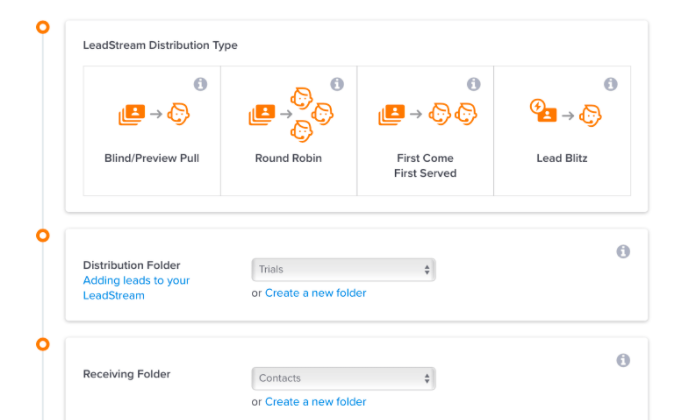
New leads are automatically routed to the right agent by LeadStream, Phoneburner’s intelligent lead distribution system. 

It’s easy to use and customizable, so you can configure the system to distribute leads according to your business processes.

This is a huge time-saver and a really important feature for teams where a manager isn’t just a few desks away. 
One of the things I really like is how easy it is for colleagues to share content like phone scripts and email templates. They can also share button configurations, instantly setting up new agents with one-click workflows built to fit best practices.

Even though it’s enterprise-grade software, you can have Phoneburner working minutes after purchase. 

The robust sales engagement platform provides everything you need, including:

  • Power and preview dialer
  • Local caller ID
  • Voicemail Drop 
  • Trackable emails
  • Native CRM
  • 150+ integrations
  • SMS support (available as an add-on)

Pricing for Phoneburner is not complicated. An annual subscription costs $1,512, which breaks down to $126 per user/month. It’s a 15% discount off their monthly price of $149 per user.

It’s a higher sticker price than some, but that’s all you pay. 

It offers truly unlimited dialing and there are no extra monthly costs—no setup fees, usage fees, or per-minute charges.

Administrator accounts are free unless they use the auto dialer. They get advanced reporting features like leaderboards, real-time dashboards, and smart lead distribution via a dedicated portal.

One last thing: Phoneburner gives you as many seats as you need during your free trial. That’s not typical and says a lot about how confident they are in their service.

#2 – VanillaSoft — Best For Outbound Sales

VanillaSoft is a cloud-based sales engagement platform with business-class VoIP. Get started with nothing more than an internet connection and watch your sales team make better connections.

They have preview and progresssive dialing modes, both of which pull data automatically from your CRM and make calls based on lead-scoring and prioritization. 

All the legwork is behind the scenes. Agents are always talking to the highest-quality leads.

On top of that, logical branch scripting ensures that every agent delivers consistent, on-brand information to customers. You can build out script libraries that present the agent with guidance and tips for every stage of the conversation.
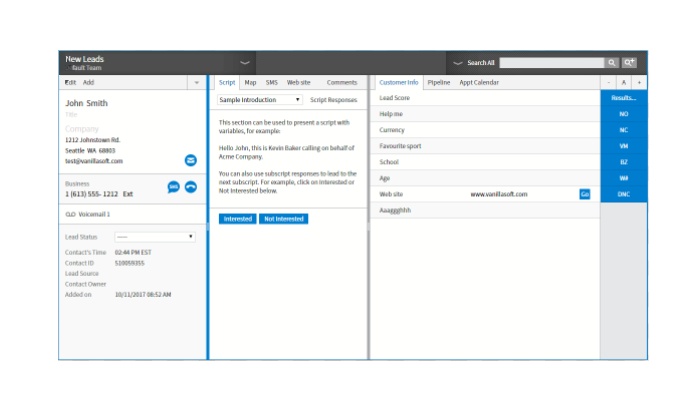
I really like the foolproof calendar that lets people from any timezone schedule calls and set appointments without any accidental overlap. Never double-book a demo again.

You can use the built-in lead and sales tracking software in VanillaSoft or integrate with your CRM. Either way, the reporting and analytics are there to help you optimize performance. 

Quickly identify which agents are converting leads and which need a little more help.

Some of the other aspects of VanillaSoft that attract sales teams are:

  • In-call supervisor features
  • Voicemail drop
  • SMS texting and email marketing
  • Local Caller ID
  • Skill-based call routing
  • Salesforce integration

You’ve got everything you need to get sales reps up to speed quickly. Once they’re comfortable, there are more than enough tools to help them visualize and improve their performance.

VanillaSoft pricing is broken down into their base platform and add-on products:

  • Sales Engagement Platform: $100/month for first user, $80 per additional user
  • Dialing: $30/month per user
  • Recording: $30/month per user
  • VoIP: $33/month per user

Discounts are available with an annual subscription and you can use VanillaSoft with your existing phone lines or VoIP provider.

This is one of the most recommended products on the market. 

Why? All of the features are easy to use and it’s flexible enough to work for inside sales, telemarketing, fundraising, and more.

There’s no free forever version, but VanillaSoft offers a two-week free trial for up to six users and 2,000 calls.

#3 – Voicent Cloud — Best Standalone Auto Dialer Software

Voicent is auto dialer software that can be molded to fit your situation.

Here’s their offer: Get one of the best standalone auto dialers on the planet for less than $20/month per user. Then, add the specific services you need à la carte. 

With Voicent, you select the exact set of tools that meet your particular needs. No more shopping around and trying to fit yourself into a prepackaged plan.

Features like marketing automation are reasonably priced add-ons in Voicent instead of being confined to an expensive premium subscription that’s bloated with tools you won’t use.
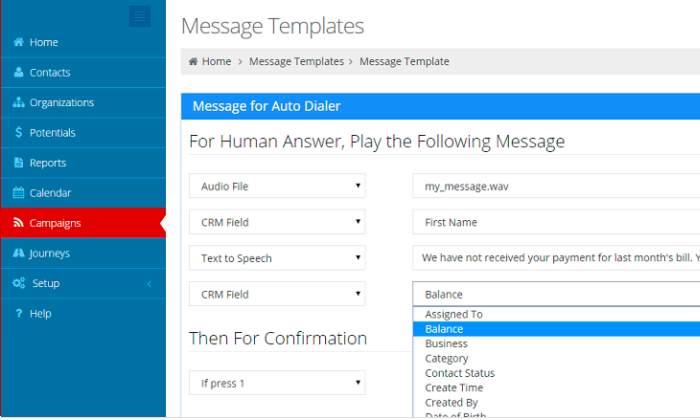
If you just need the auto dialer software, rest assured that Voicent’s base plan has you covered. You get all four dialer modes (progressive, power, predictive, and preview), as well as:

  • Native CRM and integrations
  • Campaign builder
  • Rich agent dashboard
  • Ability to play audio files while talking
  • Calling over SIP, IP PBX, and analog phone lines.
  • DNC compliance tools

All of that and more is included with the Base Plan, which starts at $19/month per user with an annual subscription. 

Paying month-to-month, it’s $29 per user. 

In addition to the subscription fee cost, Voicent has usage fees, which are charged per minute based on your calling plan:

  • 4¢ Plan: no credit, pay as you go
  • 3¢ Plan: starting at $75, with 2,500 minute credit
  • 2¢ Plan: starting at $130 with 6,500 minute credit
  • 1.5¢ Plan: starting at $375 with 25,000 minute credit

With a yearly Base plan rate of $228, Voicent is extremely affordable, but be sure to budget the usage fees into the total monthly cost. 

Voicent Cloud only supports calls in the US and Canada, though they offer on-premise software that allows for global outreach.

Voicent is a great solution for companies that need really solid auto dialer capabilities, but don’t want a full contact center or sales engagement platform. 

#4 – Mojo — Best For SMB Sales

Mojo is a sales engagement platform that operates on a copper-wire infrastructure. 

Agents call into the Mojo platform from a landline or mobile and it begins dialing their list. From a browser or mobile device, they get the crisp sound of old school telephones.

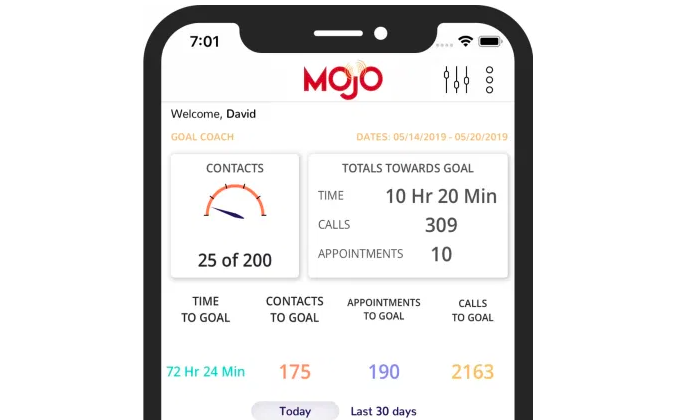
Mojo makes up to 85 calls per hour with a single line power dialer, or up 300 with a triple line power dialer. Both single and multi line dialers are used by a single agent.

Give a small team titanic reach with Mojo.

The built-in lead management and marketing tools make it easy to track every call, follow up, and stay organized. Navigable dashboards provide a clear view of KPIs and prospecting lists, while preview mode provides extensive customer information before every call.

Mojo helps growing businesses make the most of every answered call. Agents can leave notes, schedule follow-ups, initiate drip campaigns, and more, all from within the platform.

Some of the other great features include:

  • Voicemail drop
  • Roving dialer (share licenses between team members)
  • Live answer detection
  • Time-zone calling guard
  • Leaderboard
  • Mobile caller ID

Monthly pricing for individual users is $99 for a single line dialer and $149 for a triple line dialer. 

I like it for small businesses because there are no hidden costs, no contracts, and no per-minute fees.

For teams, Mojo pricing works as follows:

  • Lead Manager: $10/month, plus you must purchase one of the following dialer options
  • Single Line Dialer: $89/month per license
  • Triple Line Dialer: $139/month per license

Mojo has especially well-developed lead generation and tracking tools for realtors, who make up the majority of Mojo’s clientele. 

Judging from recent reviews, however, it seems like a diverse range of businesses are taking advantage of Mojo’s outbound dialing solutions.

Agents can access the Mojo platform with VoIP, but it may not deliver the same copper-wire clarity as a phone source.

#5 – RingCentral — Best For Compliance

RingCentral can support every channel of communication, providing companies with a full-service contact center solution. 

They offer one of the most feature-rich autodialers on the market, with progressive, predictive, and preview dialing modes.

They also offer TCPA Safe Dial, which allows companies to call unsubscribed cell numbers without risking legal troubles. Additionally, you can scrub campaign lists against your own DNC list or use RingCentral’s integrations with compliance solutions from DNC.com and Gryphon Networks.

The dashboard is user-friendly, letting agents quickly configure appropriate settings based on specific calls. Seamless integrations with top CRM software and compliance tools ensure that agents are only using the powerful auto dialer to reach valid customers at the right time. 
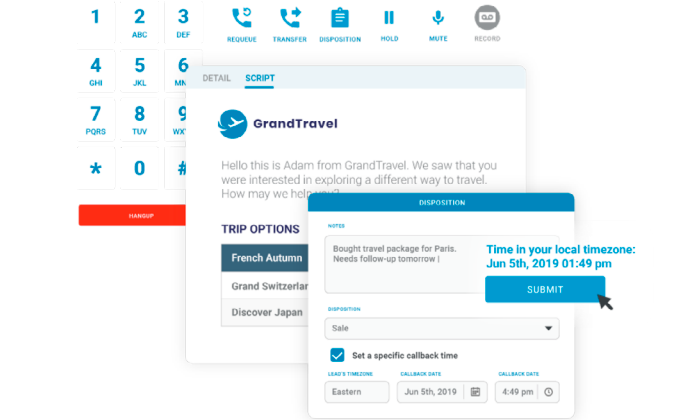
Since this is complete call center software, RingCentral has a host of call routing features that outbound-only autodialers lack, such as real call back numbers, 24/7 reachability, and IVR.

Other great features that come with RingCentral include:

  • In-call coaching capabilities
  • Real time reports and analytics
  • Live answer detection
  • Voice broadcast
  • Intelligent call routing
  • Time-zone conscious technology

Despite offering omnichannel support, RingCentral Contact Center has competitively priced plans that compare with lighter auto dialers and sale engagement platforms:

  • Essentials: starting at $19.99/month per user
  • Standard: starting at $24.99/month per user
  • Premium: starting at $34.99/month per user
  • Ultimate: starting at $49.99/month per user

All plans include unlimited calling and text in the US and Canada, as well a larger number of toll-free minutes at each tier. Additional minutes are billed at 3.9¢ per minute.

RingCentral is a great choice for organizations that want powerful autodialing capabilities and the ability to centralize all of their communications within a single hub. Scale quickly without losing oversight or getting into regulatory trouble.

#6 – Kixie — Best For Local Presence

Kixie is a cloud-based sales engagement platform with phenomenal auto dialer capabilities.

Deploy Kixie in minutes and teams can begin making secure calls anywhere in the world via the Chrome extension or mobile app.

No matter where your customers are, they are going to see you calling from a local number. Several options on this list have a local caller ID, which is super helpful, but Kixie’s AI-powered local presence takes it a few steps further.

First of all, they never spoof numbers. When a customer receives a call from a local number, they can call that number back and connect to the right agent. 

Kixie also automatically removes numbers that get flagged as spam, taking that time-consuming chore off your plate.

The end result is that Kixie’s intelligent local presence has delivered users upwards of a 500% increase in connection rates.

Kixie also helps you connect with leads faster with its AI auto dialer. As soon as a new lead shows interest, Kixie bumps their name to the front of the list and puts an agent in touch right away.
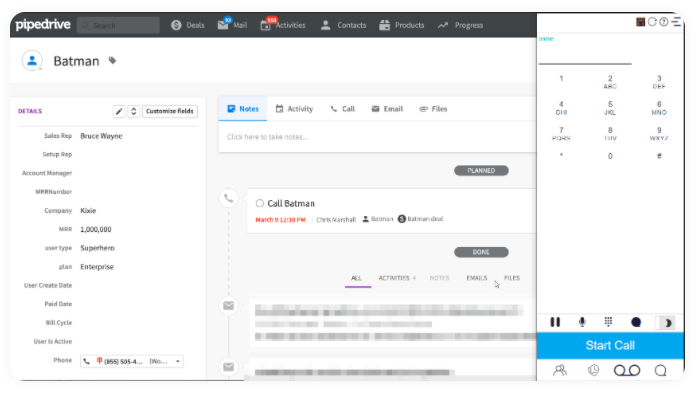
Agents don’t have to change the way they work to take advantage of all these automated features. Integrate directly with tools like Pipedrive to enable click-to-call from within the sales management tools you already use.

Some of the other time-saving and sales-boosting tools included with Kixie are:

  • In-call coaching features
  • Voicemail drop
  • IVR
  • Sales leaderboards
  • One-click integration with Salesforce, Zoho, Hubspot, and more
  • Real-time reporting

Kixie offers quarterly subscriptions or annual subscriptions at a 15% discount. Pricing is broken down into three tiers. 

For annual subscriptions, you’re looking at:

  • Integrated: starting at $29/month per user
  • Enterprise: starting at $55/month per user
  • Custom: contact Kixie sales to create a plan

Calls minutes are billed according to the current rates and vary per country. You can add unlimited calling in the US and Canada for $30/month per user.

The additional cost of local presence will depend on how many different area codes you need and whether you want to include international numbers.

Kixie’s customer support has a consistent reputation for solving problems quickly, which has translated into a constantly improving product over the long-term.

Kixie offers a seven-day free trial for Integrated and Enterprise plans, as well as extended trials for Custom plans.

Summary

Good auto dialer software can save a sales team hours each week and potentially weeks each year.

RingCentral is going to take care of any communication problem you have, providing best-in-breed service in any channel. When it comes to auto dialer software, they offer a robust product that has multiple safeguards to prevent any problems with compliance. 

VanillaSoft is going to be great for outbound sales teams. High agent turnover isn’t an issue because it’s so easy to bring people up to speed and the in-call coaching capabilities are really strong.

With Phoneburner, remote teams are completely set up. The lead distribution system routes calls to the right agents without oversight. Agents can quickly and easily transfer calls and share information within the platform, making coordination easy in the distributed workplace.

For smaller teams, Mojo can supercharge outreach with a few triple-line dialers. Combine that power with reasonable pricing and zero per-minute fees, and you have an auto dialer solution that’s perfect for SMBs.

If you are interested in really leveraging the power of local presence, Kixie is the tool you want, though it’s a really great auto dialer no matter how you cut it.

And if what you are looking for, in the end, is a standalone autodialer, Voicent is the choice for you. It’s a powerful product, and you can add other features one by one without worrying about having to jump up into a new pricing tier.

The post Best Auto Dialer Software appeared first on Neil Patel.

Friday, December 4, 2020

How to Create PPC Campaigns for Real Estate Marketing

How to Create PPC Campaigns for Real Estate Marketing

Even if you have a smaller real estate business, you don’t have to rely on third-party databases to get traffic to your listings through real estate marketing.

With pay per click (PPC) advertising, you can bring people directly to your real estate website, where you own the medium and are in control of how you present yourself. This means rather than your listing appearing—and perhaps being lost—among a sea of competitors, you can showcase your entire portfolio without viewers being distracted by others’ listings.

PPC campaigns aren’t usually difficult to set up. With a few tweaks, you may reach your target audience more efficiently and bring motivated buyers to your website.

PPC Real Estate Marketing Trends

With six million homes sold in the U.S. in one year, it’s no wonder competition between real estate agents is tough.

As you would expect in such a competitive market, real estate marketing plays a huge role, and the tactics businesses use are always developing.

Today, we see many realtors using trends such as virtual staging, drone photography, inbound marketing, and automation of lead verification. New trends come and go, the need for a good website never changes—and neither does the need to bring traffic to your site.

This is where pay per click (PPC) comes in.

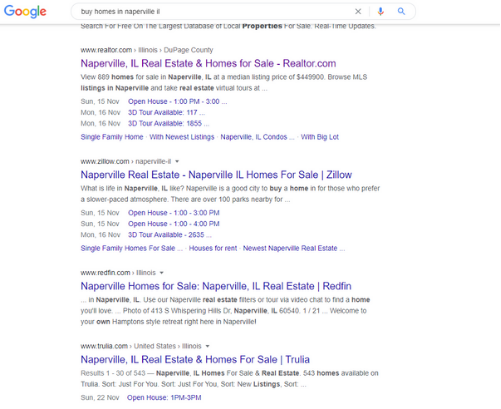
One of the difficulties with bringing traffic to your site is competition from huge online real estate databases like Zillow (236 million monthly users) and Realtor.com. Let’s take a look at a search query for “buy homes in Naperville IL.”

Real Estate Marketing Google search example

As you can see, those large sites are dominating the search engine results pages (SERPS).

However, ranking organically isn’t the only way to get to the top of the SERPs, and PPC may grant you a route to the top of the listings. Through a successful PPC campaign, your website could feature at the top of the page for your chosen keywords, potentially bringing in a large volume of traffic.  

You pay a small fee for each click, but if you’re utilizing the latest real estate marketing trends well, then you could see a solid ROI. PPC allows you to bring traffic to a medium you control, which puts you in control of your marketing.

Selecting Keyword Phrases for Your Real Estate Marketing PPC

PPC could allow your website to appear at the top of the SERPs for virtually any keyword. Your real estate marketing isn’t going to benefit from featuring an irrelevant search term, though. This means you need to find the keywords that work for you and bring in people who convert into leads.

To do this, start by understanding your target audience.

  • What does their customer profile look like?
  • What information are your potential customers looking for?
  • How do they search for that information?

Think about your audience and write out a list of all the ways they might search for your business.

For PPC to work for you, you also need to ensure your landing pages reflect the keywords you’re advertising for. When someone clicks on your ad, the page they land on needs to directly address why they clicked in the first place. Take a look at your current pages and list all the keywords reflecting the content you have on your site.

Once you’ve built up a list of keywords, it’s time to narrow it down so the keywords you bid on are relevant to both your audience and the pages they land on.

Part of succeeding at this is understanding where someone is in the buying cycle. For example, someone searching the keyword “best Chicago suburbs” might be at the beginning of the cycle, where the buyer intent is much lower than later on. Later in the cycle, they may search for “buy houses Naperville IL,” meaning they could quickly become a lead. This distinction should help you understand each keyword’s value and focus your real estate marketing PPC on boosting ROI.

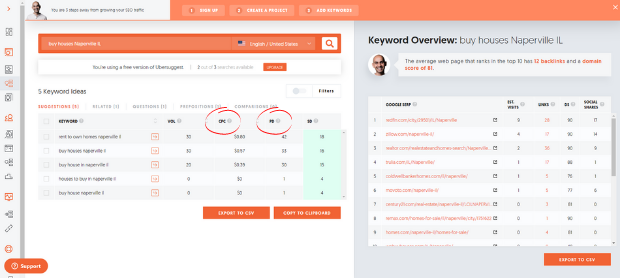
After you’ve narrowed down your list, go to Ubersuggest to find out the cost per click and level of competition for each keyword.

Ubersuggest for real estate marketing

Optimize Your Site for PPC Campaigns that Use Local Keyword Phrases

With all our examples so far, we’ve used what’s known as a “location modifier.” For instance, in “buy houses Naperville IL,” the terms “Naperville” and “IL” allow us to target a specific area. Nothing is stopping you from advertising for “buy houses,” and you’d probably get plenty of traffic—but there’s no point if you’re selling houses in Naperville and the user wants to buy one in Ft. Lauderdale.

Local keyword phrases are vital to real estate agents because they’re selling a product with a fixed location. As location is one of the driving forces behind real estate purchases, many people use these modifiers in their searches.

When you use local keyword phrases, your landing pages must match the search intent. If your advertisement says “houses for sale in Naperville,” then it has to deliver on its promise. Many people will click back to Google if it’s showing houses for rent or homes outside of Naperville.

Setting Max CPC Budgets for Your PPC Campaign

When you set up your real estate marketing campaign, you’re going to be asked to set a budget and decide the maximum you’re willing to pay per click for a specific keyword (max CPC). Remember, you’re not tied into anything—it’s something you can adjust as you go and optimize to get the best results.

To get an idea of your budget, set out the goals you want to achieve with your PPC campaign. For a simplified example, to make $5,000 a month from your advertising and the average value of your houses is $100,000 with a 1% commission, you need to sell five houses a month through your PPC.

The average cost per click for keywords related to real estate is $2.37 with a conversion rate of 2.47%—so, to sell your five houses, you might need just over 200 clicks at the cost of $494. While your numbers might vary from the industry average, you can always adjust your budget based on your average conversion rate and cost per click.

It’s also worth remembering that it’s not all about the price you pay per click, as your advertisement’s quality also plays a part. Google wants to send people to high-quality results, and if your ad achieves this, it’s more likely to be favored by the search engine’s algorithm.

Another way to maximize your budget is by boosting your click-through rate (CTR.) The average CTR for real estate ads is about 3.71%— but if you’re writing excellent ad copy, then you may find even better results. But remember, these are just industry averages, and your experience may vary. An ad budget of hundreds (or even thousands) doesn’t guarantee a sale, but PPC is worth a try for most markets.

Deciding Which Ad Platform is Right for Your Real Estate Marketing

When we think of search engines, our minds are naturally drawn to Google because it’s the biggest, with 3.5 billion searches per day. However, there are lots of different search engines and lots of other ad platforms.

Which ad platform you use should be decided by your business goals and your target audience. For example, if you’re selling sleek condos to millennials, your advertising will look very different than if you’re targeting seniors looking for a second home.

This differentiator is where you could help your real estate marketing campaigns by selecting the right platform.

Social media platforms such as YouTube, Facebook, Instagram, LinkedIn, and Pinterest are vital sources for real estate marketing, and they offer great PPC options. 99% of Millenials and 90% of Baby Boomers begin their real estate searches online, and with billions of people on social media, this could be a perfect way to reach them.

The great thing about PPC on social media is that they are highly visual media. Whereas with Google Ads you might be limited to text, social media allows you to incorporate video, images, and other effects. These tools can help your advertising stand out from the crowd, but you must choose the platform and message that resonates with your audience.

57% of Americans aged 25-30 are on Instagram, compared to 23% of 50- to 64-year-olds. However, the numbers look very different on Facebook, as 68% of 50- to 64-year-olds have accounts. This data shows people search for information differently, and your advertising needs to reflect this. You might find Google is the best way to reach your audience, or you may discover an alternative such as Instagram that offers you the most useful real estate marketing campaign.

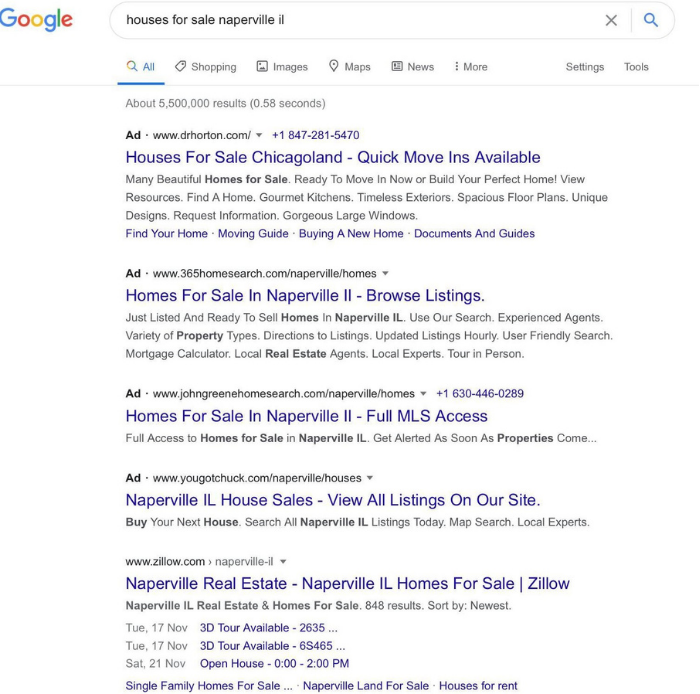
Here you can see just how different a promoted post on Instagram could look from the traditional ads you see on Google. These various formats could give you the ability to appeal to particular audience demographics and potentially maximize the effectiveness of your real estate marketing.

Real Estate Marketing which ad platform to use
Real estate marketing SERP

Whichever platform you use, you’ve got to make sure your message suits the medium, and you’re giving people the experience they’re looking for. Various advertising platforms allow you to diversify your marketing, but you’ve got to focus on the techniques that work best for each campaign.

Deciding Which Real Estate Marketing Ad Format is Best

When you come to set up your ads, you’ll find you have lots of format options. The options vary depending on which platform you’re using, but for Google, you’ll have the following choices:

  • Search ads: These are the “traditional” ads at the top of a SERP. These are particularly useful for real estate marketing because they allow you to reach a targeted audience at the precise moment they are looking for your product.
  • Shopping ads: Shopping ads are product-focused advertisements that also allow you to feature at the top of a SERP. However, shopping listings are more commonly used for very specific searches such as “buy Barbie dolls,” where many retailers sell the same products.
  • Display ads: Display ads allow your listing to feature on other people’s websites. While this can be a cost-effective way to reach a broad audience, it’s more difficult to judge where these people are in the buyer cycle because they haven’t made a specific search.
  • Video ads: Video ads play between videos on YouTube and are a great way to incorporate a more interactive aspect to your advertising. Many people use YouTube as a search engine, so it’s another good way to reach motivated buyers.
  • Gmail ads: These advertisements appear at the top of someone’s Gmail inbox and allow you to reach a targeted audience. The difficulty with Gmail ads for real estate marketing is determining buyer-intent. You might be targeting someone because they are interested in real estate, but this does not guarantee they’re looking to buy a house.

The key to these different ad types is finding the ones that best suit your business goals. For many real estate businesses, this is likely to be search ads.

This is because this method may best allow you to understand the searcher’s intent. Someone has put a specific query into Google—“find houses in Naperville”— so you more clearly know what they’re looking for and can judge where they are in the buying cycle.

With options like display ads, you can reach a targeted audience—for example, people looking at a house improvement website—but you don’t have control over searcher intent. As you’re selling something very specific that focuses on location, search ads are a good place to start.

Conclusion 

Pay per click advertising is an essential tool for your real estate marketing. If you’re to take back clicks from online real estate databases like Zillow, then you’ve got to find alternative ways of getting traffic to your website.

PPC is an excellent way to do this, and it could bring large numbers of targeted, highly engaged visitors with a strong buyer intent to your website. From there, you’re in control of the medium and not reliant on a third party who controls your interactions with customers.

If you’re investing in real estate marketing trends like virtual staging and drone photography and you want to maximize their effectiveness, a way you could do this is by getting them in front of a targeted, engaged audience. With good PPC, you could do just that because it may allow you to boost your lead generation significantly—and perhaps sell more houses.

If you do need help with your PPC campaigns, reach out to my team to see how we can help.

Has PPC benefited your real estate business?

The post How to Create PPC Campaigns for Real Estate Marketing appeared first on Neil Patel.
7 Warning Signs You Have Product Flop on Your Hands (and How to Fix It!)

warning signs you have a product flop on your hands

Ever have a really great idea for a product?

You know, the kind of idea that makes you want to grab strangers by the shoulders and explain the whole thing in a rush. For the next few hours or even days, you find yourself revved up in high gear, eager to turn your big idea into reality.

It’s an awesome feeling.

There’s only one problem: what comes up must go down, and sometimes big ideas do just that – they flop, hard.

You could shrug it off and say that failure is really a learning experience, but wouldn’t you rather learn how to avoid those product flops so you can save yourself time, money, and heartache?

I know I would.

Here are seven warning signs your big product idea is about to flop — and seven ways to avoid landing with a splat:

1. You Keep Changing Your Mind

You’re burning through your project and you’re totally jazzed. Everything’s going great! It’s such an awesome idea.

But it would be even better if you add this one element.

Wait, no – maybe you should do this instead. That’d be awesome.

Or maybe you should change that – it would make your project even better! It’ll crush all of the products in the niche!

Sound familiar?

Business old-schoolers call it “scope change,” and it can seriously hamper your progress. The more you push the boundaries and keep adding to your project, the more it becomes a time-consuming, cost-heavy monster that never ends.

Risks go up, your schedule gets trashed, deadlines get blown and quality goes down.

The solution?

Give yourself a set amount of time to do research and plan the scope of your project before you start. Take a few days, weeks, or months to really think things through. It’s okay to waffle then because no one else is watching, and you don’t have to backtrack.

But once that time has expired, stop, make the decisions you need to make, and move forward. Look at it as a deadline. You can change your mind up until a certain day on the calendar, and then after that, you stick with the plan until you’re finished.

2. You Haven’t Figured Out the Price

Most people don’t bother to figure out what their business idea will cost them, not only in terms of money, but also time and opportunity costs. They just latch on, run with their idea, and work like mad for weeks, investing their time and money blindly.

Then six months after launch they wonder why they’re broke, exhausted, and feeling trapped.

Before you undertake a project, figure out what it’ll cost you:

  • Overhead Costs: Will you need office space? Employees? Equipment? Will you have to pay travel expenses? What are the total hard costs?
  • Salary Costs: What will you pay yourself? Even if you’re living on savings, it’s still an expense. Write it down.
  • Opportunity Costs: What opportunities will you have to give up? How much will that cost you in both the short-term and long-term?
  • Time Costs: When are you going to work on it? Also, what are you currently doing in those other hours that you’ll have to cut out? Will you sacrifice sleep? Time with your family? Overtime at work?

Once you’ve calculated the true cost, ask yourself if it’s a price you’re willing to pay. Your idea might be fantastic, but if you don’t know what it’s going to cost you, chances are you’ll never finish.

Before starting a project, make sure you know exactly what it will cost you.

3. You Think All You Need is Time

You’ve done the math and decided that there’s no major financial investment involved, just your time. Maybe a few weeks of hard labor, maybe a few months. You just have to buckle down and do it.

But here’s the big question: who’s paying the bills in the meantime?

Every hour you spend working on Project X is an hour less you can work on other income sources. If your time is worth $100 an hour, do you really want to invest 1,000 free hours into a project that might make you $5,000?

If you do, you’re essentially investing $100,000 for a $5,000 return. Not smart.

The reality is, you might lose money — and that isn’t always a bad thing. In fact, becoming a multi-millionaire can require losing money, as I’ve mentioned before.

But if you aren’t considering the cost of your time, you could end up with a flop.

If you want to be successful, figure out your hourly rate, and then delegate or outsource any tasks below that rate. Sometimes, you’ll be better off working for someone else and funneling that income into paying freelancers than quitting all of your projects and cutting off all of your income streams.

Smart business people invest their time wherever they’re getting the best return.

4. No One Seems to “Get” The Concept

This is one of the biggest red flags that your product is going to flop. Sadly, most people get so excited about their big idea that they don’t see the forest for the trees.

It goes like this:

You excitedly explain your product to a few people, but they don’t seem to get it. You explain even more. They seem unsure. They ask questions. You answer, but they hesitate. So you slow down and try to explain it as simply as possible, but you still can’t seem to get through.

Maybe they aren’t as smart as you. Or maybe they just don’t get it. Maybe they aren’t in your target audience.

But here’s why it matters: if your customer doesn’t understand the idea, it doesn’t matter how brilliant it is. It’s going to flop.

So, pay attention to people’s reactions. At which point in the explanation do they seem to get confused? What part don’t they understand? Where are you losing them?

These are the places you need to clarify. There’s a missing link somewhere, and you need to find it now, not later.

Or maybe you just need to get a new idea.

5. They Get It, but No One Seems Interested

Sometimes, people get your idea, but they shrug their shoulders and say, “So what?”

Maybe they point out that someone else has done it already, or maybe they don’t see the problem you’re addressing, or maybe they think it’s just plain boring.

They’re polite and they listen to your idea, but not for long – their phone or their email is far more interesting.

Watch out for that lack of interest, because no enthusiasm means no sales. You know you’re on track when:

  • They say, “I’ve been dealing with that for years. Can you really fix it?”
  • They laugh, cry, or get angry. The stronger the emotional response, the better the idea.
  • Their eyebrows go up, and ask, “Is that really possible? That would be great!”
  • They bring your idea up again the next time you see them. It shows they’ve been thinking about it, which is exactly what you want your prospective customers to do.

If you don’t get one of those responses, find out why. What do people really want? What do they need? What’s missing?

You might be able to adapt your big idea to fulfill that demand.

6. You Don’t Really Believe in Yourself

You might really, really want to get your big idea off the ground, and you believe it will succeed, but you secretly wonder whether or not you can pull it off.

Maybe you’re an engineer, and you don’t have any confidence in your ability to sell. Or maybe you are a digital marketer, and you struggle with keeping accurate financial records for investors and bankers. Or maybe you’ve never managed anyone before, and the idea of hiring and leading a staff scares you.

You’ve tried to stay positive, but deep down, you doubt yourself. You hope you can do it, but when you talk to other people about your idea, you can feel your insecurity bleeding through.

The truth?

If you don’t believe in yourself, no one else will either. People have a sixth sense for uncertainty, and they’ll pick up on every signal of self-doubt you’re sending out. It can kill even the best ideas.

No one expects you to be perfect, but getting any idea off the ground requires leadership, and people expect leaders to be confident. So work on it.

The best way to build self-confidence is to start small and get some early wins.

If you are worried about sales, start generating leads you are certain will convert into sales, and approach those first. If you’re worried about financials, get example reports, and then start with the ones you understand. If you’re worried about managing people, start by hiring smart, ambitious people who don’t need much handholding.

Make it easy for yourself, and grow into the person you need to become.

7. You Can’t Seem To Find the Time for Your Idea

This is probably the most common sign of an impending product flop: you know your project will be a success — yet you can’t seem to find the time to work on it.

You keep pushing your idea aside. Other work comes up. Something else is more urgent. You’re busy. You push back your own deadlines and keep setting your big idea on the back burner.

It’s probably because you’re scared.

Maybe you’re afraid your big idea won’t succeed (even if you’re pretty sure it will). Or that it actually might succeed, and you won’t know how to handle it. Or that you’ll make mistakes and get laughed at, losing the respect of the people you admire.

Whatever the reason, if you find yourself procrastinating, sit down for a little introspection session. Think about why you’re not working on that big idea. Ask yourself:

  • What life changes you think would happen if you complete it?
  • What do those changes mean to you?
  • Why do you want to avoid them?
  • Are they realistic concerns?
  • What is the worst-case scenario?

Be honest with yourself. Often, reality is far different (and easier!) from what we imagine.

Maybe after some introspection, you realize the big idea isn’t going to be good for you. Sometimes our gut instinct sends warning messages that we should pay attention to – just because a project will be successful doesn’t mean it’s the right success for us.

And if that’s the case, then there are plenty of other – better – ideas for you to pursue. If there’s one thing I’m sure of, it’s this:

The next big idea is always right around the corner.

Conclusion

Not all great ideas are destined to be big hits. However, many of the largest companies in the world started as just one good idea. Review the warning signs above and make sure you are in the best possible position to move forward.

Then, it’s time to start digging in. Start by getting to know who your audience really is and do some market research. Create a business plan and don’t forget to consider outsourcing tasks that you don’t have the time — or the knowledge — to tackle.

And if you do flop? Take some time to recover, then try again.

Are you working on your next big idea? What is holding you back?

The post 7 Warning Signs You Have Product Flop on Your Hands (and How to Fix It!) appeared first on Neil Patel.

Amazon Marketing Consulting

Amazon’s so big that it has become an entire marketing channel.

You could build your entire business on just Amazon.

Many entrepreneurs do. It’s crazy how many 7-figure businesses are running on Amazon right now.

The downside?

Lots of folks know about the Amazon opportunity.

There are 353 million other products on Amazon already.

Granted, you don’t have to compete for all of them. But that’s still an insane number of products.

No matter how obscure your niche, you’ll have top-tier competition.

How do you stand out in such a highly-competitive marketplace?

Find an Amazon marketing consultant.

3 Ways an Amazon Marketing Consultant Can Help Grow Your Business

Most Amazon consultants focus on one goal: getting you more customers.

That is, after all, why most businesses get on Amazon.

They want access to Amazon’s customers.

Here are the main ways that a consultant can help.

1. Store Setup and Product Listings

Some sellers on Amazon set themselves up for failure from day one. 

And they do this with poor store setup and product listings. 

If you, a seller on Amazon, get the foundational areas like excellent store setup and product listings wrong, other efforts to grow your store will fall flat. 

No doubt, signing up for an Amazon Seller account takes only a few minutes.

But it takes a lot of work to get Amazon’s algorithms to know what category you should be in and when to show your products higher than others. 

An Amazon marketing consultant will properly set up your store and build your product listings to get you more customers. Not only will your products get more views, the product descriptions will also help you convert more of those prospects into customers.

The best Amazon consultants will help you: 

  • Choose the right seller account type for your store. 
  • Make your product descriptions as enticing as possible. 
  • Ensure that Amazon knows exactly which categories and terms you should be in.
  • Get the back-end set up properly so it’s as easy to manage as possible. 

They’ll also help you avoid these mistakes: 

  • Don’t accidentally get featured in the wrong categories which could hurt your store. 
  • Make sure all products comply with every Amazon guideline. 
  • Your listings avoid common mistakes that annoy customers, which could increase the number of negative reviews if you don’t catch them early. 

Get the foundation of your store done right. Then everything else gets a lot easier. 

2. Product SEO in Amazon

It’s one thing to have your store properly set up and your products accurately listed. 

But it’s another ball game to have them actually appear on Amazon. 

According to a study by Feedvisor, about 74% of ecommerce shoppers go to Amazon first for any purchase they want to make. 

Do you know what that means?

Amazon has become a search engine for products. Amazon SEO is now a real thing. And it’s just as important as Google SEO. For ecommerce businesses that are on Amazon, it’s probably MORE important. 

Amazon even developed its own SEO algorithm called A9. 

You could try to learn all the ranking optimization tricks on your own.

Or you can partner with an Amazon marketing consultant to help you save time, money, and make the most of your scarce resources. 

They’ll help you: 

  • Find the best categories and keywords to focus on.
  • Optimize your products for rankings.
  • Get the reviews you need to compete.
  • Break down your competition so you can learn what’s working today. 

3. Amazon PPC Management

Amazon turned on the firehose of PPC.

Not only is it making them a ton of money. It can also make you a ton of money.

For the first time, you can pay a small fee to get in front of the most valuable customers in your entire market: customers ready to make a purchase right now.

With the right product, you can easily take $1 and turn it into $2 with Amazon paid ads.

However, paid media on Amazon is also complicated.

Like any PPC platform, it requires a ton of specific know-how and tons of work to keep it optimized.

You could try to manage all this on your own.

Or you could get an Amazon consultant to do it for you.

PPC campaigns are a great type of marketing task to outsource. The work is repetitive and usually the same workflow across businesses. Consultants can easily take this off your plate and give you a nice ROI at the same time.

Even if you could do this yourself, I recommend finding a consultant to help. Your time is better used elsewhere.

Most consultants get really good at bid management and ad optimization. Use them for these areas.   

How to Get Started With An Amazon Marketing Consultant

First, what should you have before engaging an Amazon marketing consultant? 

  • An Amazon store or a store that’s about to go live. 
  • Products you want to sell and sourcing or manufacturing are sorted out. 
  • Key competitors and search terms for your market.
  • Budget set aside. 

An Amazon consultant can help with setting up your store and getting you customers. You’ll need to sort out everything outside of Amazon.

Basically, they’ll help you develop and implement marketing strategies to drive sales and revenue. 

When you visit the website of a top Amazon marketing company, you’ll usually find a contact form to schedule an initial call.

Even if you’re not sure if you need help yet, I recommend getting a call done. You’ll have a much better idea with how consultants can help you once you’ve done a few calls.

You can also ask them loads of questions like:

  • What budget would you recommend?
  • What are the key trends that you see in your most successful clients?
  • What should I do ahead of time to set this project up for success?
  • What would make us a bad fit to work together?

Yes, the consultant will treat the call like a sales call. It’s their chance to close you on a proposal. But it’s also a chance for you to learn a lot more about the space from a real expert. And the best consultants will happily teach you as much as they can. That’s how they prove their expertise.

After you’ve done a few of these calls, move forward with the one that you think is the best fit. Since this project should generate real revenue for your business, I’d go with the one that has the best chance of succeeding, even if they’re a bit more expensive than others. The good consultants will easily pay for themselves.

Measuring the ROI of Amazon Marketing Consulting Services

The ultimate measure for any marketing service is how much demand and sales it drives. For Amazon consulting, this same rule applies. 

Specifically, you should track: 

  • Views for your store and products
  • The number of new products sold
  • Conversion rate of impressions to sales
  • Total revenue
  • Average order value

I recommend that you track your totals, not just revenue and purchases from specific campaigns.

Marketing channels and campaigns often bleed into each other. For example, an increase in Amazon PPC budget will often lead to an increase in your organic Amazon sales. Trying to get perfect attribution is super difficult.

So get a good baseline before the consultant starts. Then compare the overall performance of your store afterwards.

Let’s go deeper on each metric.

Conversion Rate

This is a measure of how many impressions you’re getting for your store and products compared to how many of those impressions led to sales. 

For any consultant working on your product listings, it’s probably the most important metric to watch.

When optimizing products, you should see it go up.

And when working on product rankings, you want to see your conversion rate stay stable. If it drops while your impressions go up, it’s a sign that you’re getting less-qualified traffic. It’s possible that the extra traffic is still worth it, you’ll need to dig in. 

Product impressions

Any Amazon consultant should be able to get your products more impressions.

It’s always nice to get a conversion win right away but the real money is getting your products in front of more people. 

This is what separates great Amazon consultants from the ones that are just average. Great consultants will have a plan to double, triple, and quadruple your impressions over time. They’ll also be able to execute on that plan.

This can take a lot of time and money.

But within the first few months, you should be able to see at least some signals that things are going in the right direction.

Total revenue

At the end of the day, marketing is about increasing revenue.

The ROI needs to be there.

After a few months, check your total monthly revenue and compare it to your baseline before you started working with the consultant.

Is it moving in the right direction? Have you generated enough profit to pay for the consultant fees?

You might not be generating enough extra revenue yet but there should be a path to a positive ROI.

The great consultants will have set expectations with you at the beginning. Things should be playing out like they planned. 

4 Point Checklist For Finding the Right Amazon Marketing Consultant

Below are six things to check when finding the right Amazon marketing consultant to help drive growth for your store. 

1. Thought Leadership on Amazon Marketing

Since most of what an Amazon marketing consultant would do is help you to drive sales for your store, it’s essential you find one with practical knowledge on how to do it.

Every marketer knows the power of thought leadership.

For the best Amazon consultants, I’d expect to see some of their content already published.

It’s a great way to get a feel for how they build Amazon stores, their favorite tactics, and how they’d fit with your own company. 

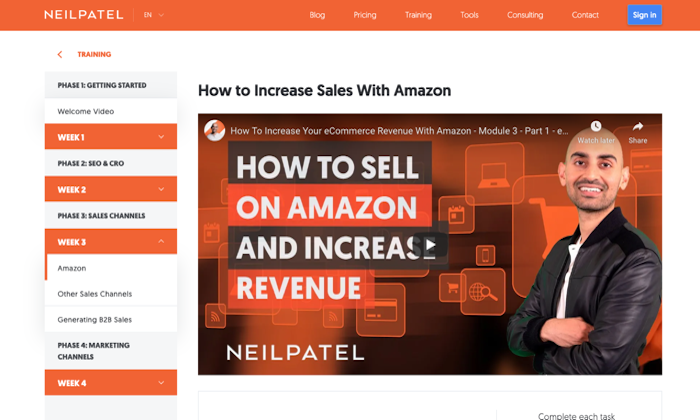
For example, I have a guide, detailing persuasion tactics to upsell products on Amazon and a full course on how to drive more sales on Amazon: 

2. Real Amazon Marketing Expertise

Many marketing consultants who didn’t offer services specific to Amazon stores have jumped on the bandwagon, seeing how much the marketplace is growing. 

The result?

They apply the same generic marketing practices, thinking it will automatically work on Amazon. 

If you don’t want to fall for this and waste your money, ensure that the consultant has true expertise with Amazon marketing. They should plenty of:

  • Deep answers to all of your tactical Amazon marketing questions 
  • Case studies with Amazon marketing
  • Clients and testimonials from Amazon marketing projects

3. Expertise on How Amazon Impacts Other Channels

If you have an ecommerce business that focuses 100% on Amazon, feel free to ignore this criteria.

But most businesses go after multiple channels.

Especially ecommerce businesses. They usually have Amazon product listings and their own ecommerce story.

Great consultants will get your different channels to help each other.

That’s right, you can can get each channel to make your other marketing channels stronger.

Here’s a few examples:

  • Using discounts and promos to get Amazon customers to sign up for subscription deliveries on your website.
  • Getting your biggest fans to help with Amazon reviews.
  • Tapping into your audiences to kick-start new products on Amazon.

With a little creativity, you can hit goals a lot faster by using assets you already have.

The best consultants look for these opportunities and take advantage of them.

4. A Proven Process for Execution

The really great consultants have a formula for rolling out their Amazon marketing campaigns. It’s how they deliver results over and over again, for every client.

Less experienced consultants may depend on the brilliance and wit of a single person.

That can work great as long as that person focuses on your marketing. But what happens when they move to another client?

Campaign performance usually suffers.

Look for a consultant that has a team behind them that can reliably execute on your project month in and month out.

The odds of accomplishing your goals goes way up.

During your initial discovery calls, dig into their process, how they manage deliverables, and train new team members. You should be shocked on how thorough it all is.

Start With an Amazon SEO Consultant

Don’t know where to focus?

Get help with your  Amazon SEO first. One project could get you more impressions, more sales, and more revenue on an ongoing basis.

The ROI of that single project can be massive.

So if you’re not sure what you really want, start there.

The post Amazon Marketing Consulting appeared first on Neil Patel.
When Should You Use Microsites

When Should You Use Microsites

Your website may be filled with hundreds of landing pages jam-packed with products, ebooks, blog posts, and videos. While an organized site architecture should enable visitors to navigate through your website easily, sometimes it’s better to keep things even simpler.

This is where “microsites” can help.

True to their name, a microsite is like a mini-website for your brand’s content. Brands often create these sites for a specific event or campaign.

Having a microsite may be convenient because it allows visitors to view information about an event or campaign in one place with no clicking through a whole site necessary.

This article explains how to come up with microsite ideas and how to create one.

What is a Microsite?

A microsite is a branded content site or a small group of web pages. It’s typically located outside the businesses’ main website or brand URL. The microsite can have its own domain, but it could also exist as a subdomain of your company’s website.

Brands have used microsites for marketing campaigns or brand awareness.

Many brands create microsites so their target audiences can focus on one particular event, campaign, or content. If these promotional materials were placed on the main website, it could get lost in the crowd.

However, some brands use microsites to regularly publish specific content types, such as niche online magazines.

Microsites vs. Websites: What’s the Difference?

In simplest terms, a website is a large hub leading viewers to all sorts of information about your brand—your brand story, your products, etc.—while microsites are smaller and have more targeted content. The primary site is likely what people come across when searching your brand, while the microsite is what they find when they’re searching for information about a specific aspect of your brand for which you’ve created this individual site.

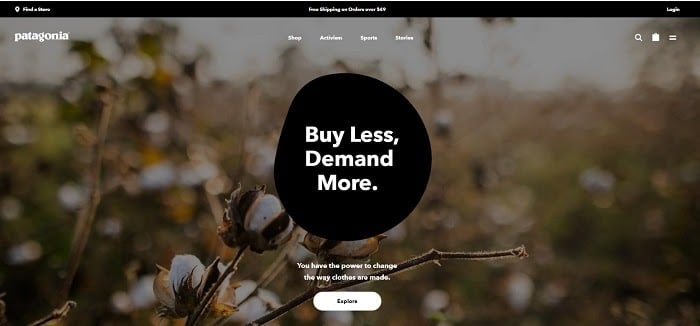
For example, Patagonia’s main website allows viewers to shop, learn about their activism, and more.

Microsites vs Websites Patagonia main site home page

In contrast, their Blue Heart microsite aims to raise awareness about the dams in the Balkan region—which Patagonia strives to show are harming their surrounding ecosystem and residents.

patagonia blue heart microsite

Pros and Cons of Microsites

Like nearly anything else in the marketing world, microsites have pros and cons.

Pro: Microsites May Help Visitors Focus On Your Marketing Campaigns

Sure, you could create a specific banner on your homepage to launch your new campaign. Unfortunately, many users may be distracted by the surrounding tabs, links, and product pages.

The average human attention span lasts for only eight seconds.

Even if you have a sizeable campaign-related banner on your homepage, surrounding site elements may distract visitors from that. Hence, less awareness and less participation.

By redirecting visitors to a specific microsite, you can wholly capture their attention.

It also forces people to focus on your campaign, cause, or event.

The main homepage is designed based on the campaign’s aesthetic, and the surrounding tabs and links contain specific information to bring awareness. Since other site elements have been eliminated, visitors can focus on your call-to-action or marketing campaign.

Con: Microsites Could Confuse Visitors

Upon learning the fringe benefits of having a microsite, you may be tempted to launch more than one so they can highlight several campaigns.

Be careful. Microsites must be used wisely.

A new user encountering your brand for the first time may unexpectedly reach your microsite.

These first-time visitors may learn campaign-specific information without finding the details they were initially searching for. If they can’t reach your main website easily, they may decide to shop elsewhere.

This con is additionally essential to consider because microsites can be costly, between your domain, design, maintenance, and more—you want to make sure you have good ROI for your microsites.  

How to Come Up With Ideas for Your Microsite

Creating a successful microsite usually isn’t as big of an undertaking as it sounds—as long as you know the right steps.

Here are those steps.

1. Create a Buyer Persona

Just like every marketing campaign you’ve launched in the past, you need to create buyer personas.

A buyer persona will help you visualize the target audience for your microsite.

Here are some questions to consider:

  • Who will visit your microsite?
  • Why will they visit the microsite?
  • What will drive them to participate in your microsite’s campaign or event?
  • How will you entice your target audience to visit your microsite?

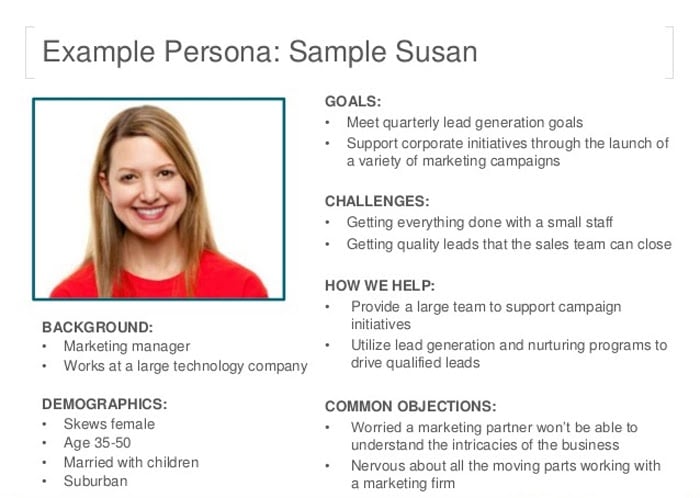
The ideal marketing persona provides an overview of your target market’s background, demographics, goals, interests, and aspirations. A detailed persona gives you an even better understanding of your target audience’s needs and aspirations.  

The result could look something like this:

Microsites how to create a buyer persona

2. Define the Goals of Your Microsite

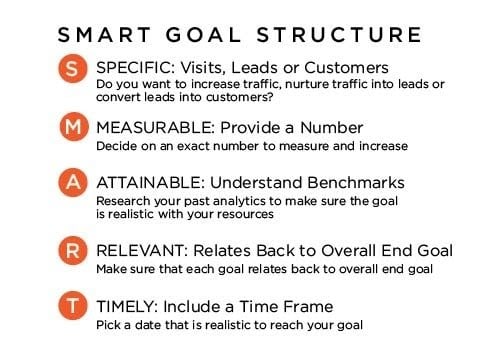
The SMART goal process helps set goals and objectives. The acronym stands for

specific, measurable, achievable, realistic, and timely.

Microsites SMART B2B Marketing goals

Let’s say your overall goal is to create a microsite to promote your new product line.

A good starting point is to determine the specific objectives you want to achieve by launching the microsite. What are your ideal sales or quarterly revenue? How many unique visitors do you want to attract?

For example, a specific goal could be: “I want to attract 100 unique visitors to my microsite per week.”

This is a clear and measurable objective you can monitor every week and may help you determine if your microsite effectively hits the goals you’ve set for your business.

3. Find Existing Examples of Microsites

To get some inspiration for your microsite, look into existing microsites.

According to Zesty, there are generally three types of microsites:

Informative Microsites

This type aims to educate visitors about a specific campaign, event, or cause.

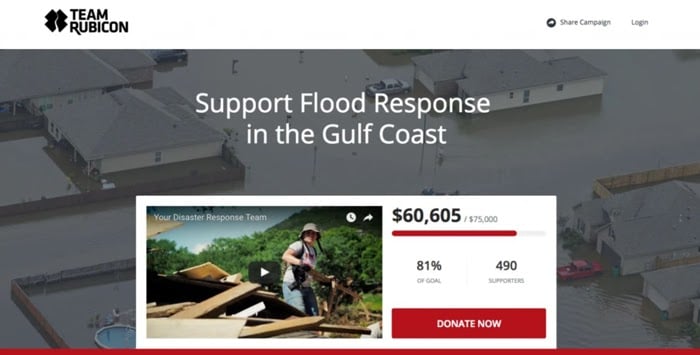
For example, Team Rubicon’s microsite hopes to raise awareness of flood victims’ plights in the Gulf Coast.

team rubicon microsite

Interactive Microsites

These encourage engagement with fun activities or campaigns.

Spotify’s “Year in Music” microsite is personalized based on the visitor’s listening habits. It has a personalized recap of your favorite songs or artists for the past year. This could trigger some good memories and may make your listeners keener on returning.

spotify microsite

E-commerce Microsites

These sites sell services or products to consumers.

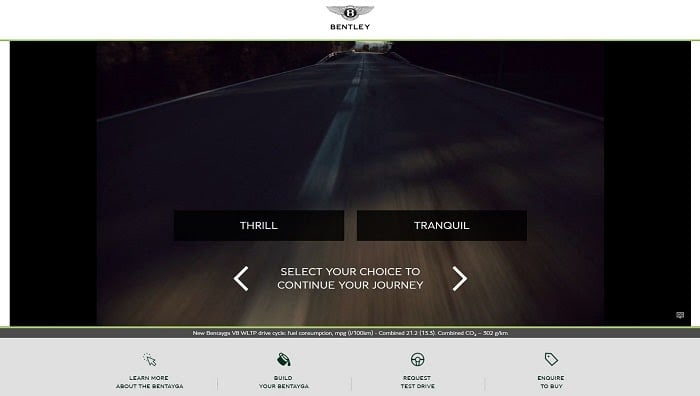
Bentley Motors launched a microsite to enable visitors to explore their new luxury Bentley Bentayga virtually.  Car enthusiasts have the option to request a test drive, digitally customize a Bentley Bentayga, or learn more about the vehicle.

Bentley Bentayga microsite

I’ve compiled a longer list of more microsite examples a bit further down this page to help you out.

How Do You Create a Microsite?

Now that you have a clear vision for your microsite, it’s time to create your own.

Here’s what you need to do:

1. Get a Domain and Hosting Service for Your Microsite

The first step is to get a domain name and hosting service for your microsite.

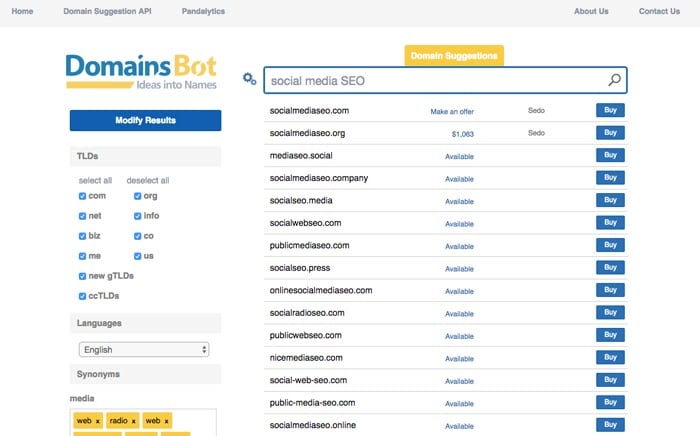
At this point, you probably have a few name ideas—or at least keywords in mind—for your microsite. You can use a tool like Domainsbot to see if these domain names are available or get suggestions based on your keywords. I used “social media SEO” to get the recommendations below:

domains bot samples of possible microsite domains

Another trick is to consider buying expired domains. This lets you redirect traffic from the old domain to your microsite.

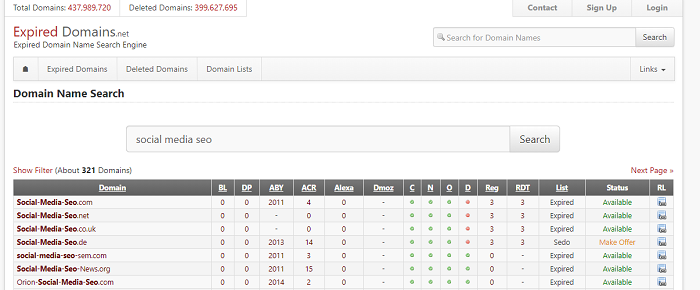
Visit expireddomains.net to find expired domain names. Again, I searched “social media SEO:”

how to get domains for your microsite example

You should also opt for a .com domain if you’re targeting a global market, though a country extension (i.e., .uk or .au) also works if you’re targeting a local market.

Depending on your host, they may be able to sell you your domain through their site (often via a third party). You can also use a separate site, like Namecheap, to purchase your domain.

2. Design Your Microsite

You’ve already searched for examples of microsites to see what works and what doesn’t. Now, it’s time to work on your own.

Meet up with your marketing team, designers, and developers to plan the format for your microsite.

Let’s take a look at the basics to consider:

  • Number of pages: Is one page enough to deliver the information, or do you need multiple pages to meet your goals?
  • Gamification: Will your site use interactive elements to tell a story?
  • Navigation: Will users navigate through the website through clicking, scrolling, or zooming in?
  • Media: Will the microsite have blog posts, videos, or images? How do you visualize the final look of your microsite?
  • Call to action: Where will you place the CTA, and how will you make it jump out to users?

If you want to retain your brand’s look and feel, you may use branding elements similar to your main website. You can also go for something different if you aim to promote a specific event or a new product launch.

However, it’s best not to abandon your brand—you don’t want users to forget who’s inviting them to experience whatever your site is advertising.

3. Create Content for Your Microsite

You’ll want to keep your team involved in this step as well. Here are some questions to discuss with them:

  • What content will work best for your site—that is, what types of media will you use?
  • What tone will you use to interact with your target audience?
  • How will your microsite encourage users to take action?

Once you’ve decided what direction you’re headed, assign content and get rolling!

4. Launch, Update, and Promote Your Microsite

Once you’ve launched your site, you need to keep things fresh and bring in new visitors.

If it makes sense, update content regularly—especially if you’re using blogs. Even if you’re using this to advertise an event and information isn’t changing much, use feedback from viewers—such as through a “contact us” form—to ensure the information is useful and clear. Perhaps use their input to create a FAQ page as well.

And of course, you must promote your website to increase traffic. Use your existing social media to let people know about your microsite, and consider creating separate social media or event pages for the site itself.

Additionally, advertise it through traditional methods you use for your other pages, such as pay per click. If you have a brick and mortar store, use physical strategies as mentioned earlier.

Managing SEO for Microsites

Just like your main website, you’ll also want to manage the SEO for your microsite.

After all, you want it to rank in the search results and make it easy to find for users.

Let’s take a look at some SEO tricks you can pull off:

Optimize Your Microsite for SEO

This means focusing on on-page SEO, off-page SEO, and technical SEO for your microsite.

We highly recommend watching our video on “The Ultimate SEO Checklist For New Websites” to help you get your microsites to rank on Google.

Create Great Content on Your Microsite

The quality of your content is essential, and this goes for microsites as much as it does for your primary site.

Besides optimizing for keywords, the content on your microsite must be relevant, engaging, and clear. Otherwise, visitors won’t be motivated to stay on your microsite for a long time.

So, dedicate time to create valuable content.

What Are Some Good Examples of Microsites?

Microsites can be used to fulfill different goals. Some businesses have used microsites to reach a specific target audience or raise awareness about a campaign. Meanwhile, other brands have used them to provide personalized content or invite users to engage in a particular action.

For a dose of inspiration, here are some fantastic microsites:

Future of Car Sharing Microsite

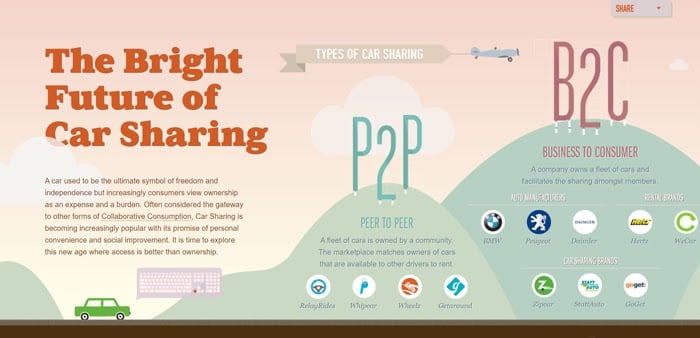
“Future of Car Sharing” is a collaboration between Collaborative Fund and Hyperkat, with assistance from Startup American Partnership. This microsite aims to educate readers on the benefits of car sharing. Visitors can scroll from left to right to learn more about car sharing types and how this practice is good for the environment.

the future of carsharing microsite home page

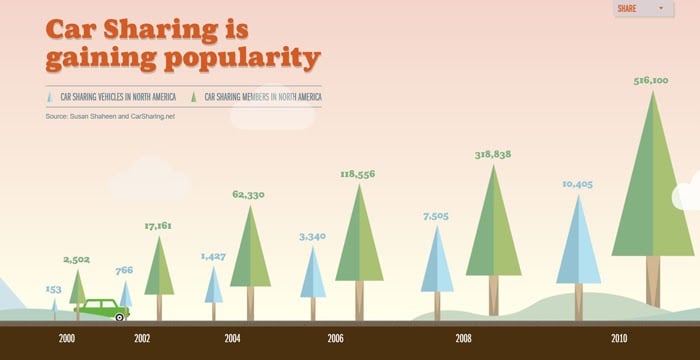
The story begins with the types of car sharing and the different companies and nonprofit groups facilitating it. Along the way, you’ll encounter statistics and the top reasons to participate.

future of car sharing microsite statistics

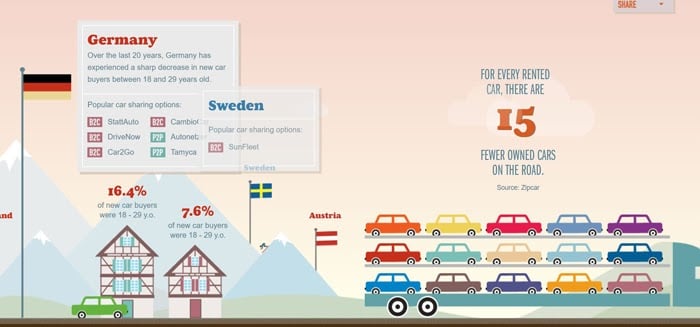
This microsite is useful because it uses easy-to-understand images and infographics to convey information. Users can hover in each illustration to learn more.

future of car sharing microsite hover popups

Styled by Levi’s Microsite

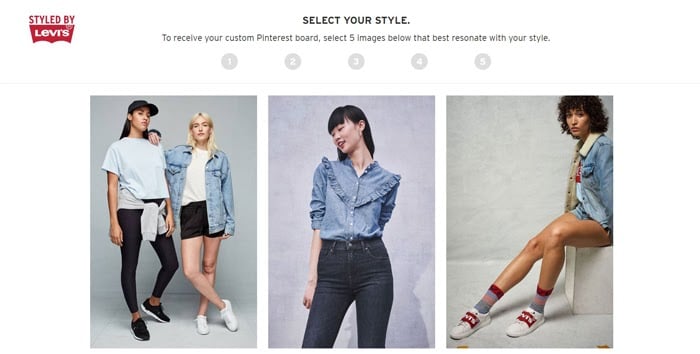
“Styled by Levi’s,” which is run by (of course) Levi’s, is a microsite allowing users to respond to a quiz about their style preferences.

styled by levis microsite home page
styled by levis microsite quiz

After completing the quiz, users are urged to log-in to their Pinterest accounts to get a personalized shoppable Pinterest board based on their choices.

When it comes to online shopping for clothes, everything is visual. According to Current Daily, the Pinterest boards can send customers to Styled by Levi’s chatbot and customer service. The platform also uses past browsing data of customers to generate personalized looks.

Thanks to this microsite’s user experience and collaboration with Pinterest, customers often find it easy to see Levi’s products matching their styles.

styled by levis microsite pinterest collaboration

3. My Creative Type

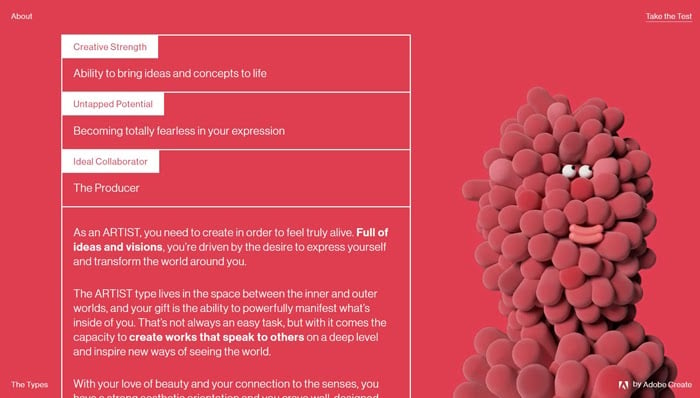
For their My Creative Type microsite, Adobe lets users take an interactive quiz to learn about their unique creative types.

My Creative Type microsite home page

Users are asked to answer abstract questions that are matched with creative traits. After answering a question, users can engage with interactive ASMR elements or animations, turning the quiz into an even more immersive experience.

my creative types microsite quiz question

At the end of the quiz, users can learn their creative strengths, untapped potential, and the biggest challenges they must overcome in their creative journeys.

Examples of Good Microsites My Creative Type

Conclusion

If you want to create a microsite, think about the objectives you want to achieve. Then, create compelling content to encourage visitors to engage.

Make microsites that have eye-catching designs and deliver seamless experiences to engage users further.

By knowing the right steps, you too could design a microsite your target audience will love.

How will you use microsites?

The post When Should You Use Microsites appeared first on Neil Patel.