Wednesday, December 2, 2020

Best Recruiting Software

Disclosure: This content is reader-supported, which means if you click on some of our links that we may earn a commission.

Are you a recruiter looking to streamline your hiring process? You’re hardly alone in that camp. Thankfully, there’s recruiting software that helps you do precisely that and then some. 

In a fast-paced recruiting environment where you need to sift through hundreds of potential applicants with differing strengths and weaknesses, your best bet is adopting an applicant tracking software that allows you to make the best hiring decisions possible. 

With so many recruiting software options to choose from, the problem is that it quickly becomes an overwhelming choice to make. No one wants to invest in tools that aren’t entirely useful to their process.  

In this in-depth review, I’ll dive into the best recruiting software options on the market, as well as how to pick one that fits your business best without having to deal with the overwhelm. 

Let’s get started.  

The Top Recruiting Software Options For 2020

  1. Recooty
  2. BambooHR
  3. Bullhorn
  4. Greenhouse

How to Choose The Best Recruiting Software For You

If you’re looking for an applicant tracking system (ATS), it’s clear your main goal is to make quality hires for your business in the most efficient way possible. 

The question becomes, what criteria do you use to choose the best software-company fit? Here are a few key factors to consider: 

Hiring Budget

Your business is unique, and so is the budget you assign to your hiring process. 

With a bit of research, you can find an ATS that fits your company without putting you over budget. 

If investing in a robust ATS software will save you money by making less bad hires in the long run, save you time by having instant access to large amounts of data, or let you employ less hiring managers, then the investment is well worth it. 

In the ATS world, there is a range of prices you can choose from that help you stay on track financially.  We’ll dive into more detail on that below.  

Specific Features  

Are you looking for a hiring system that lets you integrate email campaigns, pre-screenings, or specific candidate analytics? 

Is testing a big part of your hiring process? Maybe you’re looking for a basic system that lets you compare applications with straightforward data.

Make a list of the features your business can’t compromise on, and use those as a filter for narrowing your best options.

Usually, additional features like landing pages, automations, planning software, or workflow integrations can be added down the road. This allows you to make the best choice for where your company is now and you can upgrade and build on it later.

Hiring Frequency

You might be a small company with a lower turnover rate. Or maybe you’re a sizable  company with more than 500 employees and are constantly looking for new hires.

Your ATS needs to be able to handle the amount of hiring data you’ll be managing daily. 

Ask yourself how frequently you make new hires and what your average turnover rate is. This will be a good way to filter which software will fit you best. 

Recruiting Software Type

Are you a small up-and-coming business, a hiring agency, or a sizeable enterprise? 

This is an important distinction to make when you’re choosing a system. No software system is a catch-all for every business. There are too many hiring variables and unique business needs for this to be the case.

While some software is built to handle hiring agency needs, others are better for an established business with in-house HR and hiring managers. Whether you need a simpler ATS or a more robust CRM is an additional distinction to make that we’ll talk about more in the following sections. 

The Different Types of  Recruiting Software

Recruiting software generally falls into three defining categories: applicant tracking software, candidate relationship management, and interviewing software.  I break each of them down for you below.

Applicant Tracking Software

Processing job applications and resumes, keeping track of interviews, and managing job postings can all be done with a simple applicant tracking software. 

These are basic capabilities most ATS software will have. As your company gets bigger, you’ll start looking for additional capabilities. 

This is where we get into CRM software.

Candidate Relationship Management

If you need to gather a pool of potential candidates according to different hiring criteria on a rolling basis, then a candidate relationship management (CRM) system might be the better option for you.

An ATS focuses on managing applicants interested in any given active job ad, while CRM systems revolve around attracting the best talent from a candidate pool and managing it continuously.

This usually works best for enterprise-level businesses that are more established and are continually perusing and hiring through a pool of qualified candidates. It’s also an excellent option for hiring agencies. 

Interviewing Software

Finally, interviewing software can be big time savers. Not only do they help you sift through potential candidates, but they allow you to schedule and record interviews and interview questions you can review on your own time. 

This way, you can easily compare answers, as well as perceived candidate skills. 

This is a great fit for larger companies with higher turnover rates.

Below, you’ll find a list of the best recruiting software for different criteria, along with pricing, features, and benefits. 

#1 – Recooty – The Best Recruiting Software For Small Businesses
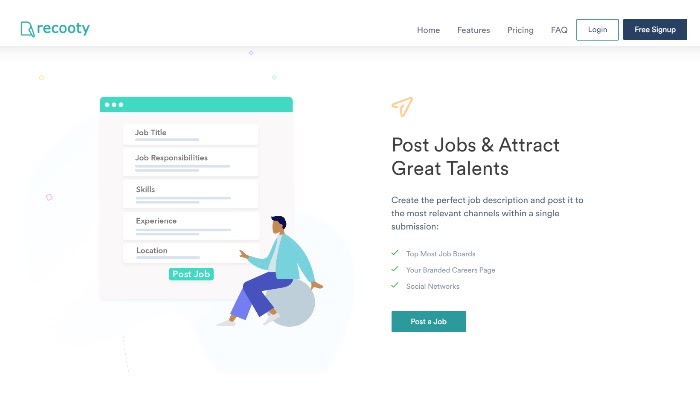
Recooty prides itself on being the easiest recruiting software for small businesses.

If yours is a small business, chances are you’re trying out hiring software for the first time. With Recooty, you can easily cover all your hiring basics. 

You can post jobs, schedule interviews, check out possible resumes, and hire with a few simple clicks.

Though Recooty is geared towards smaller businesses, you can still create a branded careers page that fits your company profile. This, in particular, is a great feature that helps you differentiate yourself as a recruiter in the job market. 

But you don’t have to stop there. You can also be accessible and post to the most popular job boards in no time. 

Pros

  • Bulk import and export when you’re ready to upgrade
  • Branded careers page
  • Ability to post to multiple job boards
  • Social network sharing capabilities

Cons

  • Very limited capabilities that don’t scale with the growth of your company
  • Limited app integrations
  • Does not offer CRM capabilities

Pricing

Recooty’s pricing is straightforward. You can choose to go with a monthly plan or save 20% with an annual payment.

For starters, Recooty has a great free plan that allows you to post three jobs, a branded career page, and lets you track applicants.

For more advanced options, you can choose the Pro Plan for $29 a month or the Ultra Plan for $49. 

Check out each of their pricing tiers in detail here. 

#2 – BambooHR – The Best Recruiting Software For Medium-Sized Businesses
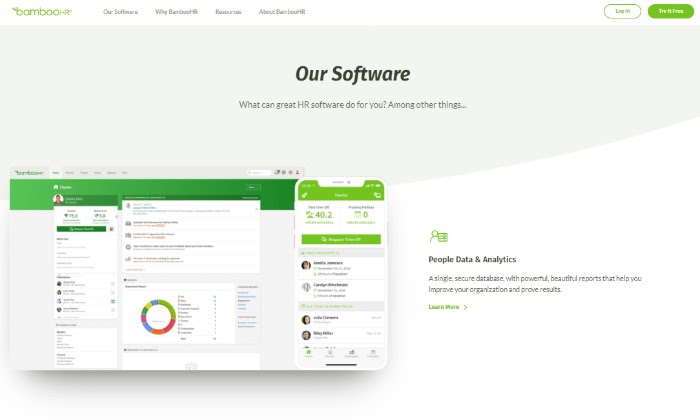
BambooHR is a great solution for smaller to medium-sized businesses with more significant hiring needs. Their user interface is immensely easy to navigate and helps you get through the hiring and onboarding cycle seamlessly.  

What makes BambooHR stand out is that they aren’t only an ATS but also a human resource system.

This means their all-in-one system also helps you track things like time off, payroll, employee timesheets, and report management once you’ve already hired a candidate. For a hiring team, this can be a real time-saver. 

One of the more standout features of BambooHR is their expansive 45 app integrations with job sites like Indeed or Glassdoor to help you automate the job listing process. 

Additional app integrations, like signing in through Google, connecting with Slack, or Universal Background Screening, make it that much easier to manage your prospect pool. Plus, if there isn’t an app integration you’d like to get, they give you the option of requesting one or using Zapier to make it happen. 

Their best features make it easy to create and list job openings. They have an IOS and Android compatible app for easier access to hiring tools, data, and employee self-service features. This helps your hiring team create rapport and stay in constant communication with prospects and hires.

You can even add custom permissions at each stage of the hiring process for any company stakeholders wanting to give input on any candidate. 

Pros 

  • Ability to create custom workflows from done-for-you templates
  • Electronic signatures for easier paperwork management
  • Applicant tracking for faster hiring
  • User-friendly and easy to navigate
  • HR reporting and analytics for optimal decision making

Cons

  • Depending on your budget, some software capabilities will cost extra.
  • If you choose the Essentials tier, you don’t get access to basic phone support. 

Pricing

Though they list either an Essentials or Advantage option with the ability for add-ons, BambooHR doesn’t provide cookie-cutter pricing tiers. 

Instead, they create personalized packages that work with your budget. You can either sign up for a free trial or receive a pricing quote on their website. 

Get started with a free BambooHR trial here.  

#3 – Bullhorn – The Best Recruiting Software For Recruiting Agencies
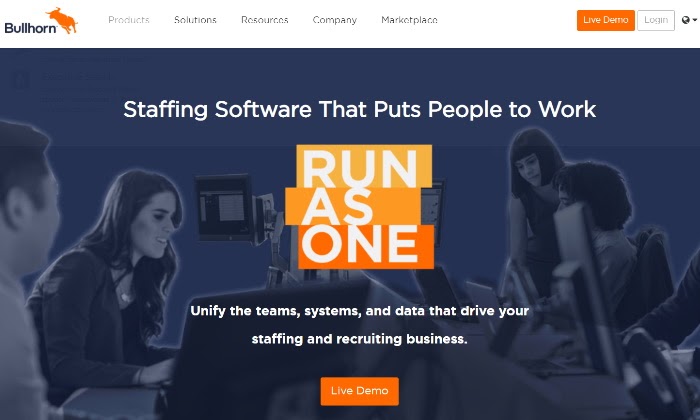
You might be wondering whether Bullhorn is an ATS or a CRM software. Well, it’s both. 

If you’re a staffing agency with a hefty pool of applicants to manage, Bullhorn is your go-to system for streamlined and centralized hiring processes.

They make it easy to find and place talented hires in open roles at scale and without data storage limitations that might hold you back. 

Their interface brings together the ability to manage the applicant and recruiting cycle so your team can make the best hiring decisions faster.

Integrations with Outlook, Gmail, and LinkedIn, also make it easier to communicate with potential hires, which is a key function for any recruiting agency. With Bullhorn, you can edit and parse any resume, add notes to applications, and even search keywords to find the right candidates for any open role. 

One of their best features is the Bullhorn marketplace, with more than 100 applications to choose from. 

This makes them a truly customizable platform that allows staffing agencies of any size to personalize their hiring processes and create a system that works for their team.

Pros

  • Centralized talent sourcing system that helps your team collectively find the best hiring fit
  • Advanced reporting to learn the health of your hiring system within a few clicks
  • Highly customizable workflows
  • Email tracking and mass emailing
  • Detail-oriented resume parsing and keyword search

Cons

  • It can be a pricey investment for up-and-coming recruiting agencies

Pricing

Bullhorn lists Team, Corporate, and Enterprise as their three main pricing tiers, but they don’t readily list their prices. You’ll have to request a pricing quote on their site since it’s based on the number of people on your team that need access to their system. 

Request a Bullhorn pricing quote here. 

#4 – Greenhouse – The Best Recruiting Software For Entreprises

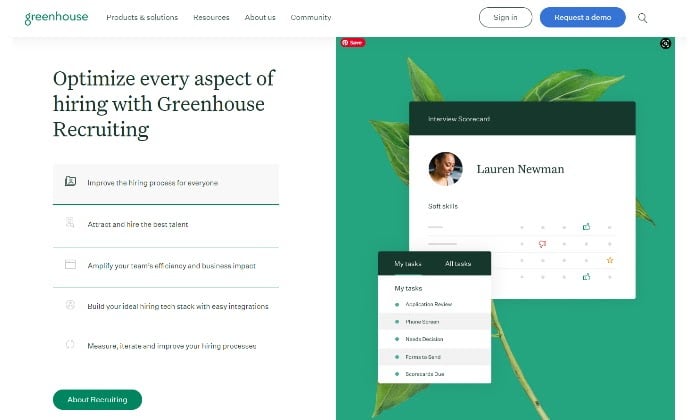
Greenhouse is made for enterprises to manage hiring at scale. Structured hiring is the name of their game as they focus on creating an equitable interviewing and onboarding process for all candidates.

Their systems are designed to lessen problems like biased hiring by basing its decision-making on each applicant’s individual evidence and data. If you’re a big company focusing on hiring diversity, equality, fairness, and lessening bias, Greenhouse has built-in capabilities that help you nurture those values. 

The Greenhouse interface is specifically designed to scale easily and grow right alongside your business with more than 300 hiring and management applications. 

Their best recruiting tools include the ability to share application reviews, access to scorecards that evaluate candidates consistently, and even finer details like allowing candidates to pre-record the right pronunciation of their names for more inclusivity. 

Pros

  • Automated surveys to measure hiring experience
  • Predictive analytics along with machine learning help make data-based decisions
  • Onboarding performance measurement
  • Accessible mobile apps for easy access to specs like candidate profiles, summaries, and scorecards

Cons

  • Can be an expensive addition to your hiring process

Pricing

Greenhouse doesn’t list their prices since their pricing is based on the size of your organization. 

You can get a custom quote by requesting their free demo here.

Conclusion

With the right recruiting software, you can forget the piles of paperwork and overbearing spreadsheets that are inefficient for getting you through the hiring process.

Adopting a system that caters to your specific business needs can make all the difference in the quality of your hires. Once you beat the overwhelm in the decision-making process, the next step is to make the choice and start.  

Pick the best ATS software using this guide and start making better hires this week.  

The post Best Recruiting Software appeared first on Neil Patel.

10 Useful Shopify Apps

10 useful shopify apps

By subscribing to Shopify’s e-commerce platform, Shopify customers can harness the platform’s shopping cart solution to sell, ship, and manage products. Founded in 2004, the e-commerce platform now reports an annual gross merchandise volume exceeding $61 billion and has over 500,00 merchants. While this number is massive, it also may be slightly daunting if you’re one in a half a million.

If you’re trying to make your service stand out among those other 500,000 merchants, Shopify offers thousands of apps that can help you optimize your commerce content. These Shopify apps range from email capture to photo optimization and everything in between.

If you’re looking to boost your success rate on the platform, there are many free ways to drive e-commerce traffic, but Shopify apps are definitely the first place you should look.

What Are Shopify Apps?

The Shopify App Store offers vendors thousands of apps. These Shopify apps function as plugins, extending a store’s functions and improving customer experience. Vendors can select a Shopify app to integrate with their store and be up and running with new functionality in no time at all.

Weeding through thousands of Shopify app options that promise optimized outcomes in all sorts of categories can be daunting, to say the least.

What Shopify Apps Should I Use?

To make the task of navigating the landscape of Shopify apps more manageable, we’ve chosen our overall “winners” in the realm of Shopify apps.

In no particular order, here are 10 useful Shopify apps:

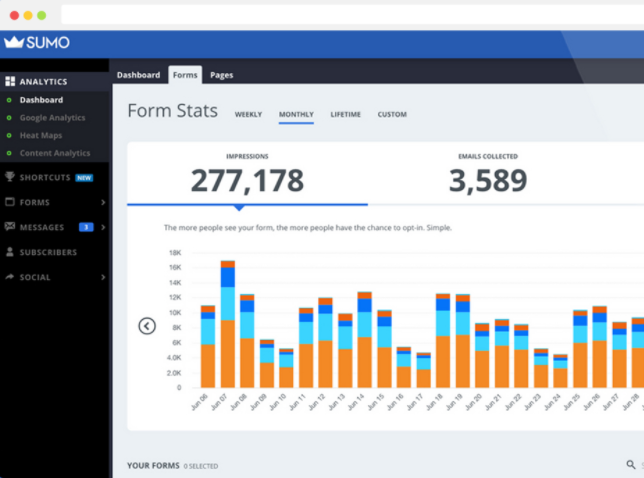
Sumo

Sumo is a Shopify app that identifies as a “set-it-and-forget-it” tool.

Sumo allows you to implement proven marketing strategies on your site quickly and easily, resulting in reduced cart abandonment, increased average orders, and larger email lists.

What It’s Best For

The Sumo Shopify app is best for incentivizing customers.

Whether a customer is about to abandon their cart or depart from your virtual window, Sumo automatically creates targeted incentives to convert these browsers into shoppers. The app also provides data that lets you delve into customer interactions in your store.

Features of This Shopify App

This Shopify app allows you to incorporate simple, straightforward marketing techniques like cart reminders and exclusive offers. These strategies can help make your store successful.

Easy-to-use and easy-to-replicate in all campaigns, this Shopify app can help make your e-commerce dreams a reality.

Sumo Shopify Apps

Smile

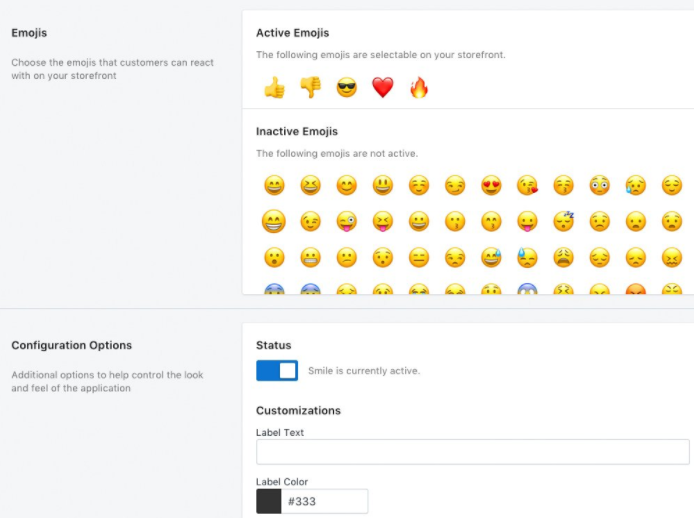
Smile is a Shopify app and marketing tool that increases engagement to ensure you get more reviews on your products. This fun, effective plugin uses the power of emojis to help you increase engagement, build trust, and boost social response.

What It’s Best For

By providing a fun interface for your clients to leave feedback and reviews through emojis, the Smile Shopify app can help you build engagement, a metric that demonstrates to potential customers that your products are as good (if not better) than advertised.

Features of This Shopify App

The utility of this Shopify app makes it hard to beat. By using emojis as the preferred means of review, you eliminate the need for lengthy written responses. This makes it easier for your customers to share their experiences with your product, since all they have to do is click.

Smile Shopify Apps

Judge.me

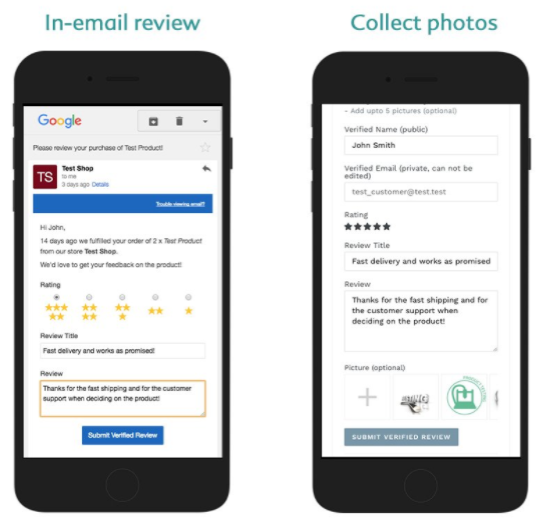
Judge.me is a Shopify app and engagement tool that helps you grow your online store by generating reviews via all modern marketing channels: Web, email, push, and SMS.

What It’s Best For

This Shopify app is best for generating reviews without begging for them. With Judge.me, users of the app select an email template and Judge.me does the rest: ask past and current customers for reviews automatically.

Features of This Shopify App

As big fans of automation, we love how easy this Shopify app is for generating reviews for your products. Plus, Judge.me’s cross-functionality allows you to take those reviews on the road and share them across your social channels, expanding exposure and reaching new audiences.

Shopify apps Judge.me

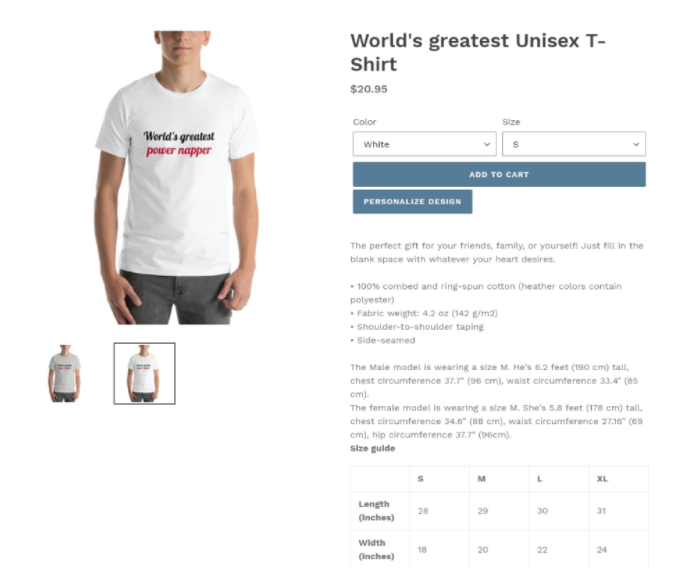
Printful

The Printful Shopify app advertises itself as your print-on-demand solution. By handling all of the custom printing needs for your store, Printful makes it easy to create unique items. Printful also satisfies your orders’ inventory, production, and shipping components, covering the logistics so you can focus on design and curation.

What It’s Best For

The Printful Shopify app is best for stores that sell custom printed goods. By streamlining the print-to-production-to-delivery process, this Shopify app makes a seller’s life infinitely easier.

Features of This Shopify App

We’re all for streamlined processes, which is why Printful landed on this list of Shopify apps.

By eliminating extraneous steps from the printing and distribution process, Printful supports your store in offering a wide array of custom printed items and eliminates the need for unnecessary trips to your preferred shipping locale.

Printful Shopify Apps

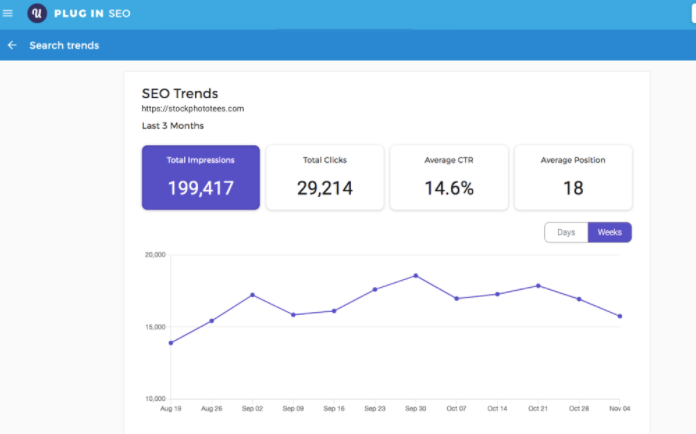
Plug in SEO

The Plug In SEO Shopify app is an integration that continuously helps you optimize your content for SEO, among other traffic-driving features

Although it’s not better than manual SEO, this Shopify app helps you manage SEO optimization, and drive organic traffic to your shop, all through one simple plug-in.

What It’s Best For

This Shopify app isn’t just perfect for store owners who aren’t 100% comfortable handling their own SEO strategy—it’s for everyone. With help from this Shopify app, you can optimize and may rise in Google’s search results, making your business even more visible to potential customers using organic search.

Features of This Shopify App

The easy-to-use nature of this Shopify app also makes it a great choice for store owners wanting to increase their rank without spending a ton of time and effort digging into the nitty gritty of their rankings.

Shopify apps Plug In SEO

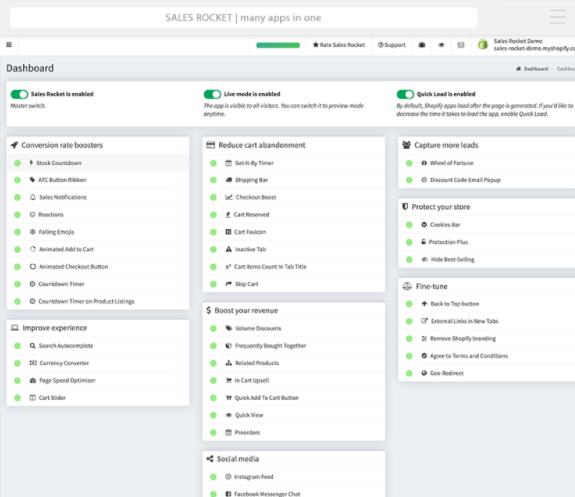
Sales Rocket

Sales Rocket is an all-in-one Shopify app that operates as a complete sales and marketing platform. The service boasts it can replace the forty apps you already have in rotation and goes the extra mile to streamline your store-related processes.

What It’s Best For

Sales Rocket was custom-made to increase your store load times and reduce spend on app charges, all while helping your store make money. By using features like scarcity and urgency timers, lead generators, and conversion boosters, Sales Rocket is designed to provide you with the power of many apps through a single platform.  

Features of This Shopify App

With this Shopify app, you eliminate the need for extra apps that slow down your speed, resulting in decreased monthly costs.

Who doesn’t love to save money?

Sales Rocket Shopify Apps

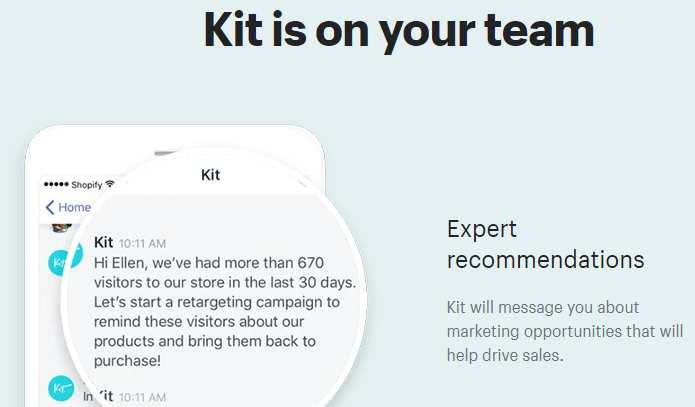
Kit

Kit is the virtual assistant you didn’t know you needed.

Created to make your life easier, this Shopify app will help you increase sales and build awareness through implementing marketing strategies.

What It’s Best For

Kit helps you build easy, effective Facebook and Instagram ads. The app even goes the extra step of posting the ads for you, making social advertising simple. Kit also offers email marketing automation, sending emails to clients and prospects alike.

Features of This Shopify App

This Shopify app truly feels like you have your own personal marketing assistant. Kit will message you about marketing opportunities, identify opportunities to make sales, and integrate with your other Shopify apps.

In short, Kit is the personal assistant we’ve all dreamed of, but never imagined existed.

Shopify Apps Kit

SEO Site Audit

Site Audit provides a detailed site audit that gives you an unparalleled view of why your sales and conversions are not improving and why your site isn’t generating traffic. With this Shopify app, you can pinpoint problem areas and fix them with actionable steps from Site Audit.

What It’s Best For

This is the second SEO-facing Shopify app to make our list. While Plug In SEO helps you optimize existing content, SEO Site Audit does a deep dive of your entire site, giving you an unparalleled view of the inner-working of your site’s composition. (You can also use Ubersuggest for this.)

Features of this Shopify App

Data. Is. Awesome. Gaining a true understanding of what is and what is not performing well on your site will empower you to fix those issues, which will hopefully result in SEO success.

Vitals

Vitals is a Shopify app that is “vital” to your store’s success. With the functionality of 40 apps in one, Vitals helps you boost sales by increasing conversion rate and eliminating page speed issues.

What It’s Best For

This Shopify app is geared toward boosting every functionality of your site. From Facebook pixels to SEO, Vitals has solutions for all of your site-improvement needs

Features of This Shopify App

Vitals is the Swiss army knife of Shopify apps. By bundling so much functionality into one app, users get all the multi-app perks for less.

Shopify Apps Vitals

PushOwl

PushOwl is a Shopify app that helps your recover lost sales. Through an automatic sequence of push notifications, users are brought back to your cart.

This functionality eliminates the need to gather personal information, such as name or email address, making it that much easier to remind your customers of what they may have left behind.

What It’s Best For

This Shopify app is best for sellers without an abandoned cart recovery strategy. If this includes you, you definitely need to get PushOwl ASAP and start recovering abandoned carts.

With PushOwl, you can send push notifications via the browser and only require customers to use their browser. The push sequence is infinitely editable, allowing you to improve upon the original by altering timing, text, or incorporating a coupon.

Features of This Shopify App

We love this Shopify app for its ease-of-use. With PushOwl, there are no complicated forms to complete. It’s just a simple series of push notifications.

Shopify Apps PushOwl

Conclusion

There are many strategies to make your Shopify store work, and Shopify apps are an excellent place to start.

The ten highlighted apps are just a sampling of those that exist in the Shopify App Store, so your options abound.

Regardless of your budget, by incorporating some, one, or all of these Shopify apps into your Shopify strategy, you can improve your understanding of the platform and hopefully convert a customer or two.

What is your favorite Shopify app available in the Shopify App Store?

The post 10 Useful Shopify Apps appeared first on Neil Patel.
Tuesday, December 1, 2020

How to Find Paid Social Media Keyword Ideas From Top Hashtags

How to Find Paid Social Media Keyword Ideas From Top Hashtags

In the world of digital marketing, content is king. And keywords hold the keys to that kingdom.

They unlock connections to your target market—people who are looking for what you’re trying to sell.

When you’re setting up paid social media campaigns, keywords can help you make those critical connections and ensure your campaign’s success.

Knowing which keywords to use throughout the copy of your campaign can be a pain. If you’re not sure which ones are right, you might miss the mark and, by extension, your audience.

Popular hashtags can be the source of inspiration that gets your paid social media campaigns off the ground.

The Importance of Hashtags in Paid Social Media Campaigns

Why are the top hashtags important for inspiration and keyword ideas? Because they can provide a lot of information if you know how to look for it.

Here are the questions you should ask when looking for hashtags:

  • What are people talking about?
  • What’s the demand for a particular product or service?
  • Is there a rise in interest? Or is the trend on the decline?
  • Who is using those hashtags?
  • What’s the context of those conversations?

Researching popular hashtags can provide relevant insights into the conversations happening around a topic. Their power is in the data you can mine from real-life, real-time sources.

Top hashtags can also lead to other hashtags and keywords you may not have considered. As you continue to dig deeper, you may start to see some patterns to add to your campaigns.

Be on the lookout for:

  • New or up-and-coming hashtags
  • Hashtags used by other relevant target markets
  • Questions or concerns people are expressing
  • Phrases in the associated content that come up often

How to Use Trending Hashtags for Your Paid Social Media Campaigns

First, you have to find the top hashtags. Begin with what’s trending in your industry and go from there. We’ll go into more specifics on different social media platforms later.

As you dive in, explore the content surrounding the hashtags.

How do you use the information you found? It’s all about inspiration. The hashtags, phrases, and keywords you find can inform your paid social media campaigns in the following ways:

  • For text: What you’ve learned can be a launching point for your ad’s language. Look at the posts’ content in addition to the hashtags, and incorporate the language people in your target market use. Knowing how people talk about things can teach you how to best speak to the pain points they face and the solutions they love.
  • For images: What kinds of images are those hashtags often associated with? Whether you plan to use a stock image in your ad or create your own, let what you find attached to hashtags help determine the type of images you use. You may even find a meme that you can join in on, making your social media ad more engaging.
  • For target audiences: Use the hashtag research to inform the parameters of your social ad reach. Who is using these hashtags? Where do they live? How old are they? What else are they interested in? These stats can help you narrow the ad reach to your target audience.
  • For sponsored post research: In addition to helping your paid social ad content be more relevant, hashtags may also help pinpoint a recent post to put cash behind. Experiment with different top hashtags in your posts on each social platform you use. Those hashtags may help your posts perform well organically, and then you can choose to boost them with sponsorship.

Using Facebook Top Hashtags for Paid Ads

Let’s start with Facebook, one of the most popular platforms for online marketing.

With over two billion users per month, there’s got to be some great data out there for your hashtag research.

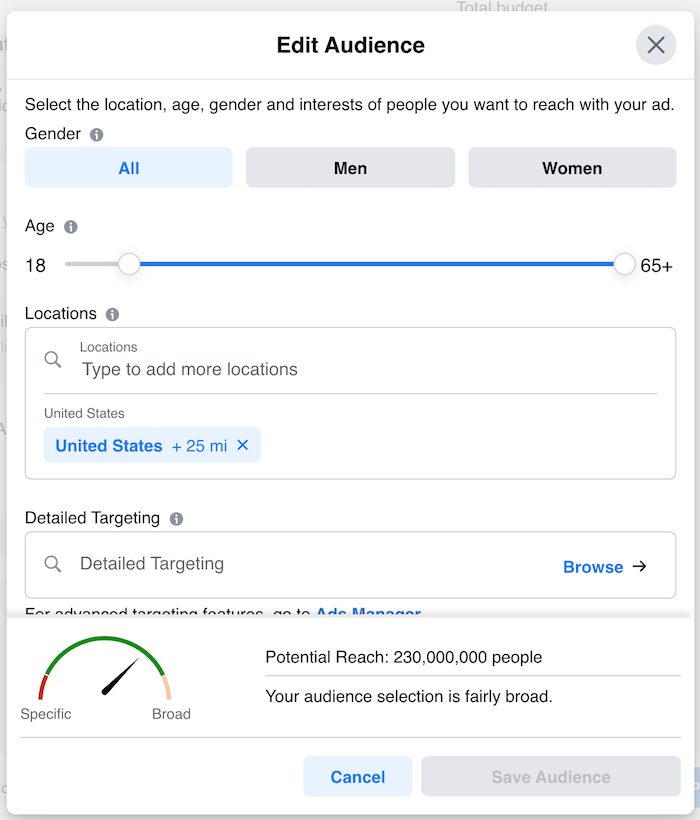
You are probably only connected with a tiny number of those people, but don’t let that stop you. In fact, you can choose who sees your Facebook ads:

Using Facebook Top Hashtags Screenshot of Facebook ad target market options

But, before you create the ad, you need to find the right words to use that are getting the most visibility. This is where hashtags come into play.

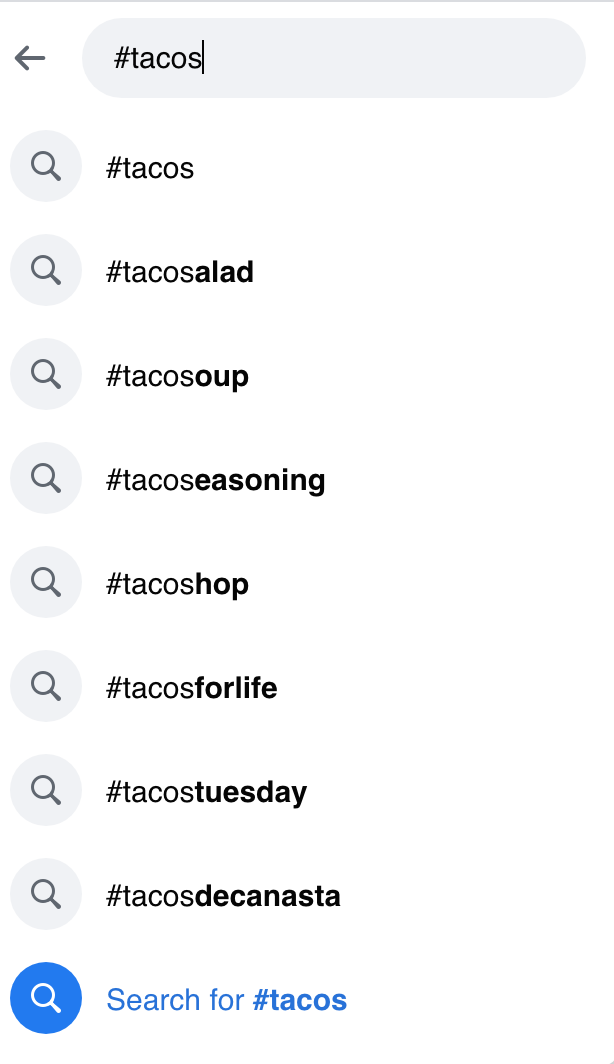
A quick search for #tacos on Facebook shows some drool-worthy meals from strangers around the world who made their posts public as well as from brand pages. You do this from your search bar.

Top Hasthags Facebook providing alternatives to the popular hashtag Tacos

That list shows you what words most commonly follow that hashtag. Additionally, when you submit the hashtag you’re searching for, Facebook shows you on the top of the next page how many people are talking about that topic:

Top Hashtags Facebook view of the popular hashtag Tacos

When you type in the hashtag that interests you, Facebook also auto-fills other hashtag options to explore.

You can also explore the bookmarks that Facebook makes available, including local events, crisis response, or other timely topics. These can provide insights into why people are using this hashtag.

Using Instagram Top Hashtags for Paid Ads

Instagram is a hashtag-heavy environment, making it ideal for top hashtag research.

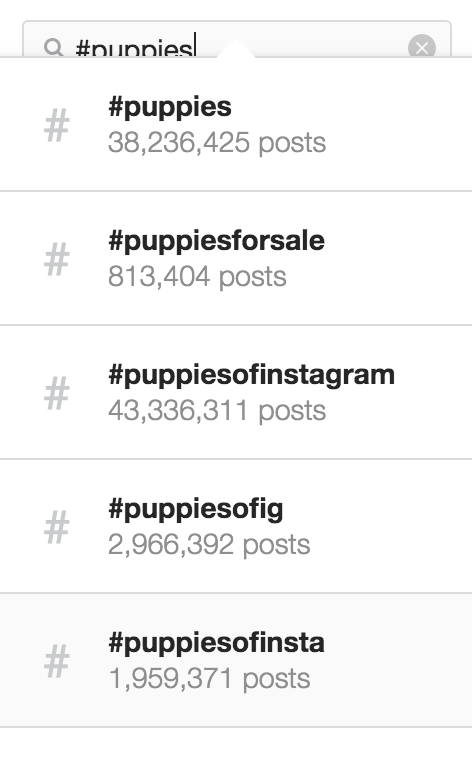
Much like on Facebook, you can start by typing your hashtag ideas into the search bar. Instagram not only auto-fills suggestions but also shows you how popular those hashtags are based on how many posts include them.

Using Instagram Top Hashtags Instagram providing recommendations for hashtags about puppies

Instagram Explore

Are you still looking for more hashtags to dig into? Head to Instagram’s “Explore” section, with the compass icon, to see top posts related to content you have interacted with in the past. You may discover new or emerging hashtags that you didn’t know about.

Using Instagram Top Hashtags

Now is an excellent time to stop and talk about how hashtags don’t always translate directly into keywords and phrases for paid social media campaigns. You may have to convert from a succinct hashtag to a robust, natural way of talking. Here are a few tips for doing that:

  • Listen to What Influencers are Saying With Those Hashtags: Take some time to watch the video posts and Instagram stories associated with the hashtags you’re researching. Hear how they talk about the subject. What are some key phrases that come up often?
  • Read and Take Some Notes About What the Hashtags are Saying: Now it’s time to turn off the videos and read the actual content. What are they using those character counts to say? This is where you can learn about key phrases that everyone is using and the meat behind the hashtag topics you are researching. For instance, a top hashtag may be “#cleanbeauty,” but it’s not about skin cleanliness—it’s about toxicity in beauty products, congressional oversight, regulations in the industry, and how to know what’s safe for your family’s skin. Learning about the issues and conversations behind the topics can help you frame paid social media content in a usable way.
  • Talk Out Loud Using the Instagram Hashtags: Hopefully, you’re working by yourself because this could get a little awkward: It’s time to start talking to yourself. Go ahead. As you’re writing down ideas that we talked about earlier and starting to craft your social media ad content, actually saying it out loud may help disconnect you from “internet speak” and get you into using a more natural tone.

Using Twitter Top Hashtags for Paid Ads

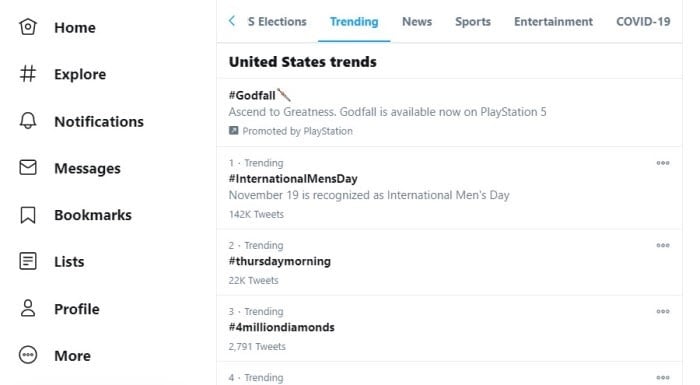
If you’re using Twitter on your mobile device, you can hit the magnifying glass icon at the bottom of your screen to see what’s trending. If you’re on your desktop, hit “#Explore” on the left side of the screen, then click “Trending” to see currently popular hashtags.

Using Twitter Top Hashtags

You can see what topics Twitter thinks are important now based on their editorial board and algorithms, as well as how many tweets are using those hashtags. Keep in mind some of these are promoted hashtags, not organic ones, though—they are labeled, as you can see with “#Godfall” at the top of this screenshot.

To learn more, click on “Show More” or the “Explore” section on the desktop layout to see more about these topics and find more currently in use.

You may need to dig deep to find hashtags that are relevant to your niche. When you see a conversation or post around topics pertinent to your industry, check out those hashtags.

Don’t be afraid to see a spark of inspiration, such as a new hashtag that’s just starting to catch fire, and get onboard that topic before it becomes a wildfire.

Using LinkedIn Top Hashtags for Paid Ads

Where do you go to find the top hashtags on LinkedIn? There are a couple of different ways to start your research.

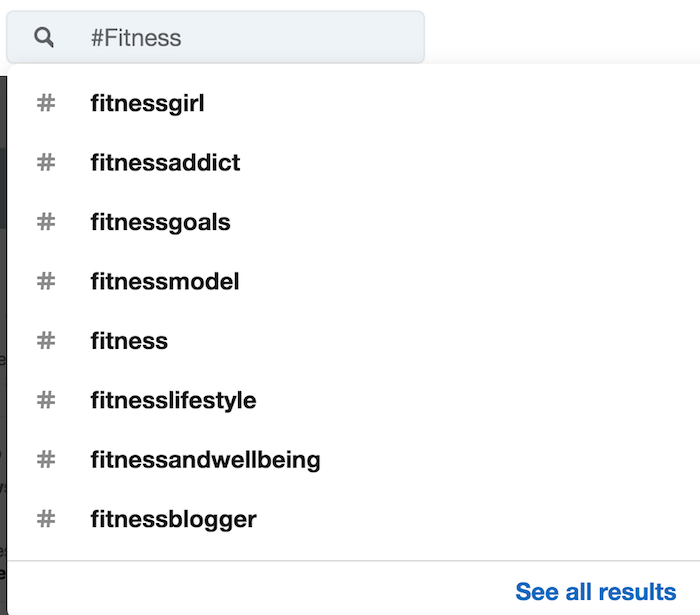
You can look up hashtags in the search bar at the top, just as you do on other social media platforms:

Linkedin Top Hasthags LinkedIn recommendations for hashtags about fitness

And like other platforms, LinkedIn will auto-recommend other options.

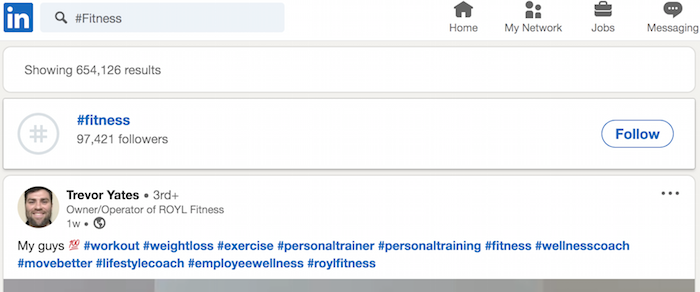
When you choose a hashtag, LinkedIn shows how many people are currently following that hashtag. This data can help you understand how many people may see your posts that incorporate that hashtag. You will also see top posts with that hashtag.

LinkedIn Top Hasthags LinkedIn option for following the fitness hashtag

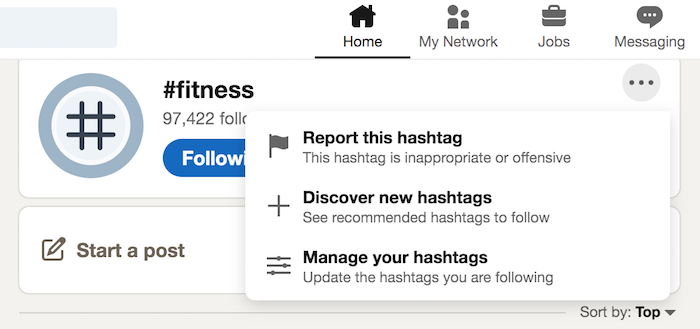
When you follow a hashtag you’re interested in, you can click on the three dots on the right of your followed hashtags and choose “Discover new hashtags.”

Using LinkedIn Top Hashtags

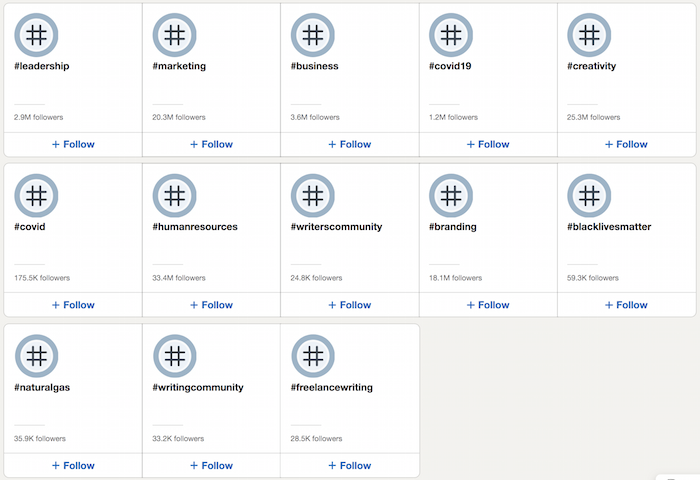
Now you’ll see all kinds of popular hashtags to inspire you.

LinkedIn Top Hasthags screen of other hashtags LinkedIn recommends

If you want to skip those steps and just start exploring, you can go straight to LinkedIn’s Follow Fresh Perspectives tab to see the top hashtags, accounts, and companies LinkedIn recommends to you.

Context Is Key When it Comes to Using LinkedIn

Here’s the critical thing to remember about LinkedIn: It’s a popular platform for content, but it’s also very specific in its contextual use. LinkedIn is generally about professional or career conversations.

Using Pinterest Top Hashtags for Paid Ads

Are you trying to reach a creative, DIY crowd with your paid social media ads? Pinterest can show you what’s hot right now.

With Pinterest, hashtags aren’t as critical and promoted as they are on other platforms. Keywords in a post seem to be just as crucial for searching.

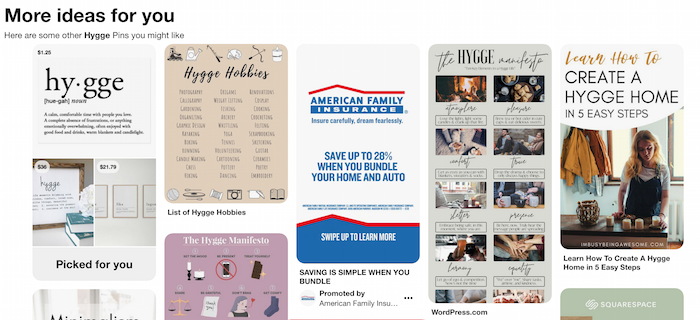
Here is a search for the popular term “Hygge:”

Pinterest Top Hasthags Top posts on Pinterest for the search Hygge

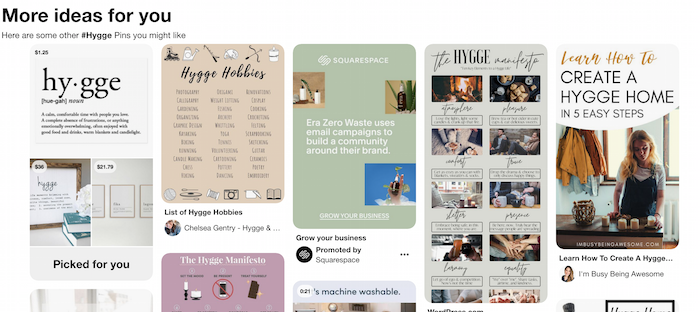
And a search for “#Hygge:”

Pinterest Top Hashtags Top results for the hashtag Hygge on Pinterest

You’ll notice similar results. So, just searching around for popular topics on Pinterest and exploring the top posts may prove just as useful.

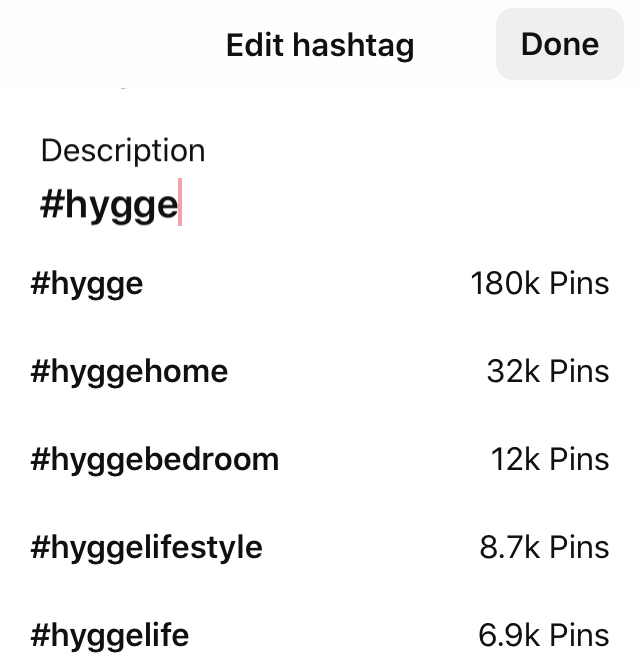
However, if you are looking for top hashtags, there is a workaround. You can log in to the mobile app, click to create a new pin, and type a hashtag into the description section. This will give you a listing of top alternatives and stats for how popular they are.

Pinterest Top Hasthtags

More Tools For Finding Hashtags

If you’re still looking for the right hashtag, you may want to try one of the many hashtag search tools. These online and app tools allow you to plug in hashtags you’re using, and find related and popular hashtags. A few options include:

Conclusion

The key to using hashtags for paid social media is to use them as a launching point. They should inspire relevant content for your very specific target market. Hashtags can help you understand who they are, what they care about, and how they talk online.

Popular hashtags can also open the door to new opportunities for your social media strategy as you join fresh, ongoing conversations happening online and reach out to new markets.

Which popular hashtags will you be analyzing to inform your next social media ad campaign?

.

The post How to Find Paid Social Media Keyword Ideas From Top Hashtags appeared first on Neil Patel.

Best Data Visualization Tools

Disclosure: This content is reader-supported, which means if you click on some of our links that we may earn a commission.

The right image convinces a conference room instantly. 

Sell that new client, get your boss’s approval, and rally the team behind you. Data visualization tools turn a whole mess of numbers into a crisp image that says it all.

With the right product, you can take command of overwhelming amounts of data to tell a clear and compelling story, while leaving your audience with a visual that resonates long after your presentation concludes. 

In this post, I’ll give a complete overview of the best data visualization tools, and what to look for as you make your decision. 

The Top 5 Options for Data Visualization

  1. Tableau – Best for Enterprise
  2. Infogram – Best For Collaboration
  3. Plecto – Best for Sales Teams
  4. Datawrapper – Best DIY Visualization Tool
  5. Highcharts – Best for Interactive Visualizations

How to Choose the Best Data Visualization Tool for You

I get it. There are a million tools to help you visualize your data. 

Then, when you start digging, it’s like, “Wait, do I have to know several programming languages to use this really cool product?”

Slow down. Don’t worry. You’re not going to have to go back to school to get amazing data visualizations.

Some of the high-end tools will require a little IT know-how to get off the ground, but those are really aimed at companies who can factor that into their budgets.

If that’s not what you’re looking for, no worries. There are really great data visualization tools a non-specialist can have up and running before lunch.

The key is knowing what you want your data visualization tool to do.

By understanding your local requirements, you can whittle down your options quickly by going through each of the major elements of data visualization products.

Visualization Capabilities

Are you looking for a nice tool that creates sleek reports, or a platform that lets you publish interactive dashboards?

Every vendor showcases data visualization examples on their site. Check these over and really reflect on your gut reaction. 

If you are in search of the “wow” factor, don’t settle until you find something that will give your presentations that aesthetic edge.

Connectivity

This is perhaps the biggest make-it-or-break-it factor on the list: What data types and sources are supported by the data visualization tool?

No data visualization tool is good enough to justify a massive migration. You need to find something that connects with your data, wherever it lives. 

Ideally, connecting data is an easy, secure, and highly-visible process. 

Look for products that clearly explain how to manage and connect data sources. Official partnerships with the database products you use is a big plus. 

Cruise a few reviews to see if people are finding that the connectivity is as good as advertised. Also, be sure to walk your sales team through your desired deployment to make sure it’s going to work as planned.

Skill Requirements

Not so long ago, complex data visualization required familiarity with structured query language (SQL), Python, or another language.

Today, great data visualization products like Tableau allow users to search vast databases using natural language. They provide drag-and-drop functionality that lets non-specialists drill down into the most complex questions.

That said, if you have complex data flows coming into real-time dashboards, it’s a good idea to have someone in-house who can ensure that everything is running smoothly. 

Mobile Compatibility

Look for something that will appeal to your clients and customers, however they browse. 

Does your data visualization tool support touch and multi-touch? 

Good interactive visualizations take a lot of effort, and the last thing you want is for users on iOS or Android to be barred from the experience because of incompatibility. 

Quality data visualization software delivers a final project that looks good on desktop, tablet, or smartphone. You can’t really budge on this unless you are committed to developing visual content for internal use. 

Another thing to think about is collaboration. Will your remote and on-the-go employees be able to stay current with their team projects?

The Different Types of Data Visualization Tools

This product category is highly diversified, ranging from modest software that turns a spreadsheet column into a pie chart to interactive dashboards that interpret data flows from multiple sources in real time.

Although data visualization tools don’t break down into completely neat tiers, there are definitely recognizable categories.

I’ll start out with the lightweight tools and work up to the best business intelligence software, capable of handling the most complicated data analysis.

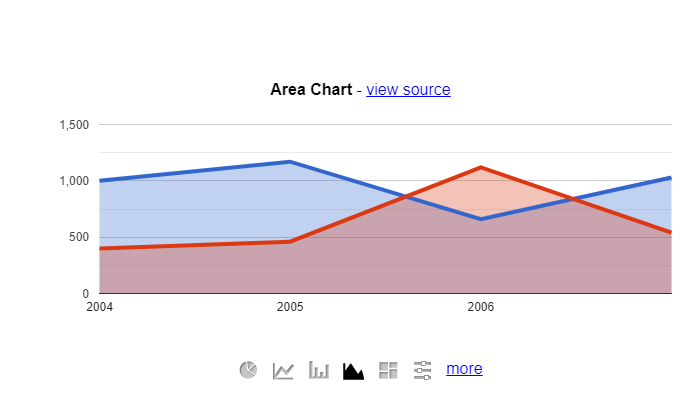
Simple Charts and Graphs

Simple chart tools have limited connectivity and few data visualization options. The draw is that they are often free and easy for anyone to use. Here’s an example from Google Charts, which is free forever:

For teams in constant communication, these lightweight data visualization solutions can come in handy. 

If you are presenting to clients or company leadership, however, the reports generated by a simple chart might not cut it.

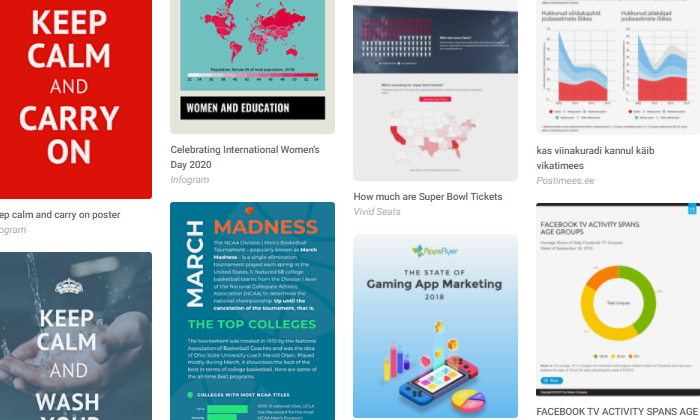
Infographics

Infographics are really great for making compelling visual statements. 

I like them because you can tie multiple charts, images, and streams of information into a cohesive presentation that can be shared on a billboard or a smartphone screen.

Plus, these are great for your content. Adding original infographics increases shares and retweets because they make your posts stand out.

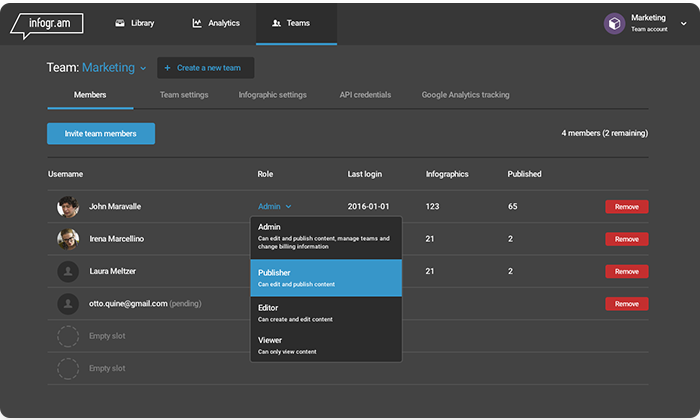
Infogram is a really popular infographic tool, and looking at the examples above, you can see why I chose to review it. Your teams get a whole new dimension of artistic and creative freedom to present data in an eye-catching way. 

Using Publisher or Google Docs to achieve an end result that looks this good would be tedious, if possible at all. 

Generally, infographic tools come with many options for visualization out of the box. 

They don’t tend to have the connectivity or analytic capabilities that come with business intelligence software, though they are far more robust than a simple chart tool.

Interactive Visualizations

Want people spending time on your site? 

Interactive visualizations let customers and visitors play with your data in a controlled way. 

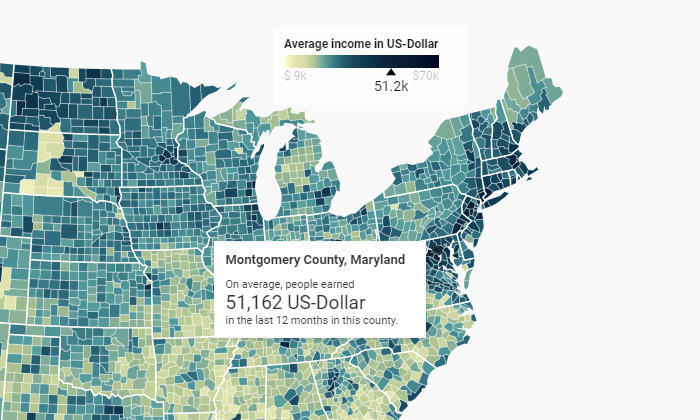
Below, in the data visualization example from Datawrapper, the chart displays information based on the county the user hovers over. The county itself is also highlighted, and the average income is adjusted on a sliding scale:

Consider these products a blend or midway point between infographics much more powerful business intelligence tools. 

There is nothing complex about interactive visualizations for end-users to understand, yet they allow users some degree of control over the data, which an infographic can’t support.

Business Intelligence Tools

Business intelligence (BI) tools comb through massive amounts of raw data and turn it into actionable insights. As part of their reporting features, many BI tools come with data visualization tools designed to support the most complex analysis.

BI tools connect to a large number of disparate data sources, and usually require a higher-degree of technical skill to deploy and manage. Most often, however, end users like executives and sales managers can easily manipulate data within a dashboard once it is set up.

Customizable dashboards and robust reporting features allow different people within a company to pay attention to relevant KPIs in real time, picking up on trends and patterns that would otherwise be hidden.

Deploying and maintaining a BI tool represents a significant investment, whereas tools from the previous product categories tend to be a lot less work. 

That said, there are BI options for small and mid-sized businesses that provide cross-organization connectivity and data visualization at an affordable price.

#1 – Tableau — Best for Enterprise

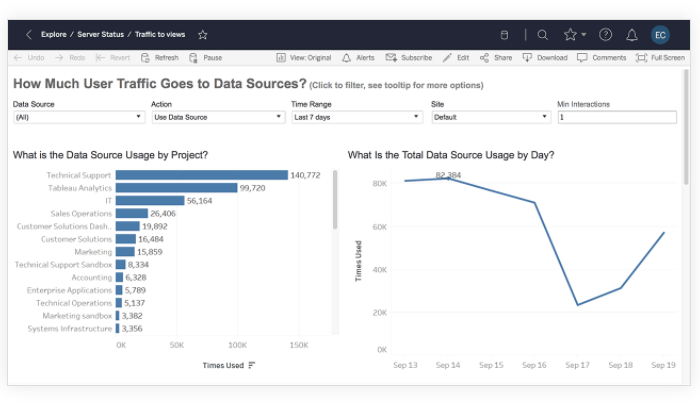
Tableau is a best-in-breed BI tool with phenomenal data visualization capabilities. It’s not the cheapest option on the market, but you get both an intuitive UI and the ability to drill down into virtually any data source.

In other words, you don’t have to make the typical sacrifices. Tableau is ultra-powerful in terms of supported visualizations, but it’s really user-friendly once you get it set up.

Many companies elect to use Tableau in order to encourage a data-driven, transparent, collaborative culture. It’s also one of the most secure products on the market, with enterprise-grade governance tools and the option for on-premises deployment.

For the most part, Tableau can do everything that any other data visualization tool can, but better. Some of the standout capabilities include:

  • Combine different data sources without writing code
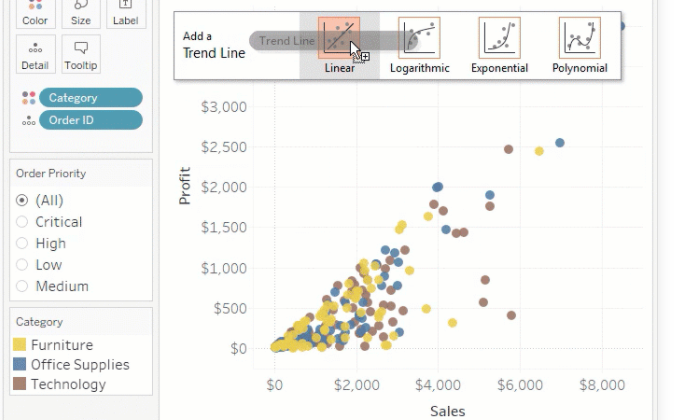
  • Drag-and-drop statistical analysis, forecasts, and trendlines
  • Optimize dashboards for all screen sizes
  • Natural language queries of any published data source
  • AI-powered data analysis 
  • Publish data sources as encrypted extracts on Tableau Server
  • Robust data management tools
  • Support and solutions from an active community of over 1 million users

Team pricing for Tableau is role-based, which lets large organizations economize their subscription. The roles are:

  • Creator: $70 user/month
  • Explorer: $35 user/month, 5 user minimum ($42 if fully hosted by Tableau)
  • Viewer: $12 user/month, 100 user minimum

Creators have full author/edit privileges, and can connect new data sources and flows. Explorers can work with most existing assets and create their own visualizations. Viewers can interact with data and collaborate with colleagues, though they cannot author or prepare data.

Tableau Public is a free forever version of the product and the company offers a free 14-day trial that lets you test drive some of the premium features.

#2 – Infogram — Best for Collaboration

Infogram is an intuitive data visualization tool that delivers stunning reports, slides, dashboards and social media visuals. 

First-time users are going to love the UI. Basically all of the visualization building can be accomplished via drag-and-drop. 

Infogram makes it easy for teams to share and produce consistent work with customizable branded templates, role-based permissions, and file versioning..

You can see who’s editing your projects in real-time and you can add comment threads directly to an image within the infographic. 

Teams can get up and running with Infogram quickly, taking advantage of its incredibly deep design capabilities::

  • 1 million stock images and icons, as well as animations, GIFs, and video
  • More than 35 interactive charts and over 550 interactive maps
  • Preset and customizable branded design themes
  • Data integration with Google Analytics, Amazon Redshift, OneDrive, MySQL, Oracle, and more
  • JSON feed to import live data
  • WordPress plugin

The streamlined features don’t stop there. Tasks like embedding projects, for example, involve no more than copy/pasting embed codes into your CMS. 

Infogram can be extremely beneficial for companies of any size. In addition to a free forever version, Infogram offers several pricing tiers:

  • Pro: $19/month for an individual
  • Business: $67/month for an individual
  • Team: $149/month for 3 users
  • Enterprise: contact sales

With Team and Enterprise subscriptions, you get the ability to invite members, set flexible permissions, share projects, and collaborate in real-time. Connect your data, get the input you need, and start publishing great looking content before the end of the week.

#3 – Plecto — Best for Sales Teams

Plecto is a great tool for promoting a data-driven team culture. The idea is to involve everyone in the constant flow of data by making all relevant KPIs available in a real-time, highly-visible dashboard.

Okay, plenty of other tools can do that. Gamification is where Plecto really separates itself from the crowd. 

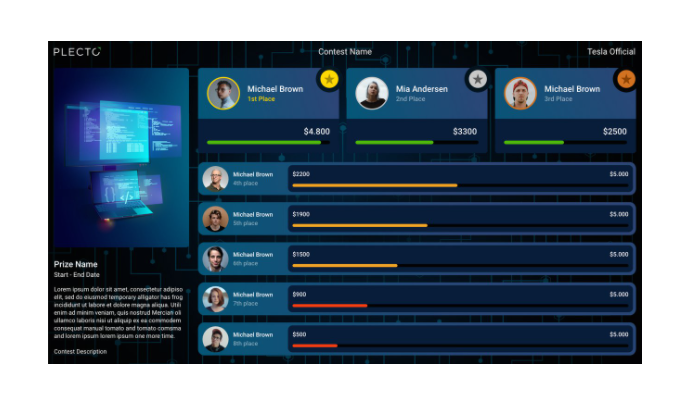
Gamification? Yes, it’s a word, and a hot one these days. With Plecto, it’s super simple to create contests using your KPIs as benchmarks. This could be sales closed, employees hired, lists built—whatever metric you need to drive, use Plecto to enable the spirit of competition.

Plecto is built for this. It’s easy to set goals and achievements that are directly tied to the numbers you care about. Increase transparency and motivation at the same time.

The platform’s capabilities work exceptionally well for sales teams, yet other departments across the organization can benefit from the unique mix of features and functionality, which include:

  • Unlimited dashboards and data sources
  • Custom KPIs
  • Display multiple dashboards on the same screen
  • Integrations with Microsoft SQL, Oracle SQL, PostgreSQL, and MySQL
  • Notifications based on thresholds and other milestones
  • One-click integration with more than 60 leading cloud services
  • Create and track individual performance agreements in private employee-manager dashboards

There are three plan options for Plecto:

  • Medium: $100/month for 5 licenses, $20/month per additional license
  • Large: $350/month for 10 licenses, $20/month per additional license
  • Enterprise: Contact sales, minimum 100 licenses

Some of the important data visualization tools (like SQL integration) are not included with the Medium plan. You only need to buy licenses for users who send their data to Plecto (view-only users are free).

#4 – Datawrapper — Best DIY Data Visualization Tool

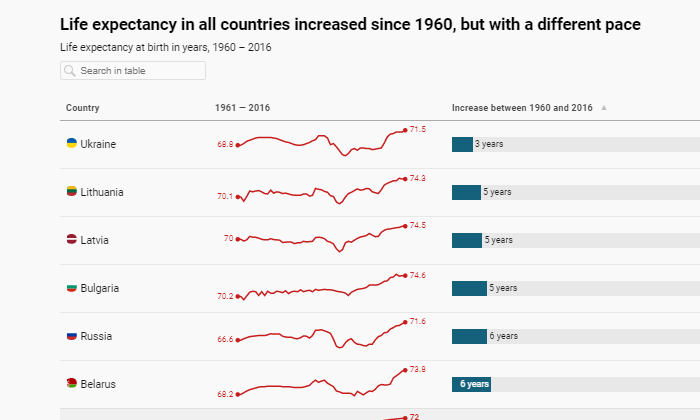
Datawrapper has a simple chart tool feel, yet it’s got the ability to deliver interactive and responsive charts, maps, and tables. 

It’s not designed for BI so much as mass producing next-level data visualizations to capture attention on feeds and pages.

Lots of companies, like The New York Times, for example make use of Datawrapper every day to improve their content. Using striking visuals, the Times can convey complex ideas to consumers about voting data, consumer preferences, and so on.

Datawrapper has a clean, intuitive interface that makes it easy to engage with the cloud-based product’s full range of functions, which include:

  • Copy data from Excel, Sheets, or the web into Datawrapper
  • Create live-updating charts by uploading CSV/XLS files or linking to a URL
  • Embed different types of interactive and responsive charts, maps, and tables
  • Export as PNG, PDF, or SVG
  • Colorblind check for all images
  • Live-updating graphics for maps
  • Collaborative tools and shared team folders
  • On-premise creation to comply with regulatory requirements

You have to purchase premium plans to create custom charts and white-label projects. Custom, the first tier above free, starts at $599/month and really allows companies to reach their audience with on-brand, original visuals.

Datawrapper’s free version is excellent for internal or team use, but less attractive for public-facing visualizations.

#5 – Highcharts — Best for Interactive Visualizations

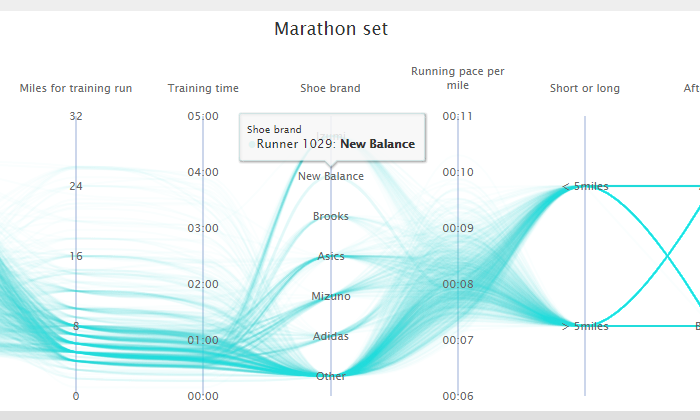
Highcharts is a wonderful tool aimed at helping developers add interactive charts to web and mobile projects. It’s a clean, SVG-based, multi-platform, JavaScript charting library.

Upload multiple types of data and use official wrappers to work in:

  • Microsoft .Net
  • Python
  • PHP
  • R
  • iOS & Android

This product requires some technical skills to use effectively, but the tradeoff is that it’s relatively inexpensive and works with any database or stack.

And the results are phenomenal. 

Highcharts is extensible, scalable, and meant to work anywhere on every device. Some of the key features include:

  • Multiple map types (heatmap, mapline, tilemap, etc)
  • Dedicated Highcharts Gannt product
  • Export JPG, PDF, PNG, or SVG
  • Add tooltip text information when users hover over labeled data points
  • Pure JavaScript requires no client-side plugins
  • Intuitive configuration and chart editing
  • Mobile and touch-optimized for truly interactive user experience
  • Download, inspect, and edit Highcharts source code.

For personal, non-commercial, or non-profit organizations, all of Highcharts’ products are available for free. This includes Highchart Stock, Gantt, Maps, Editor, and Mobile. 

They also have deals for startups and ways for other businesses to customize the various Highcharts products to their needs. Contact sales to start putting together a pricing plan.

Summary

Tableau is the best tool for enterprise because it gives teams an edge in every aspect of data visualization. 

It’s a considerable investment, though, and not every company is looking for a full-bore business intelligence solution.

If what you need is a data visualization tool to build and share memorable images, Infogram will help your teams take their game to the next level with zero graphic design or programming skills.

For companies that want to embed interactive visualizations in their online content, look no further than Datawrapper. Highcharts is another great option for embedding interactive content into your sites, though it’s not as easy for non-specialists as Datawrapper.

Coming back to Tableau for a second—yes, it’s heavy, but you can try the free version today without having to navigate a multi-step enterprise sign-up process. There aren’t any hoops to jump through, just the chance to take your data visualizations to the next level.

The post Best Data Visualization Tools appeared first on Neil Patel.
How to Engage Your Audience with Live Streaming

How to Engage Your Audience with Live Streaming

Are you missing out on a huge section of your target audience? If you’re not using live streaming to engage with your followers, then you might be.
The numbers behind live streaming are impressive, and if you’re not already, you should be incorporating this medium into your marketing strategy. Here’s how you can leverage live streaming to create crazy levels of engagement with your audience.

What Is Live Streaming?

Live streaming is a powerful way to connect with your target audience and personalize your message in a way that’s unique compared to other marketing mediums. It’s a simple process to send a live feed over the internet to your audience, but it can have big results.

By utilizing your social media reach, you can stream live footage to a huge audience and give your followers a unique glimpse into your company.

The growth of live streaming has been exponential, with the market increasing from $30 billion in 2016 to an expected value of $70 billion in 2021 and $184 billion by 2027. That’s a huge amount of growth, and it’s something that’s forcing marketers to sit up and take notice, with 28% starting to invest more in live streaming.

Why Your Company Should Be Using Live Streams

Live streaming is a great way to connect with your audience in a genuine, personalized way. It allows your audience to see the faces and voice behind the brand in an unfiltered medium that drives brand association and loyalty.

When it comes to the reasons your company should be using live streams, the numbers speak for themselves:

  • Live streaming topped 1.1 billion hours in 2019 (Livestream)
  • 80% of audiences prefer to watch live video than read a blog (Livestream)
  • Enjoyment of video increased brand association by 139% (Livestream)
  • Consumers are 39% more likely to share video content (99 Firms)
  • 82% of audiences prefer to watch a live video over standard social media posts (Hubspot)
  • Live broadcasts account for one in five Facebook videos (Facebook)

People use live streaming to create a deeper connection with your brand, and through your social media presence, it’s likely you already have a platform to leverage it.

Which Social Media Platforms Have Live Streaming?

One of the good things for businesses that aren’t already utilizing live streaming is that it doesn’t take a lot to get set up. For the most part, you can live stream from platforms you’re most likely already using, such as Facebook, Instagram, YouTube, Twitter, and many others.

Each platform offers slightly different features and the opportunity to reach a different audience. If you’ve already got a big presence on these platforms, then you will find you can immediately reach a large audience through live streaming, but even if you don’t, it’s a great way to build your presence.

Facebook Live Streaming

99Firms states that 52% of live streams happen on social media, and with 2.7 billion monthly active users, Facebook is the most popular. Facebook Live has been around since 2016, and in those years, has made a big impact on the platform.

Live videos get 10x more comments than regular videos and 3x longer watch time. This shows the power of live streaming on Facebook and is why 42.7% of businesses use live streaming on this platform.

Instagram Live Streaming

Instagram (1.15 billion active users) might not be as big as Facebook in terms of monthly users, but it does allow your business to reach a different demographic. Popular with people aged 18-34, Instagram Live allows you to make use of one of Instagram’s biggest benefits – being a very visual platform.

Although you’re limited to live streaming from a mobile device, this allows you to offer a very personal glimpse into your brand and tailor your content to your audience.

YouTube Live Streaming

In many ways, YouTube was the original video-based platform, and today it plays a big role in live streaming for marketers. With an active audience of 2 billion monthly users, it’s second only to Facebook as a social media platform and is widely considered to be the second biggest search engine in the world behind Google.

live streaming youtube

This offers huge potential for marketers, and as you might expect, live streaming performs particularly well on this platform. To put the numbers in perspective, Red Bull’s live stream, “Stratos Jump,” had 2.3 million concurrent views. When you realize that the average NBA game in the 2017-18 season attracted 1.93 million viewers, it’s easy to see the potential of live streaming.

On YouTube as with Facebook, your live videos are saved after you stream. Here’s an example of a live stream that was then automatically saved to this sport channel’s YouTube:

Periscope Live Streaming

Periscope is a live streaming app that allows users to broadcast live events to Twitter. We often think of Twitter as being a more text-based platform, but this certainly isn’t the case anymore, and video (live video in particular) creates a huge amount of engagement.

Video has seen huge growth on Twitter in recent months and attracts 10x more engagement than regular tweets, making it a great way to boost your Twitter profile.

Tips and Tools to Optimize Engagement with Your Live Streams

As with anything in marketing, there are lots of tools to help you optimize your live streaming. What’s important with these tools is not going crazy and signing up for lots of subscriptions, but doing your homework and finding the package that best suits your business.

To help you with this, here are some of my favorite live streaming tools.

Restream.io

If you were reading along thinking, “it’s great there are so many platforms to live stream on, but what if I want to use them all simultaneously?” then restream.io is your answer.

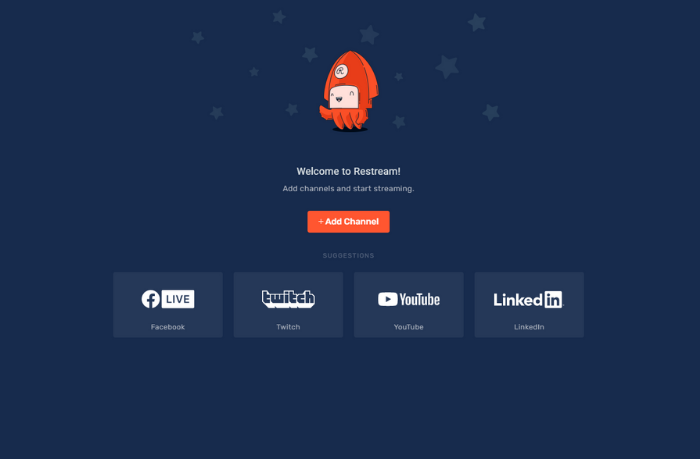
livestreamingRestream

When it comes to live streaming, Restream does pretty much everything. It allows you to stream to over 30 social media platforms at the same time, schedule your live streams and pre-recorded videos, engage your viewers through chat, and bring all your analytics together in one place.

With a free forever starter plan and packages ranging up to a professional plan for a very reasonable $41/month, Restream gives your live streaming the ability to take off and engage a huge audience.

One of the best things about Restream is just how easy it is to get set up and start streaming.

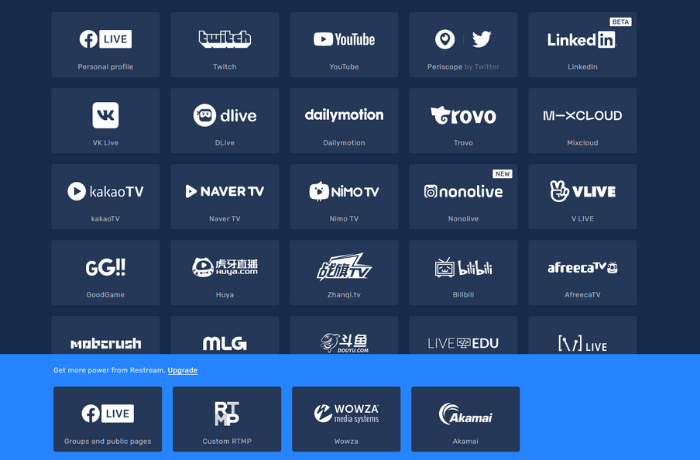
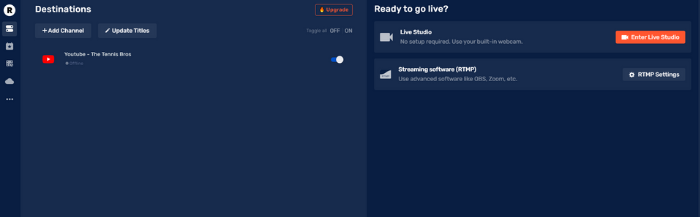
Once you’ve made an account, you will arrive at your dashboard, where you will be prompted to add your channels. From here, you will be able to choose from a list of different platforms and connect your accounts in just a few clicks.

live streaming Restream apps

When you’ve synced all your accounts, then you’ll see the option to go live in your dashboard. You can easily connect all your accounts and broadcast live to your followers in just a handful of minutes.

live streaming go live

Another great tool that Restream offers is the ability to schedule an event so you can let your followers know you’re going live. This gives you a chance to make sure your followers are online when you go live so they don’t miss out.

However, it’s not just live video where Restream can help. It’s also useful for scheduling pre-recorded videos. This allows you to plan your posts, rather than logging in each day.

Undoubtedly, one of the biggest benefits is having all your analytics in one place. You don’t have to flick between Facebook, YouTube, and Twitter to understand how your streams are performing because Restream gives you all the in-depth insights you need.

Social Media Scheduling Tools for Promotion 

To get the most out of your live streams, you want to reach as big an audience as possible. To do this, you’ve got to build your following and make sure you promote your live videos.

You also need to be consistent with your social media. Social media marketing depends on producing consistently engaging content, and the easiest way to do this is by utilizing scheduling tools. You’ve still got to come up with great content, but at least with these tools, you can schedule your posts without having to log in to each social media platform.

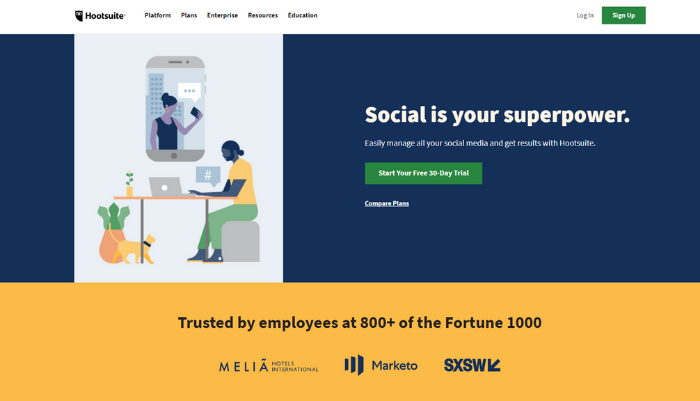
While Restream has you covered for videos, tools such as Hootsuite, SocialPilot, and Buffer can help make sure you’re staying consistent with your other social media posts. A lot like Restream, all you have to do is sync your accounts and then you can immediately post to each platform and schedule all your content.

live streaming tools hootsuite

This can help you create a large, engaged audience who are eager to interact with you, which is perfect for your live streams.

Image Creation Tools

Images are going to play a big part in how you promote your live streams, and you’ll see in Restream you have the option to add a thumbnail to the reminders you send out.

It’s important to remember the images you use have to reflect the quality of your live streams. There’s no point putting all this effort into creating a great live stream if you’re going to use low-quality posts to promote it. You’ve got to look at it as a package and invest in your marketing as well as the execution of your live stream.

Posts with relevant visual content get 94% more views than content strategies without it, and this is where your custom images come in.

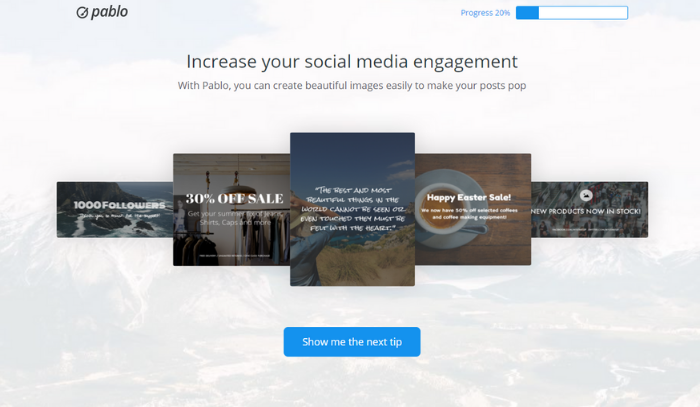
Tools such as Pablo and Canva allow you to create amazing visuals and edit them so they are perfectly optimized for your audience. Add text, filters, and other design elements that grab your target audience’s attention and make them aware of your future live streams.

live streaming tools pablo

Both of these tools offer free accounts that allow you to make awesome custom images to promote your live streams.

Video Editing Tools

Although the whole point of a live stream is that it’s live, you still want to save it for future use. Once you’ve saved a live stream, it can be used like any other video and incorporated into your marketing strategy.

You might find that once you’ve saved your video, there are some small edits you wish to make. You’re no longer live, so you’re in complete control of how you present your video, and with video editing tools such as Lumen5 and WeVideo, you can add helpful extras such as graphics to make points clearer, and format your video to suit your needs.

live streaming tools lumen5

This allows you to repurpose your live streams and make sure you’re getting added value from them.

Equipment You’ll Need for Great Live Streaming

You don’t need fancy equipment to create a great live stream. If you’re streaming to channels like Facebook and YouTube, then all you need is a phone to create engaging content.

If you are planning on producing something on a bigger scale though, you will need to look at getting the right equipment. Important things to consider are the quality of your laptop, lighting, camera, and microphones.

Audio is a key component of any live stream, so you want to make sure you’ve got microphones that can offer clear, crisp sound. Microphones like the Shure MV88+ Video Microphone Kit that work with your smartphone are easy to use and can add the extra level of professionalism that can help your live streams stand out.

How to Make Engaging Content for Your Live Stream Videos

As with any marketing strategy, your success is going to be dependent on the quality of your content.

To drive engagement, you first have to understand your audience, the questions they have, and the pain points they might be facing. Once you have a good understanding of your target audience, then you can create a rough plan for what you want to achieve with your live stream.

Remember these important points:

  • Live streaming is an inclusive medium: Engage with your audience before you go live and ask them what they would like to see you address. This can guide the theme of your stream, and help make sure you’re answering people’s questions.
  • You should have a rough plan: You need to be prepared enough so that you feel comfortable; however, this is an opportunity to improvise and show your character. People like live video because it’s not staged, and it hasn’t been perfectly optimized and edited. It’s a raw look at you, your brand, and your company, so you need to be flexible.
  • Be responsive to your audience: This is an opportunity for your followers to feel truly connected to your brand, and one of the ways you can achieve this is by allowing them to drive the discussion. Be responsive to comments and feedback, and allow them to guide you.
  • Remember your goals: The goal of live streaming generally isn’t to push your product; it’s about building valuable relationships. Always be aware of the value you offer the viewer and look to maximize this wherever possible.

Conclusion 

Live streams are growing in popularity, and it’s not by chance; this is a technology with an amazing ability to engage targeted audiences and boost your marketing. Businesses around the world are eager to make the most of it.

Thanks to tools like Restream, getting started with live streaming couldn’t be easier, and you’ve got lots of ways to engage a large audience. It’s important to remember it’s not just the live stream itself that matters though. To make the most of this tool, you’ve got to be focused on growing your following, and this requires good social media marketing.

Live streaming is a powerful tool to work into your social media marketing plan, and it can help expand your brand’s profile, so it’s time to embrace it.

Does live streaming play a big part in your brand’s marketing strategy?

The post How to Engage Your Audience with Live Streaming appeared first on Neil Patel.