Tuesday, February 11, 2020

How I Drove 231,608 Visitors to My Site Using This New Channel

Just like any marketer, we all fear what we can’t control.

And sadly, for years, a lot of our future is being determined by algorithms.

From social sites to search engines… they all have algorithms. Heck, you even have to deal with them with things like email.

When you send marketing emails, you can bet that there is a good chance that they will end up in the “Promotions tab.”

Now sometimes these algorithms do adjust in your favor, but we all know that’s rare in the long run.

But what if there was a way you could drive consistent traffic, not have to deal with algorithms, and not have to spend money on ads?

There actually is. And I bet you’ve never used it before.

Here’s the best part, it’s generated me more than 231,608 visitors and it automated and free. 🙂

How so?

Alright, check this out.

Every time I publish a blog post or anytime I want to drive traffic to any page on my site, all I have to do is click a few buttons and instantly I am able to get more traffic.
So how do I do this?

It’s with a free tool I built called Subscribers.

It leverages something that you are familiar with but probably don’t know what it is.

It’s called push notifications.

What’s a push notification?

Does this look familiar to you?
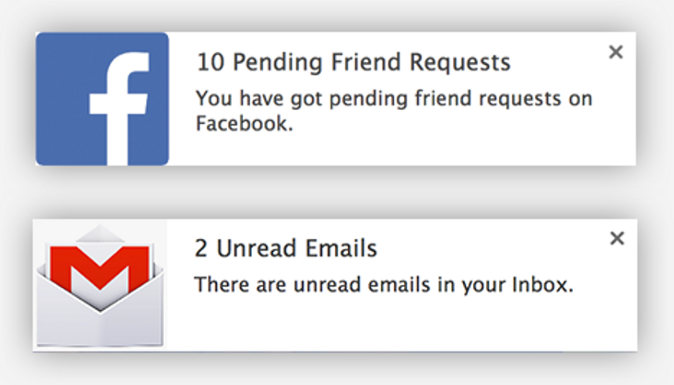
You can receive messages through your browsers. This is called a push notification.

What’s cool about push notifications is that anytime someone visits your website you can ask them to subscribe to your site.
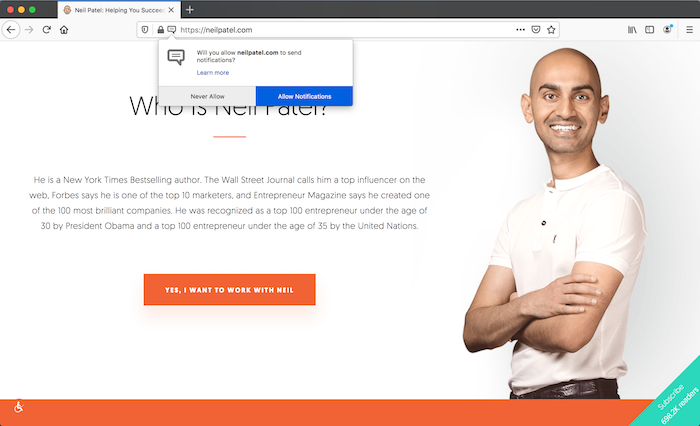
And at any time, you can send them a message promoting your website.
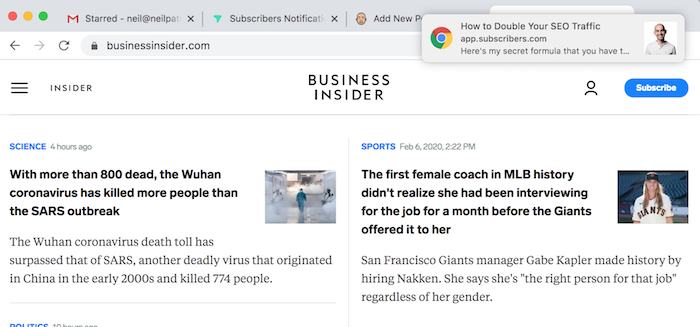
Each time someone clicks on it, you get traffic to your site.

But here is the best part: not only do you not have to deal with any algorithms, but you also don’t have to worry about people missing your push notification either.

See, unlike email, if you send someone a push notification while they are on vacation or sleeping, the next time they log onto their computer and pull up their web browser (Chrome, Safari, Firefox), they’ll see the push notification.

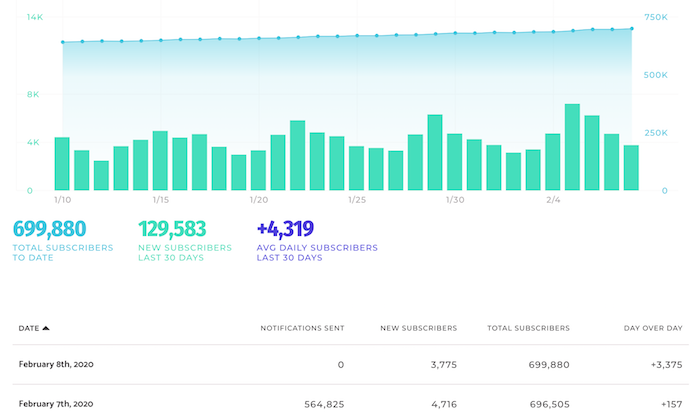
Here are my stats from some of my most recent push notifications:
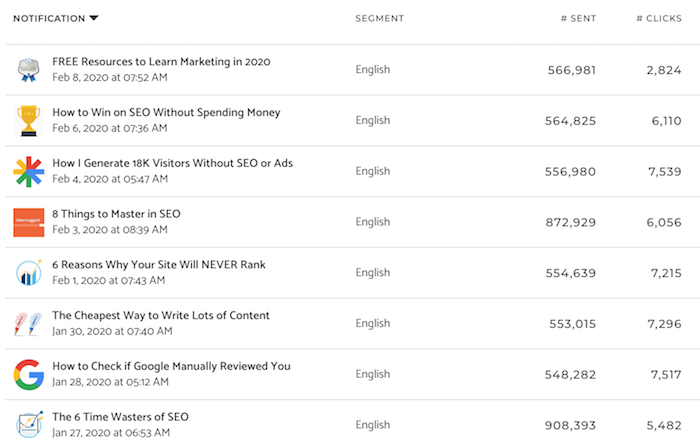
How to grow your traffic through push notifications

Head over to Subscribers and sign up for a free account.

Once you add your site and sign up, you’ll need to either add a piece of javascript to your site or you’ll have to install a plugin.

Whether you are on Shopify or WordPress, Subscribers has a good amount of options for you.

Once you are up and running, you’ll want to head to the “prompt settings” navigation option in the sidebar of Subscribers.
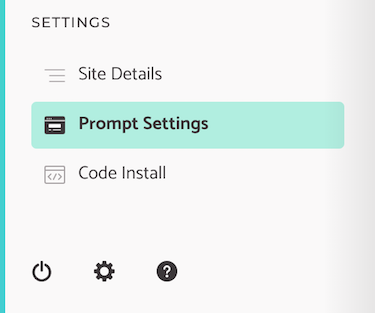
This is where you control what people see when they come to your website so they can subscribe.

You’ll want to make sure you have turned on “prompt enabled.” Then select “use custom popup prompt by default” as this will allow you to select what message you show your users.

Here’s what my page looks like.
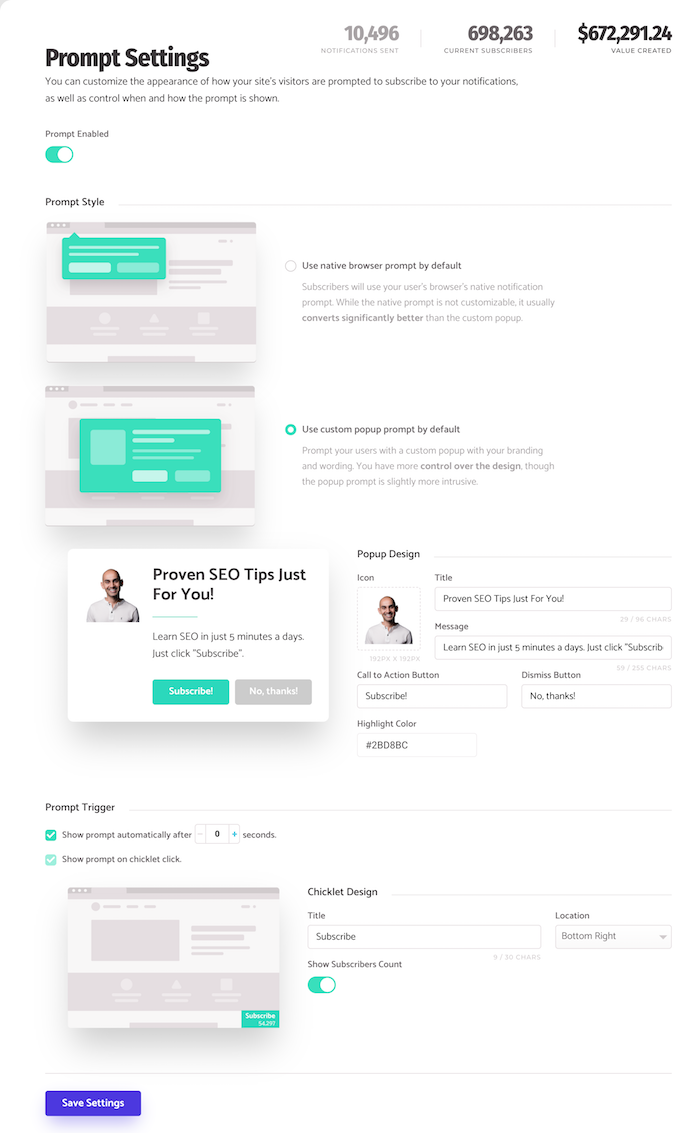
In my prompt settings, you’ll notice I did a few things:

  1. I uploaded my own image. My site is NeilPatel.com so it makes sense for me to use my own image. For you, it could be your face or your company logo.
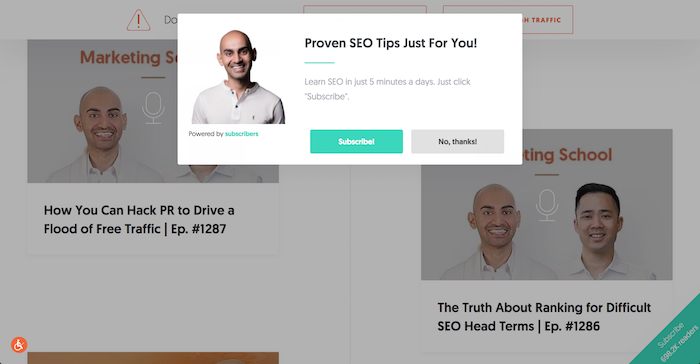
  2. For the title and description, you’ll want to clearly state the benefit. I let you know that I am going to send you proven SEO tips and how easy it will be.
  3. You can then test the “subscribe” and “no thanks” button text. I’ve found that text to work well on my site.
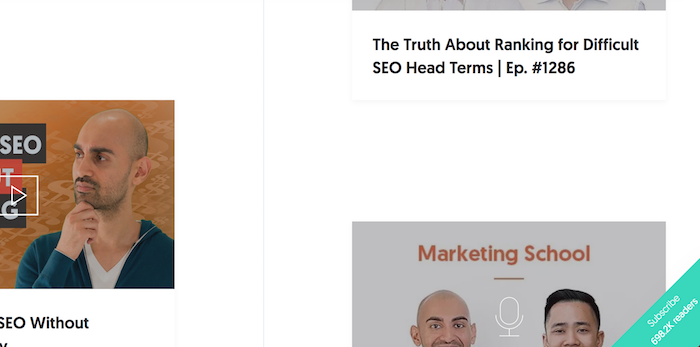
  4. As for timing, I like showing the prompt right away as well as showcasing my “subscriber count.” I’ve found that the bottom-right corner converts well for me.

Once everything is set up the way you want, just click “save settings” and you’ll see your prompt on your site.

Here’s what it looks like on the NeilPatel.com site.
When someone clicks on “subscribe” they will see a prompt box that looks something like this…
And then when they click to subscribe in the prompt box their browser will ask them if they want to subscribe to your site.

It’s so effective I have over 600,000 subscribers. It’s a lot!

It may take time for your subscriber numbers to build up, but the longer you do it the easier it is. Keep in mind I’ve been doing this for a few years now, that’s how I have been able to build up such a large following.

So, once you have subscribers, what’s next?

How to generate traffic through subscribers

What I like doing is promoting my blog posts through Subscribers.

Just click on the “New Notifications” navigation link.
You’ll now be able to send a message to all of your subscribers. More importantly, you’ll be able to promote a URL or a service or product you are selling.
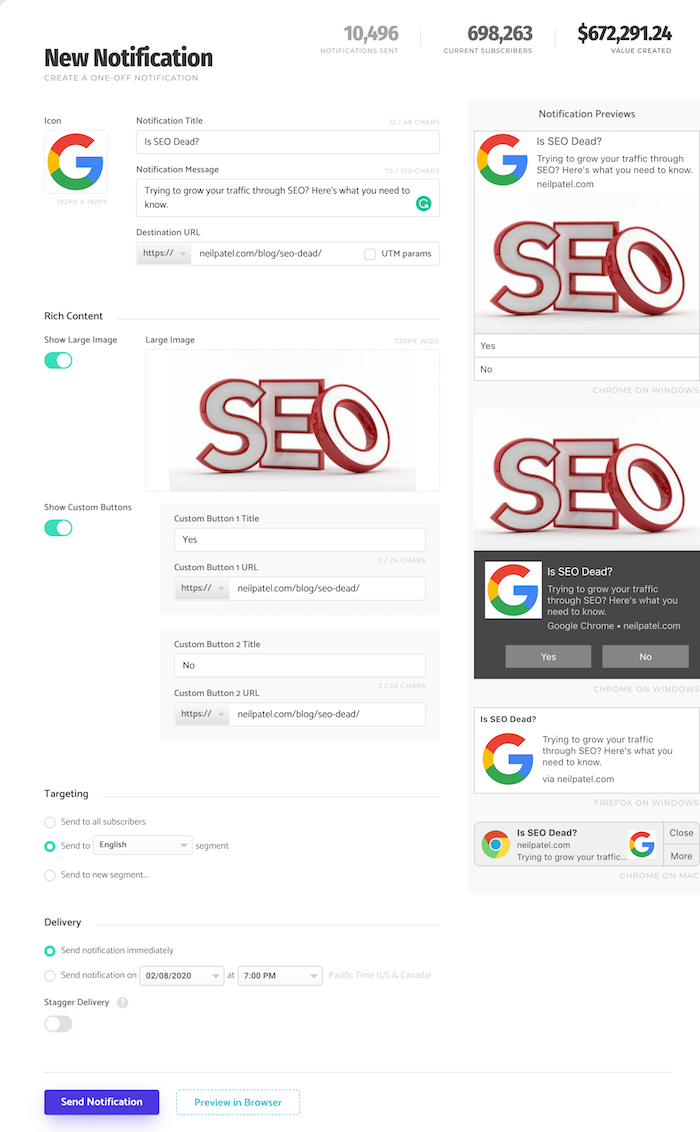
There are a few key things you’ll want to do on this page if you want the maximum amount of traffic.

  1. Evoke curiosity – with your headline and description try to pique peoples’ curiosity. This is a simple way to get a ton of clicks. Just like how I asked, “Is SEO Dead?”
  2. Show a large image – when you use a large image, you’ll find that you will get more clicks. Large images don’t show up on all push notifications, it only shows up for users who are on a PC. If you don’t know where to find images, you can use this free stock photography site.
  3. Show custom buttons – this feature also only shows up on PCs and not Macs. But it is still worth using. I’ve found that if I can ask a “yes or no” type of question with my headline, such as “Is SEO Dead?” then when I use “yes” and “no” as the two options in the custom buttons, I get a ton of clicks.

If you follow those 3 tips, you’ll find that you’ll be able to maximize how much traffic you get from push notifications.

Just look at the push I did on the post about SEO being dead… it drove 16,263 visitors to my blog. That’s a lot of traffic for one push notification.

Don’t forget to set up a Welcome Campaign

Now the best way to generate traffic from Subscribers isn’t to manually send out notifications.

Yes, manual notifications generate traffic but there is a better way.

Through a Welcome Campaign, you can generate even more traffic.

Think of a “welcome campaign” as a drip sequence like you would have in email. But this is through push notifications.

So, in the navigation click on “Welcome Campaign.”
From there, you’ll want to click on “create a new campaign.” From there you will see a page that looks like this:

Similar to sending a normal push notification, you’ll want to use a larger image and use custom buttons as this increases how many clicks you’ll get to your site.

The other thing you’ll want to do is be careful and not spam. Don’t send them a message every 30 minutes or anything annoying like that. I spread out my messages in my drip by at least a few days.

The first notification goes out instantly, but the rest are spread out.

Once you set up your welcome campaign, just hit save and you’ll be good to go.

As new people subscribe to your site, they will automatically receive notifications which will increase your traffic.

Just like at my welcome campaign stats, it drives more traffic than manual pushes.
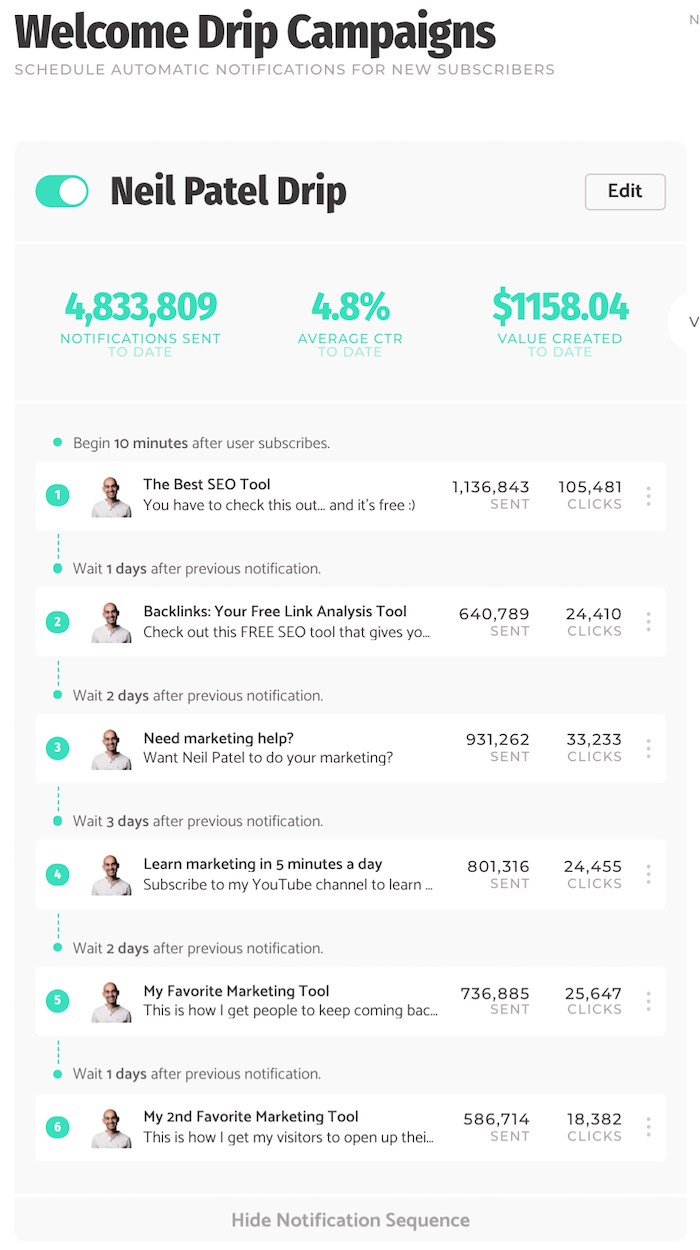
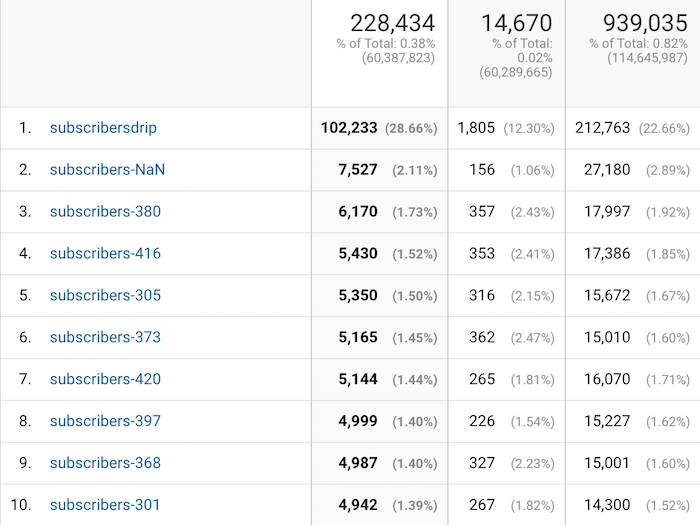
231,608!

That’s how much traffic I’ve gotten just from my welcome campaign and that number continually climbs each day.

Conclusion

Although most of the popular platforms have algorithms that are hard to crack, it doesn’t mean that all hope is lost.

There are still other ways to get consistent traffic to your site.

What’s beautiful about Subscribers is that it drives traffic without you having to deal with algorithms or filters. But it does take time to see results, just like email marketing, the longer you use it the more traffic you’ll see.

So, have you tried push notifications or Subscribers before?

The post How I Drove 231,608 Visitors to My Site Using This New Channel appeared first on Neil Patel.

Tuesday, February 4, 2020

How I Generated 18,800 Visitors from Google Without SEO or Ads

If you want to get traffic from Google, how would you go about it?

Chances are you are either going to leverage SEO or pay for some ads.

But what if there was another way to get traffic from Google? A way that didn’t take as long as SEO and didn’t cost money like paid ads. And no, I’m not talking about Google News… there is actually an easier way.

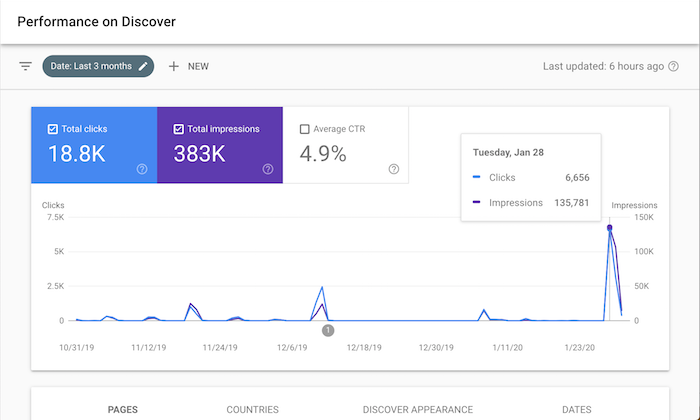
It’s so effective that it drove 18,800 visitors to my site in the last 3 months. Just look at the screenshot above.

So, what is it?

Google Discover

Similar to how you have feeds on Facebook, Instagram, and Twitter, did you know Google has a feed for you.

It’s called Google Discover.

If you mainly use Google on your laptop or desktop computer, chances are you haven’t seen it. But if you have the Google mobile app or the Chrome mobile app, you probably have already seen it.

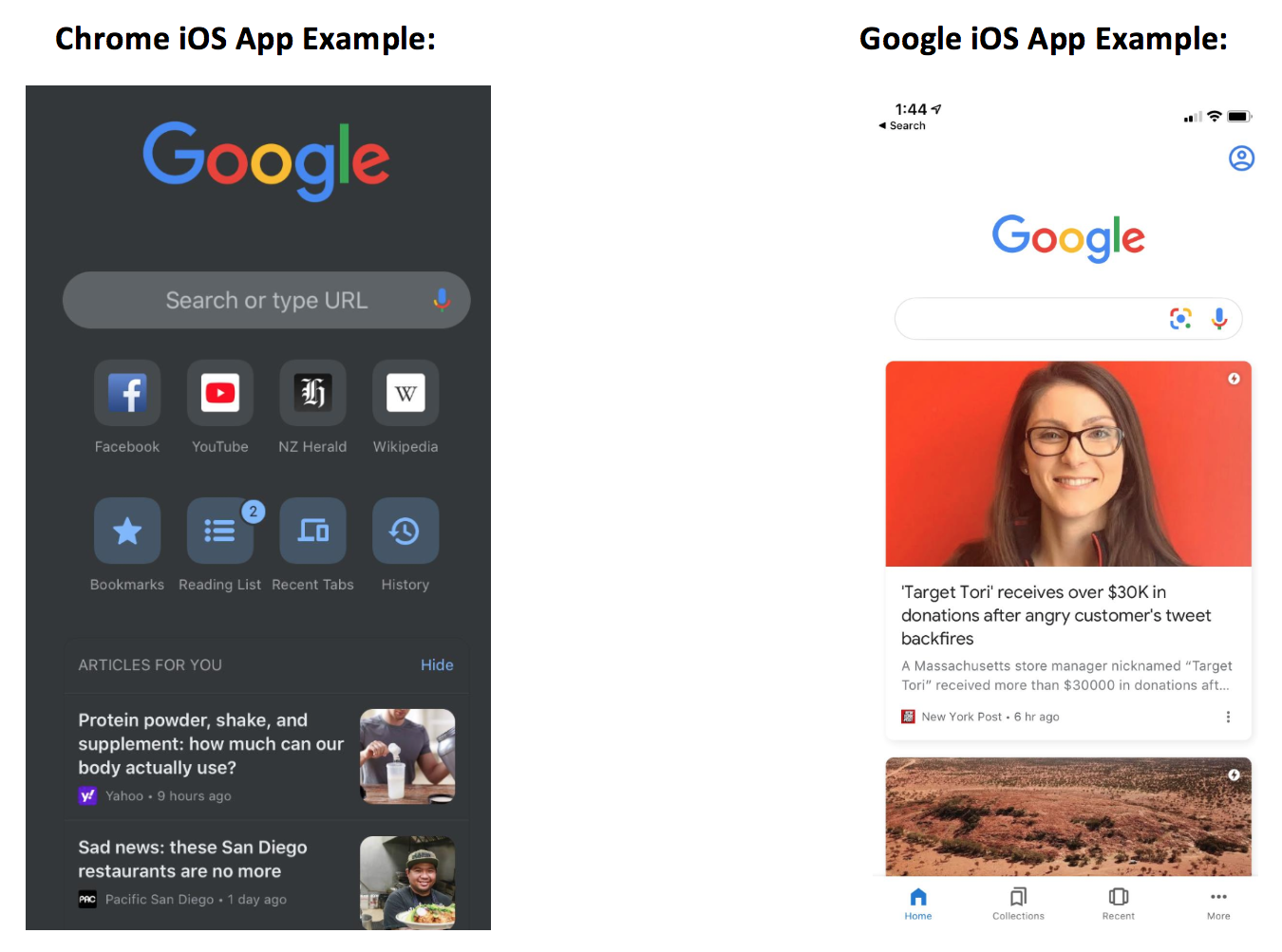
Here’s what it looks like on an iPhone:

This is Google’s version of a social feed.

Here’s how it works… Google Discover results, which appear below the search box on the Google mobile app and Chrome mobile app, show a summary of web pages as cards. These cards are a scrollable list of topics, almost like a social feed, that you can browse on your mobile devices.

Tapping one of these cards from Google search home will send you directly to the page you just clicked on.

And if you are wondering why you are seeing certain stories that others may not be, it’s because the recommendations are based on search history, interactions with Google products, and who you choose to follow directly via Google Discover.

But here is where it’s getting interesting…

Google Discover is everywhere, you just don’t know it

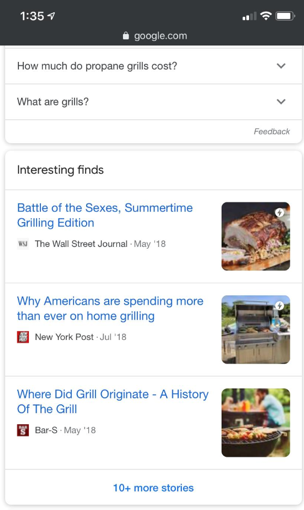
Discover results for some topics also appear within the search engine results under the label “Interesting finds.”

If you click one of these stories, it’ll take you directly to that web page, or, if you click to see “more stories” at the bottom of the Interesting Finds card, it’ll bring you to a new Google Discover user interface where you can follow that topic, follow related topics, and explore related Discover listings.

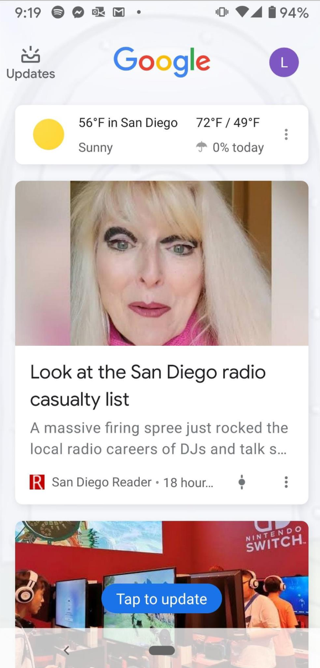
Now if you have a Pixel phone, you’ve seen Discover a lot, but again you just haven’t realized it.

By simply swiping right on your Pixel phone home screen you get a customizable and personalized feed just like the image above.

Now, you may be wondering, how is this different than just using Google News? Because they have a top stories section which is kind of like a feed, right?

Unlike top stories, Discover doesn’t limit rankings to what’s published most recently.

If Google thinks a user would find earlier content interesting, then Discover might show it. Discover also features videos, sports scores, entertainment updates such a movie, stock prices, event info for things like a music festival, and much more.

Google is positioning Discover as a content hub for all of your interests just like Facebook is doing with their feed.

In other words, this is Google’s version of your Facebook feed.

Similar to following a hashtag on Instagram, you can follow a topic of interest on Discover. Also, similar to Instagram’s Explore Page, you don’t need to follow anything to get content you might like. Discover is aiming to show you content you’d be interested in before you even know you want it.

The key is “before you knew about it.” Just like how Facebook and Instagram do the same thing.

So, why should you care about Google Discover?

Because it can drive you a ton of traffic.

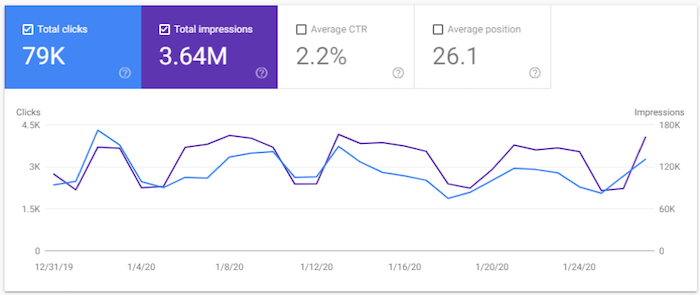
Just check out one of the clients of my ad agency, Neil Patel Digital. Look at their Discover traffic.

They generated 3.64 million impressions in the last 28 days and 79,000 clicks to their site.

That’s a ton of traffic. In addition, all of those impressions help with branding.

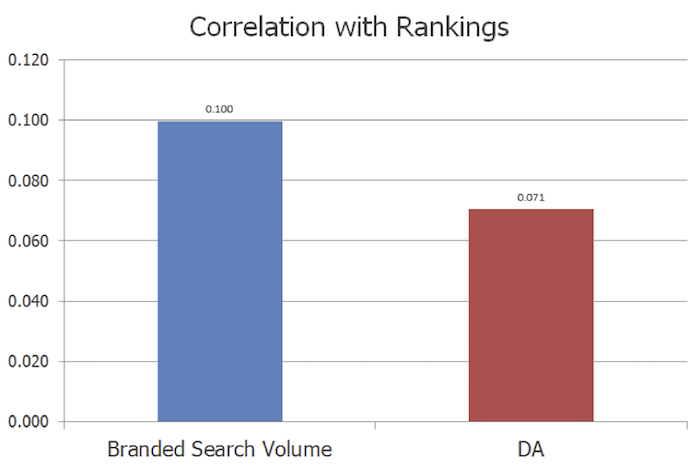
Now you may not care about branding but the larger your brand, the easier it is to rank on Google. Brand search volume is more correlated with rankings than links or domain authority.

And as Google’s ex-CEO stated:

Brands are the solution, not the problem. Brands are how you sort out the cesspool.

So, all of those impressions you can generate from Discover are great because they will help put your brand out there. It helps with the concept called the Rule of 7, in which when someone sees or interacts with your brand 7 times, they are much more likely to become a loyal customer.

This can also help with Google’s E-A-T algorithm updates. It is the best way if you want to build up your expertise and credibility as an author. Discover is a simple way to help you get there.

So, how can you get more traffic from Discover?

How to optimize for Google Discover

Luckily, it’s not as complicated as SEO and the results happen much faster. Still not instant, but over time you should see your Discover traffic continually rising.

Here are 3 simple tips that will help:

  1. Be sure to use high-quality images. Images appear with every Discover result, so relevant and high-quality images that accompany your content is important. And just like with your headlines and titles, try to choose images that are more likely to entice clicks. Images that are shocking or evoke curiosity will do the trick.
  2. Content is king, but if you don’t write about the right stuff then you won’t show up. Check which topics Google suggests following inside of Discover to see if those topics align with your website. If it does, consider using their suggested topics as a guide to what people are interested in and write similar content. Of course, you don’t want to copy others, you want to go above and beyond so you can one-up your competition. Use Brian Dean’s skyscraper technique to do this.
  3. Hopefully, when you’re creating your website content, you’re already taking some time to think about maximizing your content. What do I mean by that? Maximizing your content means thinking about your website as an API for your content. So yes, your content lives on your site, but hopefully, you’re creating it keeping in mind how it can be posted or promoted in other areas so you can secure backlinks and attract social engagement across other relevant channels. To do this you need to focus on topics with shareability, topics that are trending, topics with growing interest, and also focus on leveraging clickbait and enticing titles and headlines. Remember that Google Discover is like a social feed. If you’re only trying to make your content work hard for you on your site, you’re not getting enough out of it.

Once you make a deliberate effort to go after Discover traffic, it’s time to measure how you are doing.

Analyzing your traffic

Chances are, you use Google Analytics. But to see how well you are doing on Discover, it’s easier if you use Google Search Console.

Head over to Search Console and log in.

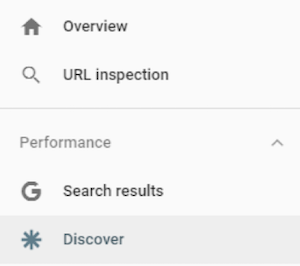
Now, on the left side, you’ll see a navigation menu.

I want you to click on “Discover.”

You’ll now see a report that looks something like this.

Compared to the screenshot I showcased earlier, I barely get any Discover traffic.

Why you may ask?

Do you notice a trend with my chart? Well, I tend to publish content every Tuesday and that’s the day I get Discover traffic.

Similar to any other social network (and unlike traditional SEO), you mainly see traffic as you post new content. It’s not long-term traffic that is consistent, instead, you keep getting quick bursts of traffic.

I only blog once a week, but if I write multiple pieces of content a day, my Discover traffic would skyrocket.

Conclusion

Whether you are a fan of Discover or not, it doesn’t matter. As a marketer, you need to look at it as another channel.

Data has already shown that it is popular and as long as Google keeps pushing it, people will use it.

So why not leverage it to your advantage and harness it to drive traffic and sales for your site?

Plus, you should never rely on traffic from just one channel alone because the moment an algorithm change happens, it can crush your traffic. That’s why you need to take an omnichannel approach and leverage any relevant channel out there.

So, what do you think of Discover? Do you use it on your phone? Have you thought about leveraging it for traffic to your site?

The post How I Generated 18,800 Visitors from Google Without SEO or Ads appeared first on Neil Patel.
Tuesday, January 28, 2020

How to Check if Google Manually Reviewed Your Site

Do you know how Google decides what website should be ranked number 1, 2, 3 and so on for any given keyword?

Well, they have an algorithm for that.

But as you know, algorithms aren’t perfect. That’s why Google continually tries to improve it.

One way that they try to improve their algorithm is through Search Quality Raters.

What’s a Search Quality Rater?

Google knows that they can always make their search results better. And one way is to have humans review their listings for any given keyword.

So, all around the world, Google has people who manually review websites. And they review each website based on these guidelines.

It’s kind of long and extensive, but it is important that the Quality Raters don’t directly impact rankings.

Instead, they give feedback to the engineers who code up the algorithm so they can make it more relevant to searchers.

Now, the real question is, how do you know your site is being reviewed?

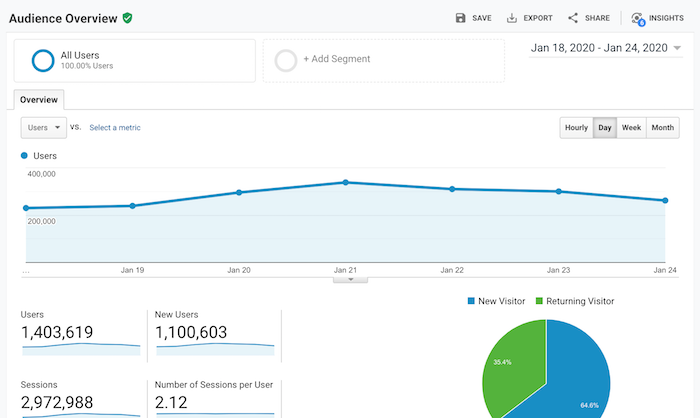
First, I want you to log into your Google Analytics account and go to the audience overview report.

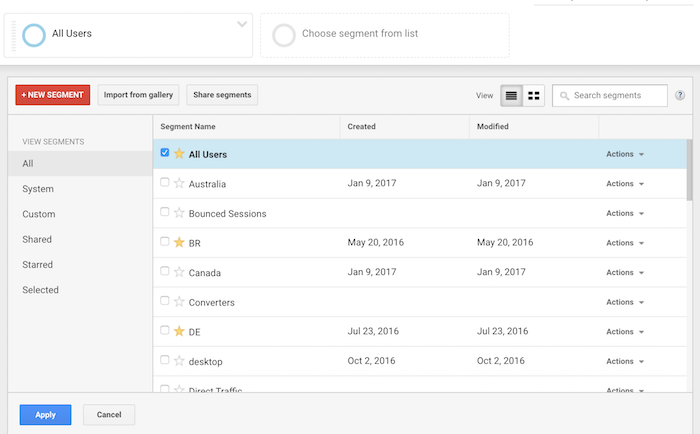
Then click on “Add Segment.”

Your screen should look something like this:

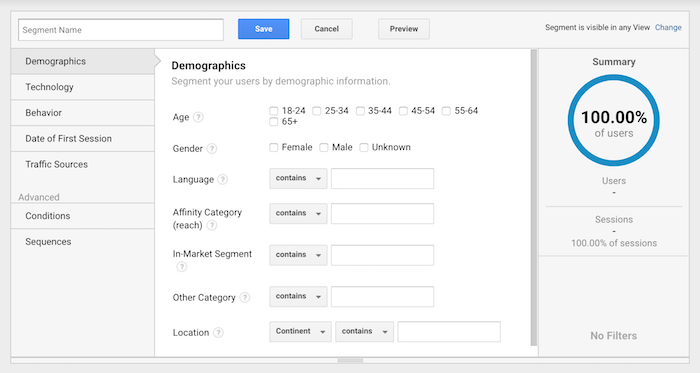
Then click on “+ New Segment.”

Your screen should look like the image above.

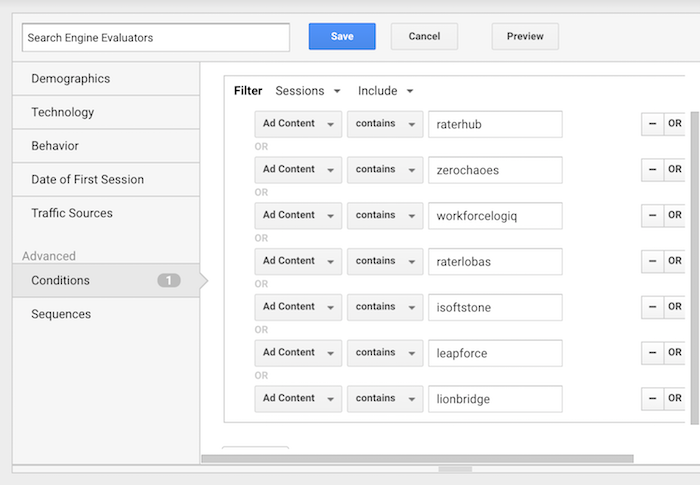
I want you to click “Conditions,” which is under the “Advanced” navigation label. Once you do that, fill out everything to match the screenshot below and click “save”.

Just make sure that when you are filling out the table you are clicking the “or” button and not the “and” button.

Now that you’ve created the new segment, it’s time to see if any Quality Raters have viewed your site.

How to spot Quality Raters

When you are in Google Analytics, you’ll want to make sure you select the segment you just created.

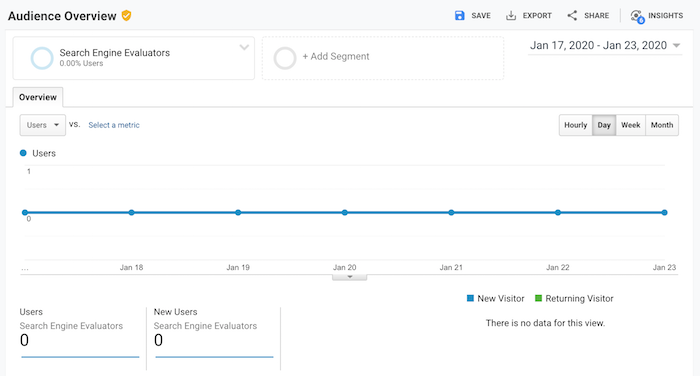
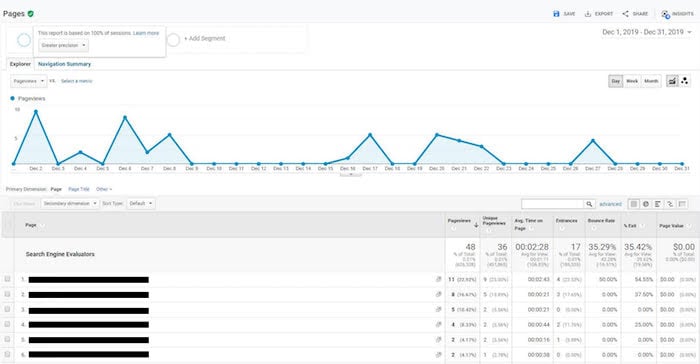
If you copied my screenshot, you would have labeled it “Search Engine Evaluators.” And when you select it, you’ll probably see a graph that looks something like the image below.

You’ll notice that no Quality Raters have been to my site during the selected date period, which is common as they don’t visit your site daily and, in many cases, they don’t come often at all.

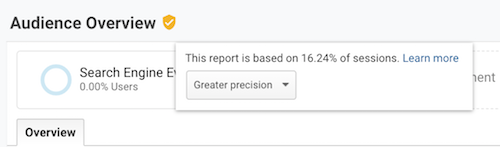
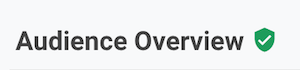
The other thing you’ll notice is that next to the “Audience Overview” heading, there is a yellow shield symbol. If your symbol is green, then that’s good.

Yellow means your data is being sampled.

If you see the yellow symbol, reduce your date range and you’ll eventually see a green shield next to “Audience Overview” like the image below.

In general, it is rare that Quality Raters view your site each month. But as you expand your time window, you’ll be able to spot them.

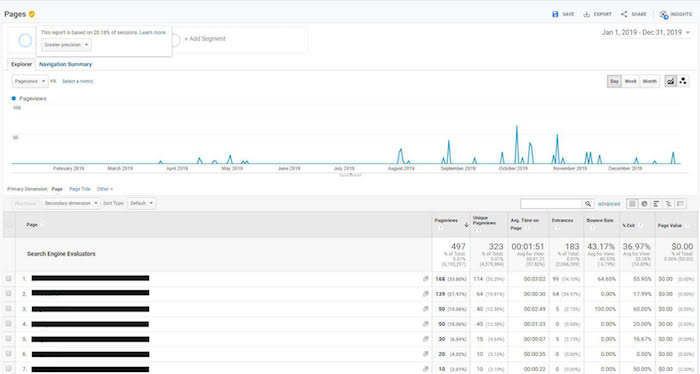
And once you spot them, you can shorten the date range so the data isn’t sampled and then drill down to what they were looking at on your website.

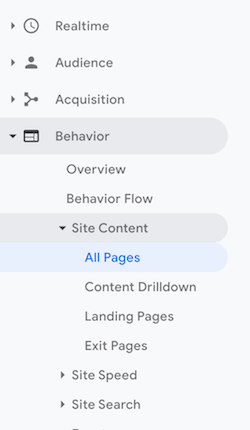
The key to analyzing what Quality Raters are doing on your site is to look at the “Site Content” report in Google Analytics and that will help you produce results that look like the screenshot above.

To get to that report, click on “Behavior,” then “Site Content,” and then “All Pages.”

What do I do with this information?

The goal of a Quality Rater is to help improve Google’s algorithm. And whether they have visited your site or not, your goal should be to make your site the best site in the industry.

You can do so by doing the following 3 things:

  1. Follow the quality guidelines that Google has released. It’s 168 pages long but, by skimming it, you can get a good understanding of what they are looking for.
  2. Always put the user first. Yes, you want higher rankings, but don’t focus on Google, focus on the user. In the long run, this should help you rank higher as Google’s goal is to make their algorithm optimized for user preferences over things like on-page SEO or link building.
  3. Check out Google’s advice for beating algorithm changes. In that article, you’ll find a breakdown of what Google is really looking for.

Conclusion

If you have Quality Raters browsing your site from time to time, don’t freak out. It doesn’t mean your rankings are going to go down or up.

And if you can’t find any Quality Raters visiting your site, don’t freak out either. Because that doesn’t mean that you won’t ever rank well in Google.

As your site gets more popular, you’ll notice a higher chance of Quality Raters visiting your site over time. This just means that you need to focus more on delighting your website visitors. Create the best experience for them and you’ll win in the long run.

So, have you spotted any Quality Raters in your Google Analytics?

PS: Special shoutout to Matthew Woodward who originally brought the Google Quality Raters segmentation to light.

The post How to Check if Google Manually Reviewed Your Site appeared first on Neil Patel.
Tuesday, January 21, 2020

Is SEO Dead? (A Data-Driven Answer)

seo dead

SEO has been changing drastically over the years.

In 2010, Google made 516 algorithm changes. That number increased to 1,653 in 2016 and to 3,234 in 2018. We don’t have data for the last couple of years, but still, you can bet that the number is continually going up.

With over 9 algorithm changes a day, it’s safe to say that is no longer easy to manipulate or game Google.

So, is SEO dead?

Well, let’s look at the data and from there I’ll show you what you should do.

Is SEO dead?

Do you know how many searches take place on Google each day?

Roughly 5.6 billion searches per day.

That’s roughly 2 trillion searches each year.

Although that’s a lot of searches, there is also a lot of content being created.

There are roughly a billion blogs on the web.

There are so many blogs that you can find an excessive amount of content on most topics out there.

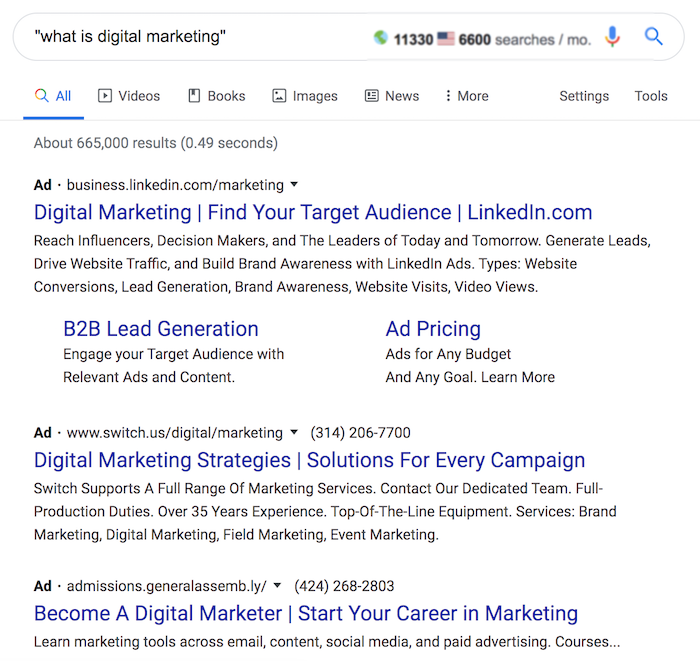
For example, if you look at the long-tail phrase, “what is digital marketing”, there are only 11,300 global searches a month but a whopping 665,000 pieces of content trying to answer that question.

In other words, the supply is much greater than the demand.

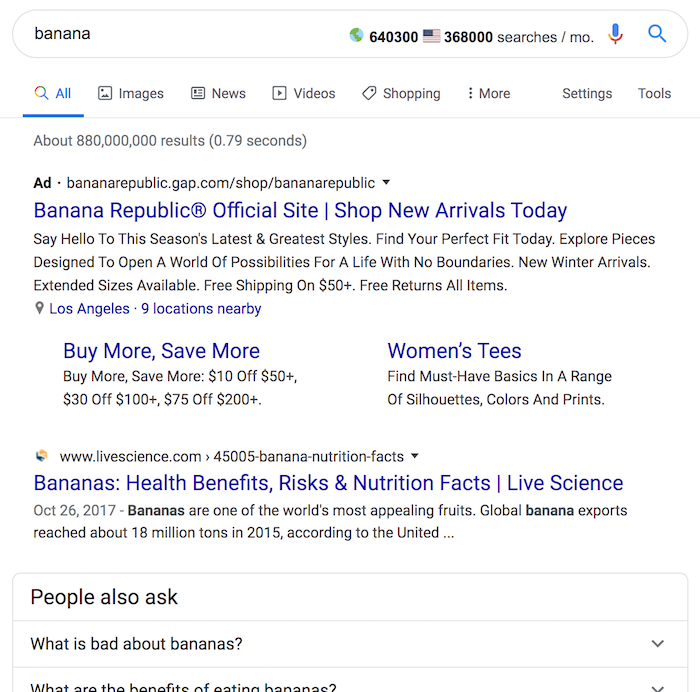
You’ll see even more of this for head terms. Just look at the phrase “banana”:

640,300 global searches seem like a high number but there are 880,000,000 million results. Sure, some of those results may not be on the food, banana, but still, that’s a lot of content compared to the search volume.

You can still find search phrases where there is more search volume than content but the trend is continually increasing in which content production is exceeding search demand.

On top of that, Google is turning into an answer engine in which they are answering people’s questions without them having to go to a website.

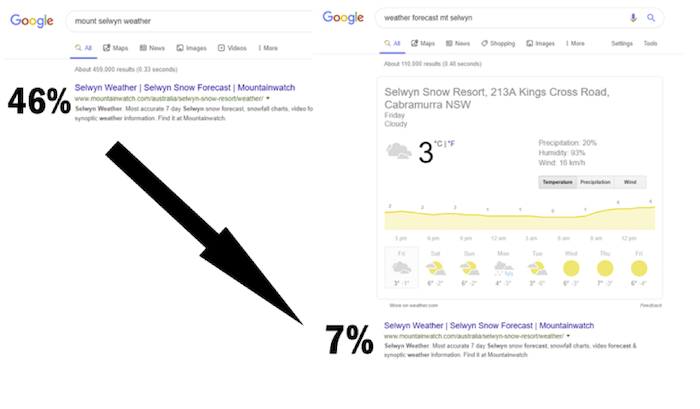
According to Dejan SEO, they saw CTRs drastically decrease once Google started answering questions. Just look at this weather search query:

Their clicks from weather-related queries went from 46% all the way down to 7%.

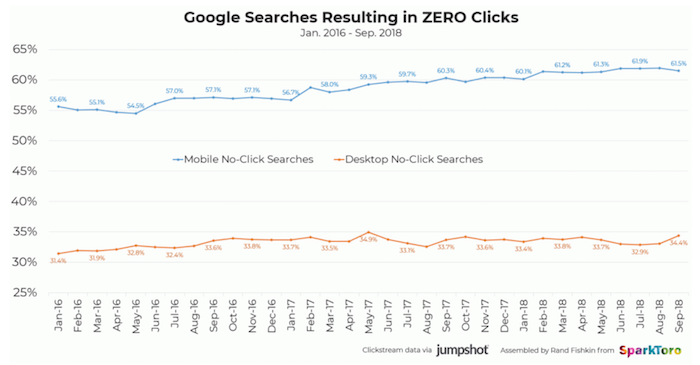
This trend has become so common that the percentage of traffic that Google drives to organic listings (SEO results) has been decreasing over time.

So, does this mean SEO is dead?

It’s actually the opposite.

SEO is not dead

With all of the data, how can that be the case?

First off, all marketing channels become statured over time. It’s just a question of when.

You can say the same thing about Facebook, Instagram, Twitter, and even email marketing.

Heck, just look at the image below. It was the first banner ad on the Internet.

Can you guess what company created that banner ad? It was ATT.

Of the people who saw it, 44% of them clicked on it. Now banner ads generate an average click-through rate of 0.5%.

That’s an enormous drop.

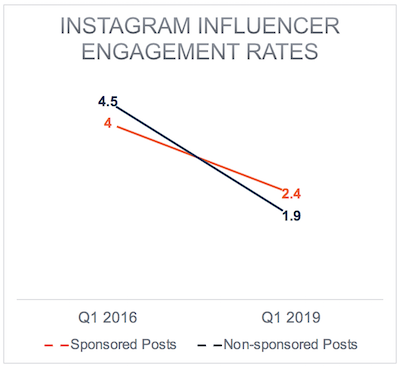
And, as I mentioned above, it’s with all channels. Just look at Instagram engagement rates:

It doesn’t matter if it is a sponsored post or an organic post, the trend on Instagram is that engagement is going down.

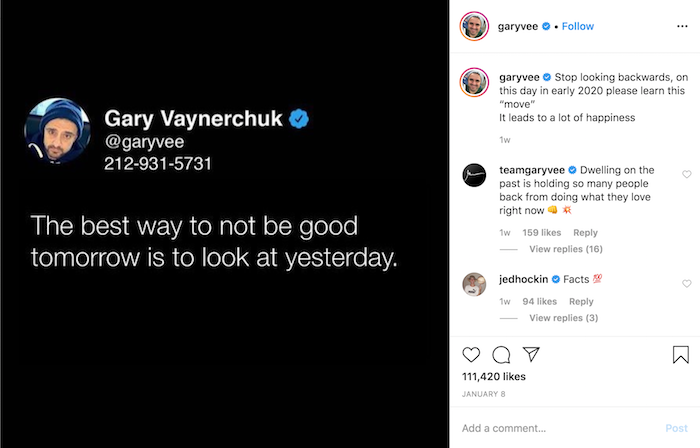
That’s why you are seeing people like Gary Vaynerchuk and Grant Cardone promoting their phone numbers all over Instagram.

That way they can communicate with their fans directly without having to deal with algorithms or platforms decreasing their engagement.

But even with those decreasing numbers, you are seeing sponsored posts on Instagram surging by 150%.

In other words, people are still spending money because they are seeing an ROI or generating enough value in their eyes.

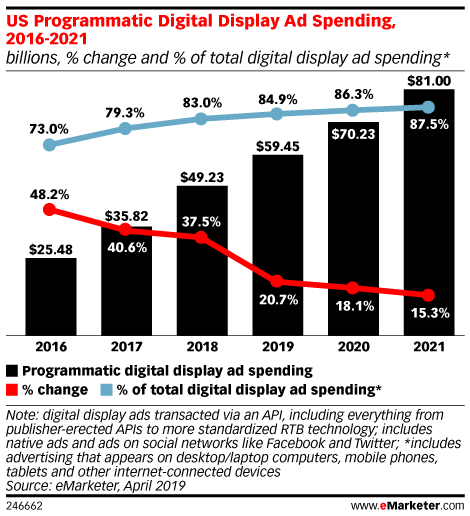
And the same is happening with digital ad spending.

The numbers are on the rise because companies are generating an ROI.

So, how is SEO still not dead?

As I explained above, just because the metrics aren’t going in your favor doesn’t mean that a channel is dead.

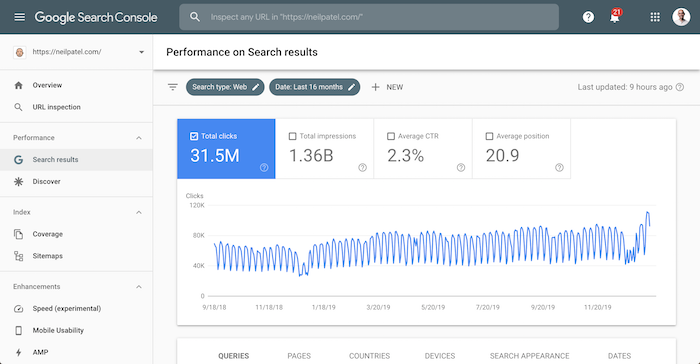
Just look at my search traffic on NeilPatel.com.

Not only do I have to deal with Google’s algorithm like you, but my competition includes other marketers who know what I know… yet I am still able to grow my search traffic even with Google’s decreasing CTRs.

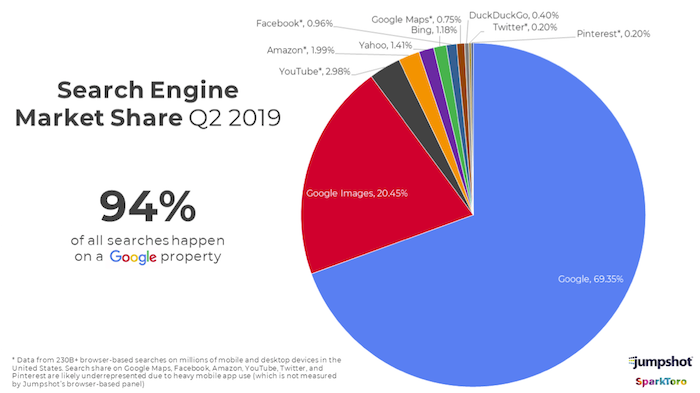
When you look at search as a whole (and I am not only talking about on Bing and Google as people also search on other sites and platforms as well) Google still dominates market share with a whopping 94%.

People still use Google and prefer them as their method of search. But what’s changed is how Google is being used.

It used to be where you would use platforms like Instagram for discovery and Google for commerce (purchasing).

The trend has switched over the years in which Instagram is being heavily used for commerce and Google is mainly used as a discovery engine.

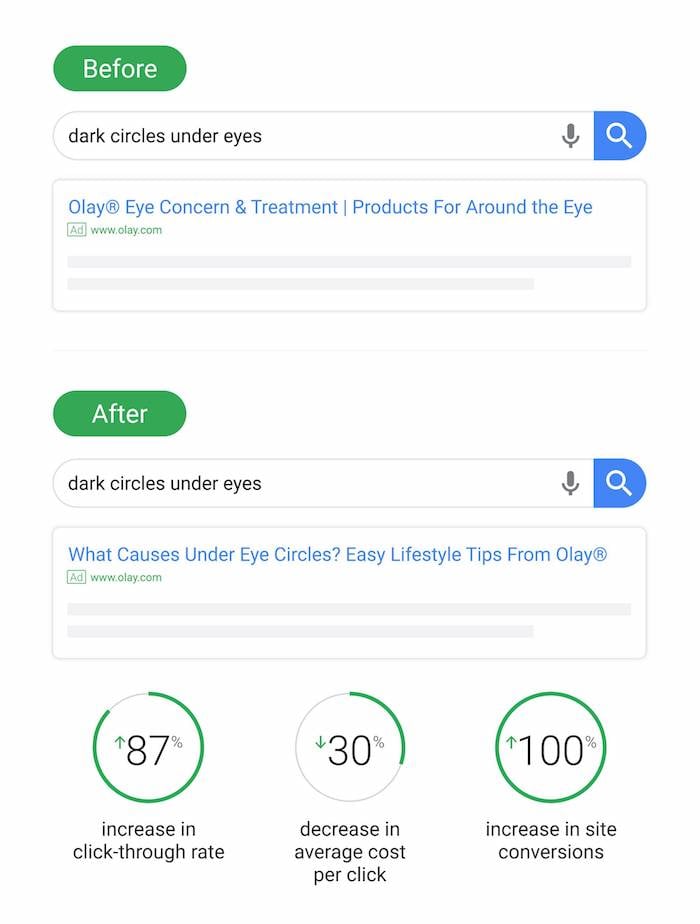
Just look at this case study by Olay.

Olay sells products related to skincare. One of their products happens to reduce darkness under your eyes.

So, they used to push heavily on ads that sold their products directly.

But the moment they changed their ads to focus on education by teaching people how to reduce dark circles under their eyes instead of forcing people to buy their products, their ROI went through the roof.

By sending people to educational-based content first (and then selling through the content), they were able to increase click-throughs by 87%, decrease their cost per click by 30%, and increase conversions by 100%.

This is a prime example of how more people are using Google as a discovery engine first instead of a commerce engine.

SEO isn’t dying it is just changing

Now that you know that Google is shifting to a discovery engine (for both paid and organic listings), there are a few other things you need to know if you want to dominate the organic listings.

1: Google wants to rank sites you want to see

Their algorithm core focus isn’t backlinks or keyword density, or a specific SEO metric… the focus is on the user experience.

If a site has millions of backlinks but users hate it, the site won’t rank well in the long run.

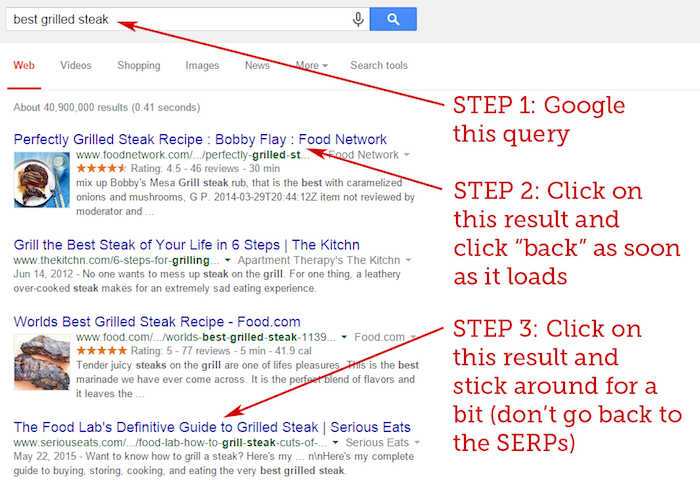
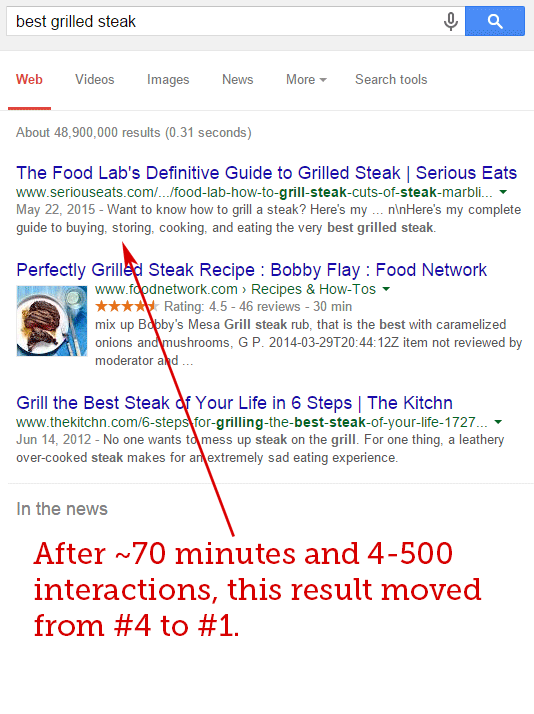
Look at this case study of the “best grilled steaks.”

Rand Fishkin had all of his social followers do the following:

Within 70 minutes, the listing jumped to the top spot.

This is what I mean by user signals. You, the end-user, control how Google adjusts rankings.

2. People don’t just use Google. Google gathers data from everywhere.

Google knows you spend hours a day on your mobile device and hours on other sites and applications that aren’t controlled or owned by Google.

So, when they are figuring out what to rank and where to rank it, they aren’t just looking at their own dataset.

They crawl things like social media and use social signals to help them better improve their results.

For example, here is a case study on how Google is using social media for search discovery.

Even if you hate the social web, you need to use it more. Not only can it help with your site’s indexing but it can also help with brand building, which indirectly will help boost your rankings as well.

Here are some articles to follow to help boost your social media presence:

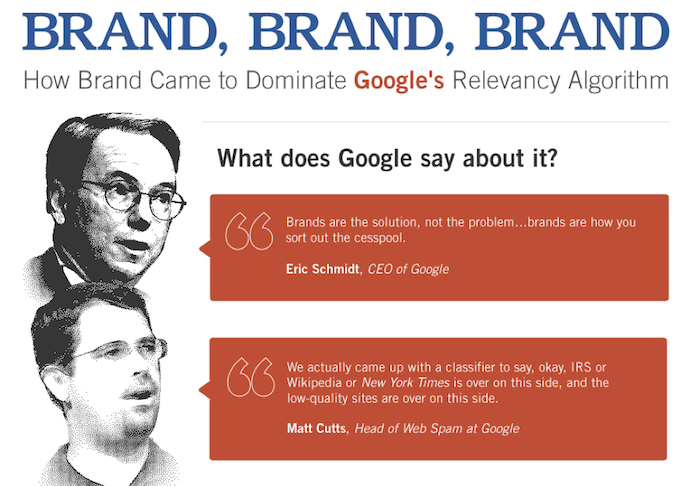
3. Google loves brands

If you don’t believe me, just look at these quotes from Google’s ex-CEO and ex-head of webspam.

They both believe in brands.

As your brand grows, you’ll find that your rankings will climb as well.

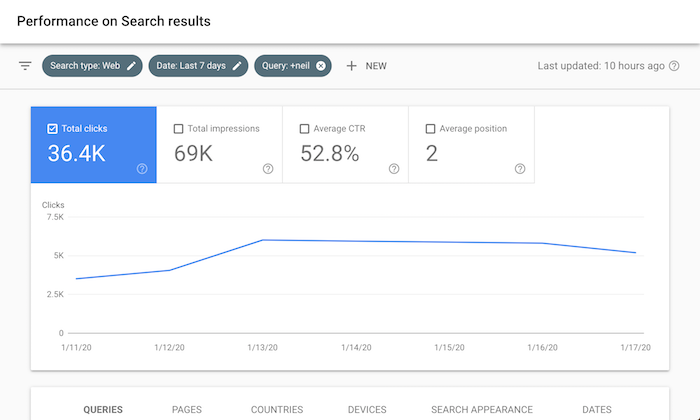
You saw my search traffic stats earlier in the post, but here’s a breakdown of how many people found my site by searching for my name in the last 7 days.

And that number doesn’t even include the misspellings. You would be shocked at how many people spell my name as “niel” instead of “neil.”

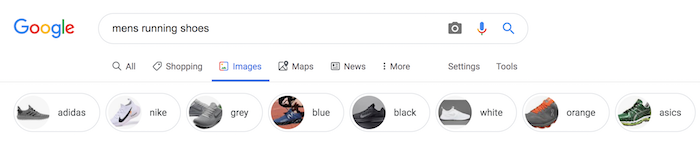
Google loves brands. Heck, when you type in “men’s running shoes,” they even have Nike, Adidas, and Asics there.

Branded search volume is more correlated with rankings than links or domain authority.

If you want to build a brand, focus on the social media articles I linked to above and follow the brand building articles below:

If you are still struggling to build a brand, talk to one of my team members about our Digital PR.

4. Focus on a niche

Do you remember the old-school site About.com?

Over time, About.com tanked in terms of their Google rankings and the business was dying. There were a few reasons why:

  • The site didn’t focus on a single niche… it was about everything
  • The content was mediocre. They didn’t go in-depth but instead just kept things surface level.
  • They had too much content that no one cared to read.

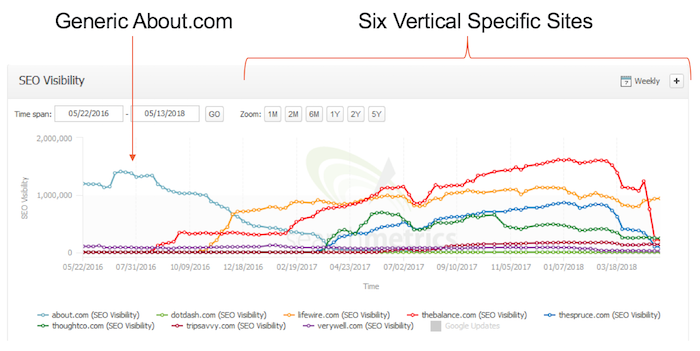
They decided to rebrand as Dotdash and start niching down. So they took the content on About.com and split it into six specific vertical sites.

When doing this they found that a lot of the content didn’t fit into those 6 verticals or wasn’t up to their new quality standard. This caused them them delete roughly 900,000 articles.

From the data, you can see that they got much more traffic by splitting up their content into niched-down sites.

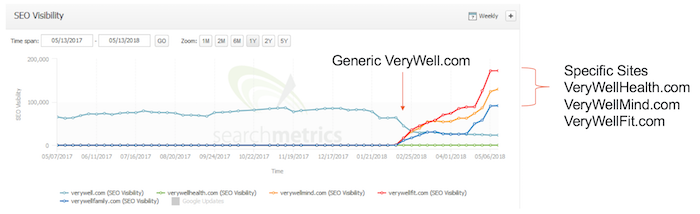
It was so successful that they took one of their new vertical sites and broke it down further into three niche sites. Here were the results:

This helped them grow their revenue by 140%.

If you want to do well in today’s world of SEO, focus on one niche. Google prefers topic-specific sites because that’s what you and everyone else loves.

Just think of it this way… would you rather read medical advice from About.com or WebMD?

WebMD of course.

Another thing they did

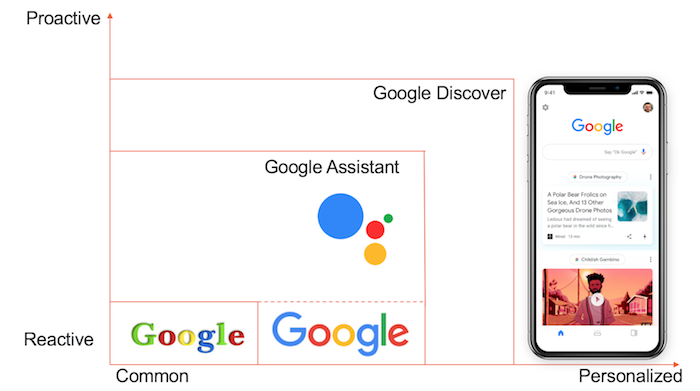
5. Future is personalization

Have you noticed that when you search on Google the results you see are different than the results of your friends?

It’s because Google is trying to personalize the results to you.

Not just on Google search but anywhere you use a Google device… from a smartphone to Google Home to even their autonomous cars.

With all of the data they are gathering, they are better suited to understand your preferences and then modify the results to that.

Just think of it this way: Every time you visit a place and you are carrying your mobile phone (especially if it is an Android device), Google may be able to potentially use that information to tailor results to you.

With your website, don’t try and show everyone the same message. If you personalize your experience to each and every user, you will be able to rank better in the long run as it will improve your user metrics.

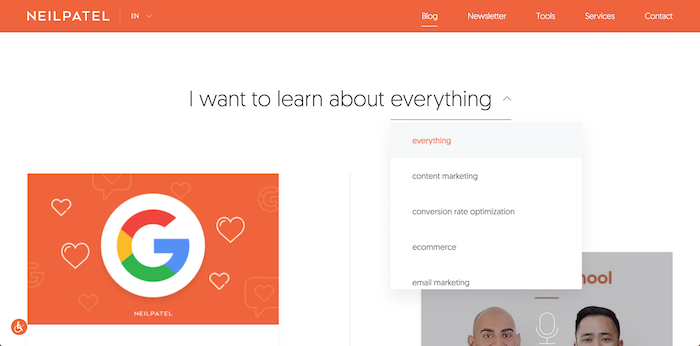
A good example of this is on my blog.

Right when you land there, I let you pick the type of content you want to see and then the page adapts to your interest.

It’s actually the most clicked area on the blog, believe it or not.

Conclusion

SEO is not dead, it’s just changing.

Sure, click-through rates are going down and Google keeps adjusting its algorithm but that’s to be expected.

Google has made it so you can easily target your ideal customer through SEO or paid ads.

It used to be much more difficult before they came along. That’s why they are able to generate over 100 billion dollars a year in advertising revenue.

Don’t worry about things that aren’t in your control. Instead, start adapting or your traffic and business will be dead.
What do you think about the changing SEO landscape?

The post Is SEO Dead? (A Data-Driven Answer) appeared first on Neil Patel.