Thursday, January 9, 2020

How to Turn Your Site into an Automated Sales Machine

Want to make more sales? Of course you do.

Maybe you’re not hitting the kind of figures you want, or maybe you haven’t even made a single sale yet. Either way, you’re not selling as much as you want to be.

But why aren’t you? 

There are tons of possible reasons here, but I’m willing to bet it’s your website. Even if you have an expertly designed site, it could still be the culprit that’s stealing all your sales.

I learned this the hard way. My websites used to flat out suck and I barely got any sales. Once I started putting serious effort into my sites, my sales skyrocketed.

I tried everything. Some stuff was a huge waste. Some techniques ticked off my users. 

But I was able to find some serious long-term winners. 

While there’s no magic formula that will 10x your sales overnight, there are some best practices that will help you optimize your website to pull in the maximum amount of sales possible.

In short, you want to turn your site into an automated sales machine.

And I’m going to show you exactly how to do that.

Ready?

Setting Up Behind the Scenes With a CRM

The first thing you need is great customer relationship management (CRM) software.

A CRM helps you manage all of your current customers and leads in one place. You can communicate, track progress, and oversee all interactions without having to leave the CRM.

The reason you want to use a CRM is that it will help you generate the most amount of money out of your customers. And this is a lot easier to do than it is to acquire new customers.

When my friends at Keap reached out to let me know about their rebranding, I realized it had been a long time since I talked about how important their tool is in my arsenal.

Now, throughout the rest of this article, I’ll show you how I use Keap to grow NeilPatel.com.

But first, let me go into what it does… that way whatever solution you decide to choose, just make sure it has these features.

All-in-one Client Management

A good CRM should provide everything you need to manage your customers. You shouldn’t have to use extra software or apps to fill in the cracks.

That means your CRM should allow you to manage every interaction between you and your customers. You should be able to look at your CRM and know exactly where you are with any given client.

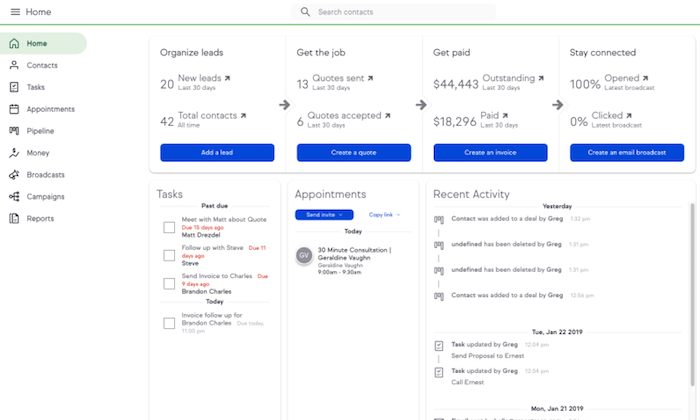
Here’s what it looks like when you first view your dashboard:
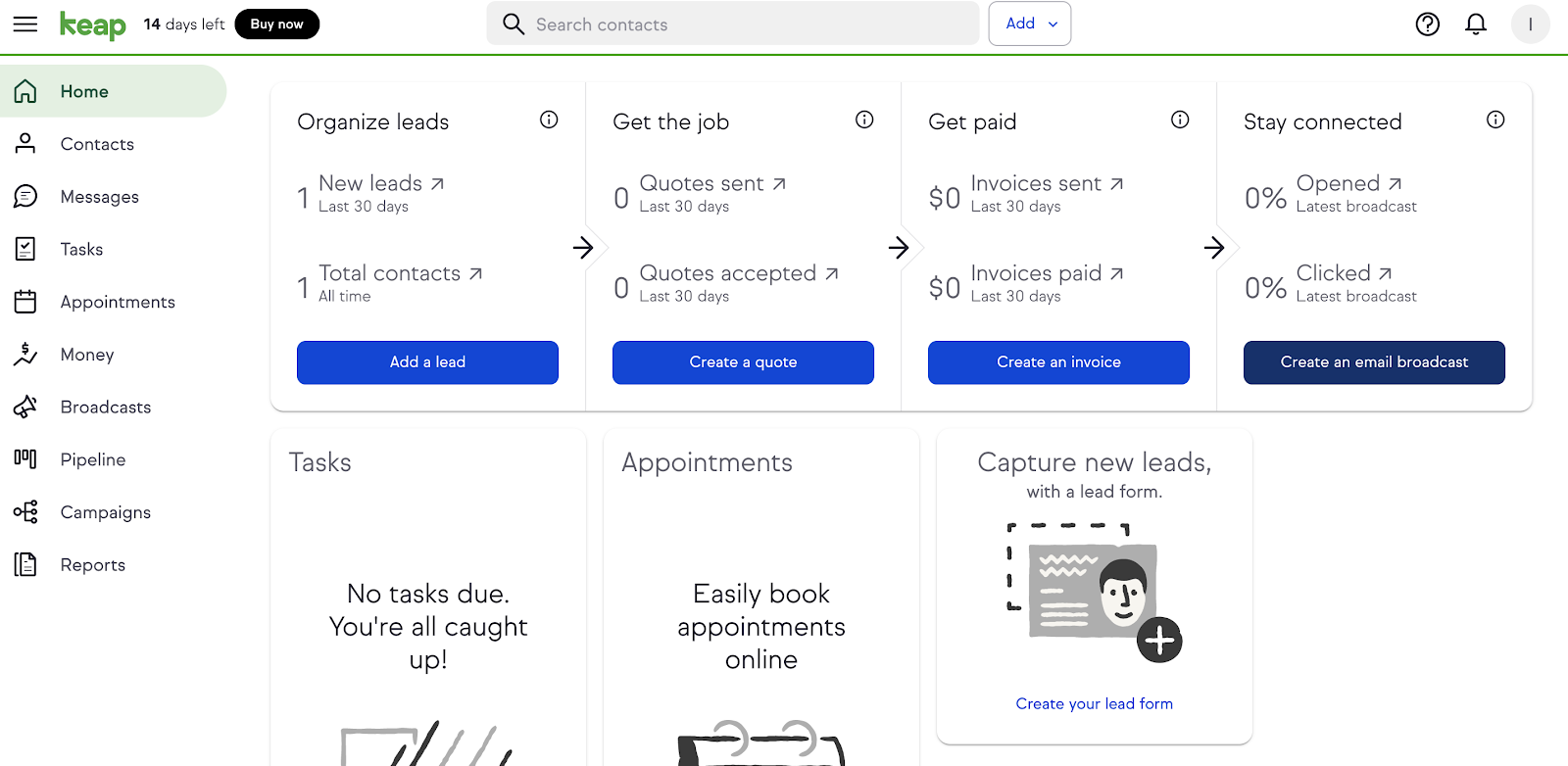
Having a simple, minimalistic design like this really helps cut down on the confusion that comes with managing tons of clients. There’s no second-guessing.

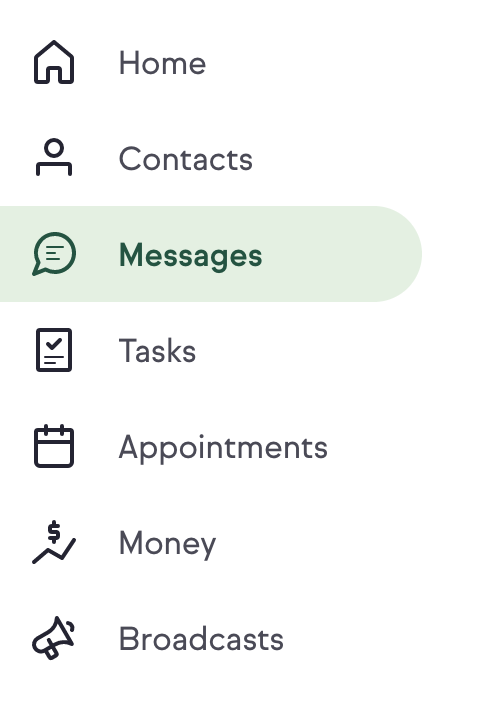
Take a look at the menu on the left-hand side:
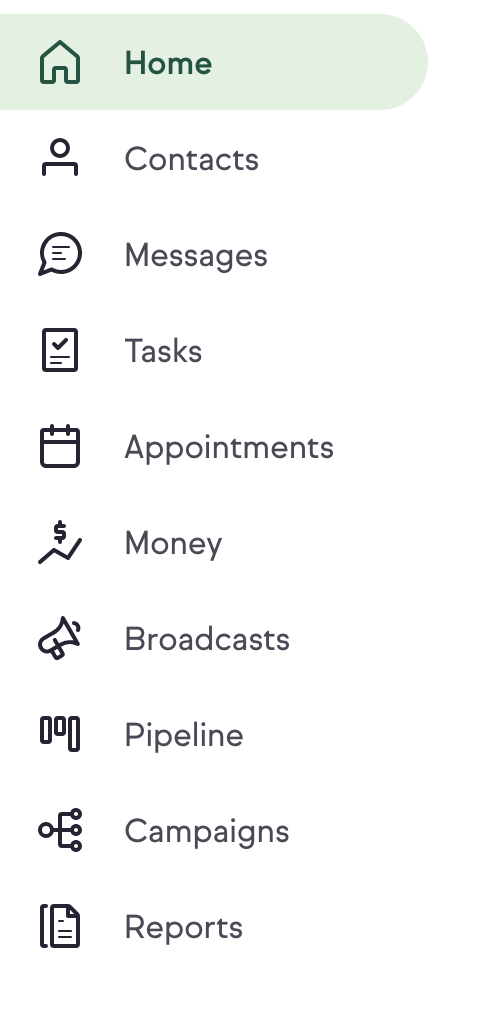
Keap has taken all the ways you interact with your customers and broken them down into nine intuitive categories.

By clicking on the Contacts tab, you can see all of your clients:
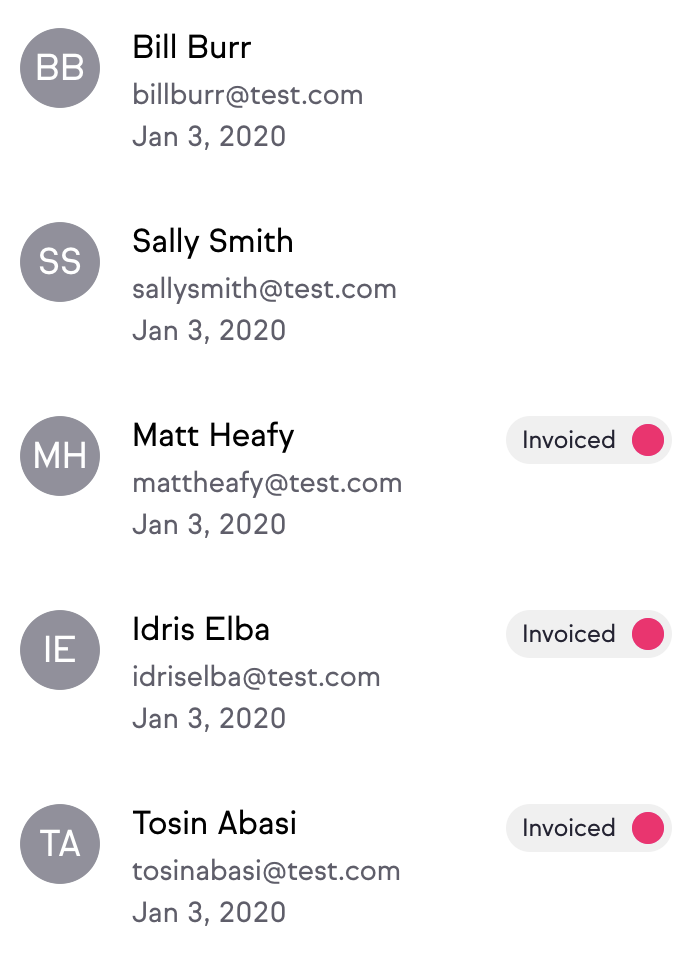
By clicking on a particular client, you can see a summary of your activity with that person, including email conversations and invoice history.
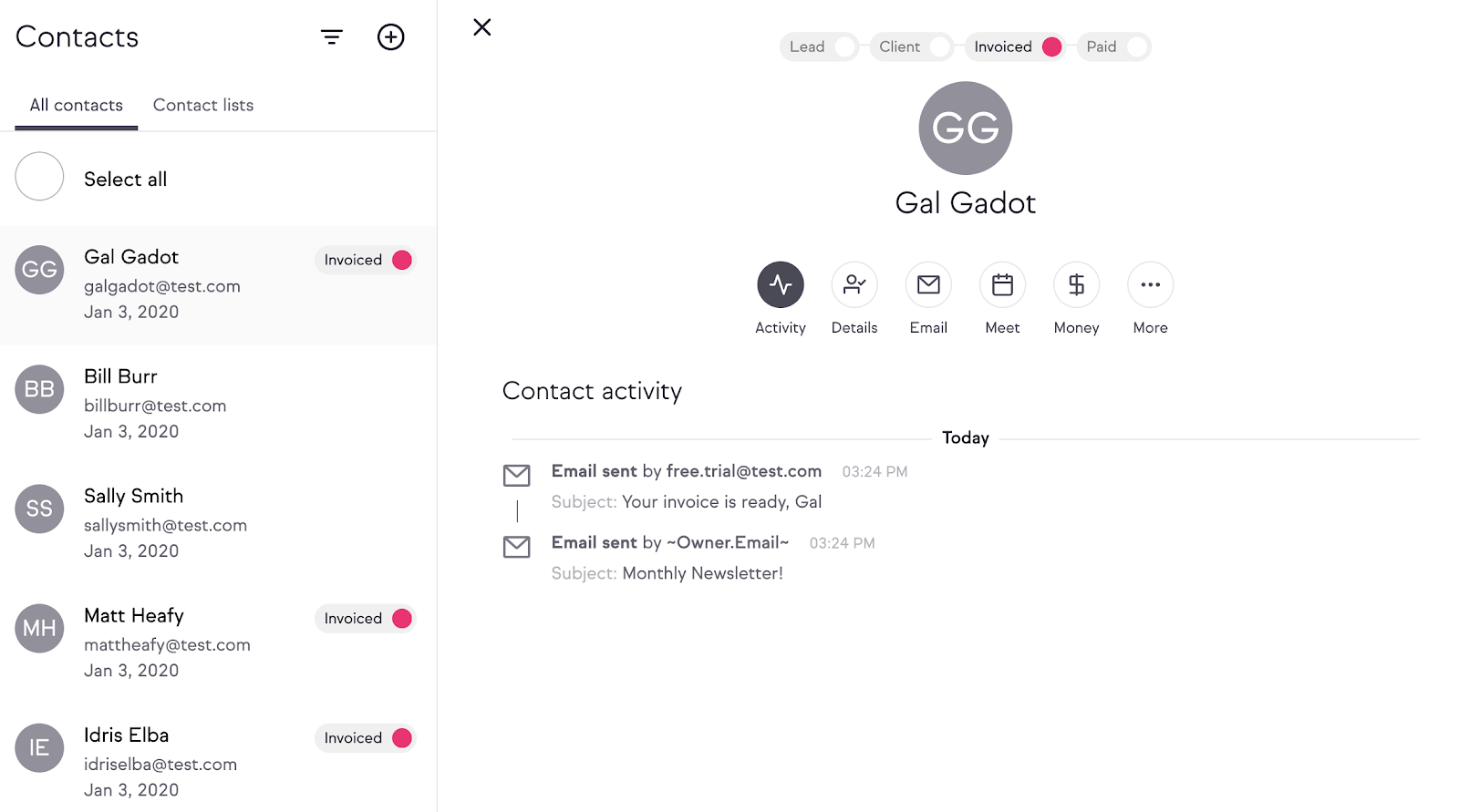
This is important for me and my team as we offer multiple products and this view helps us understand where people are.

Remember, by having multiple products you can maximize your lifetime value, which then allows you to spend more money on marketing.

There’s also a separate message function that you can access by clicking on the Messages tab:
Here you can see all of your correspondence with each client. You’ll need to connect your mobile phone with the Keap app. This allows you to seamlessly switch between mobile and desktop for an efficient messaging experience.

The Tasks tab gives you a rundown of your to-do list for your clients:
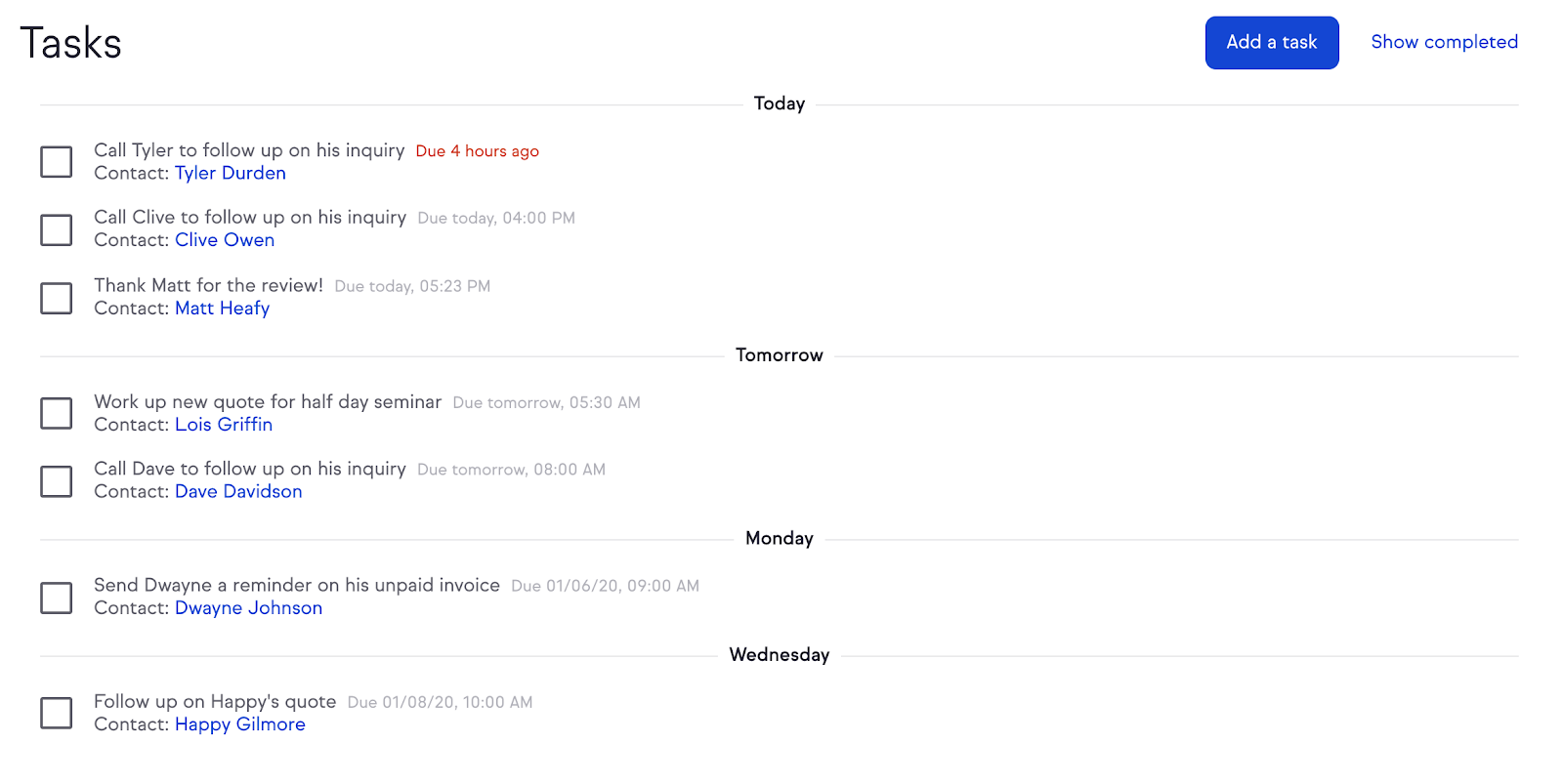
You can check off each task here and easily add more by clicking the blue “Add a task” button at the top right. This way, you’ll never lose track of what you need to do.

Next is the Appointments tab, where you can set up a custom booking link to allow clients to schedule appointments with you. You choose your own availability so that clients always choose times that work for you.

This is great if you regularly have face-to-face interactions with your clients for example.

The Money tab is your one-stop-shop for all things finances. You can connect your bank to get paid in a flash and you can also manage all your invoices without any fuss.
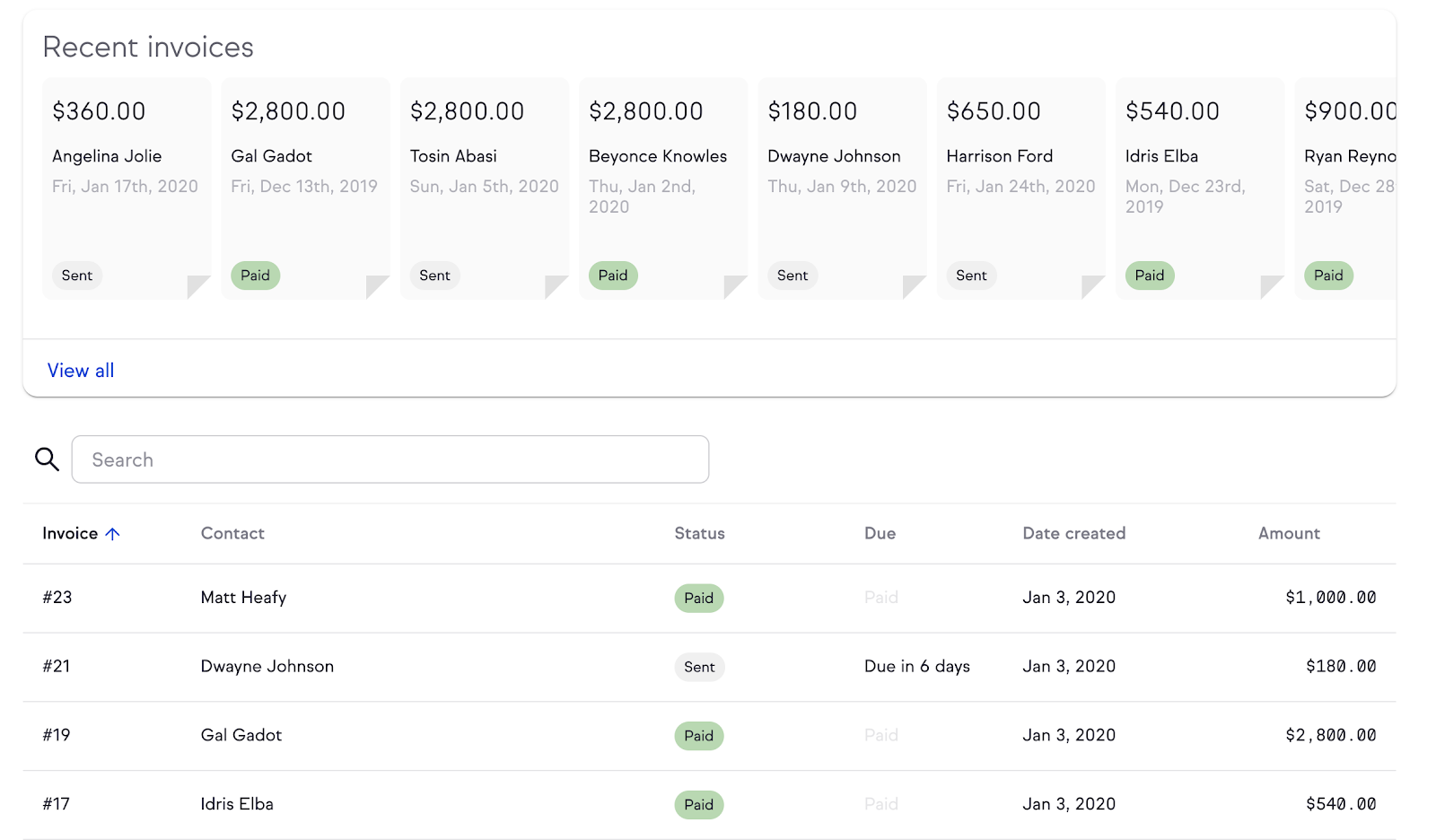
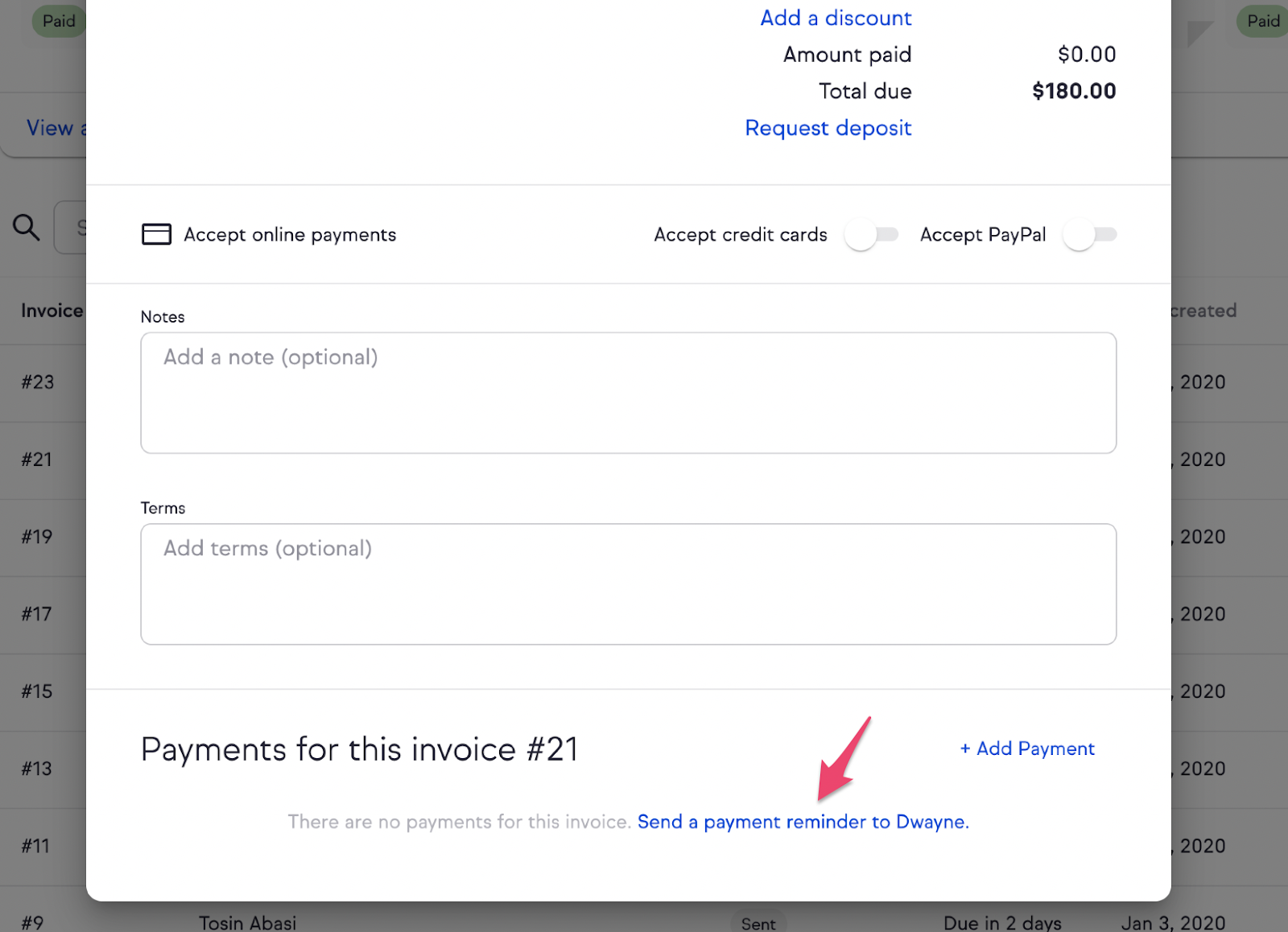
You’re always aware of who’s paid and who hasn’t, so you don’t have to go chasing down clients one by one. You can simply send them a reminder within the interface by clicking on the specific invoice and scrolling to the bottom where there’s a reminder option:
The Broadcasts tab allows you to send out emails to your list.
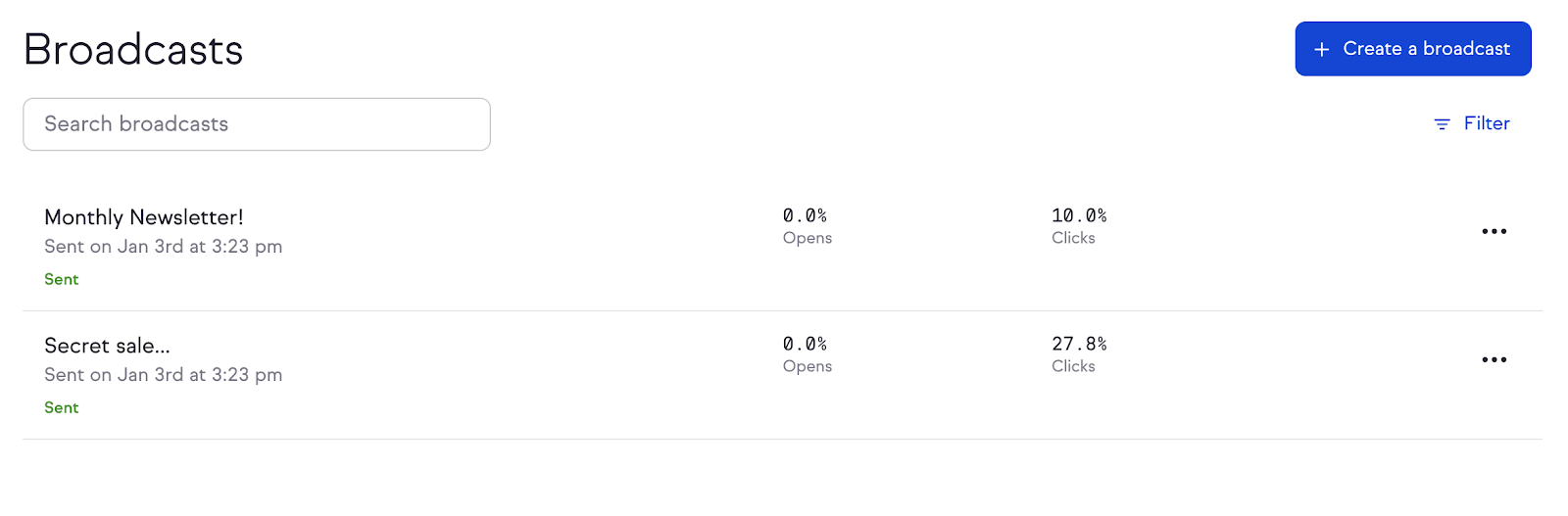
Even though this isn’t standalone email software, you can still see a ton of helpful metrics by clicking on each campaign:
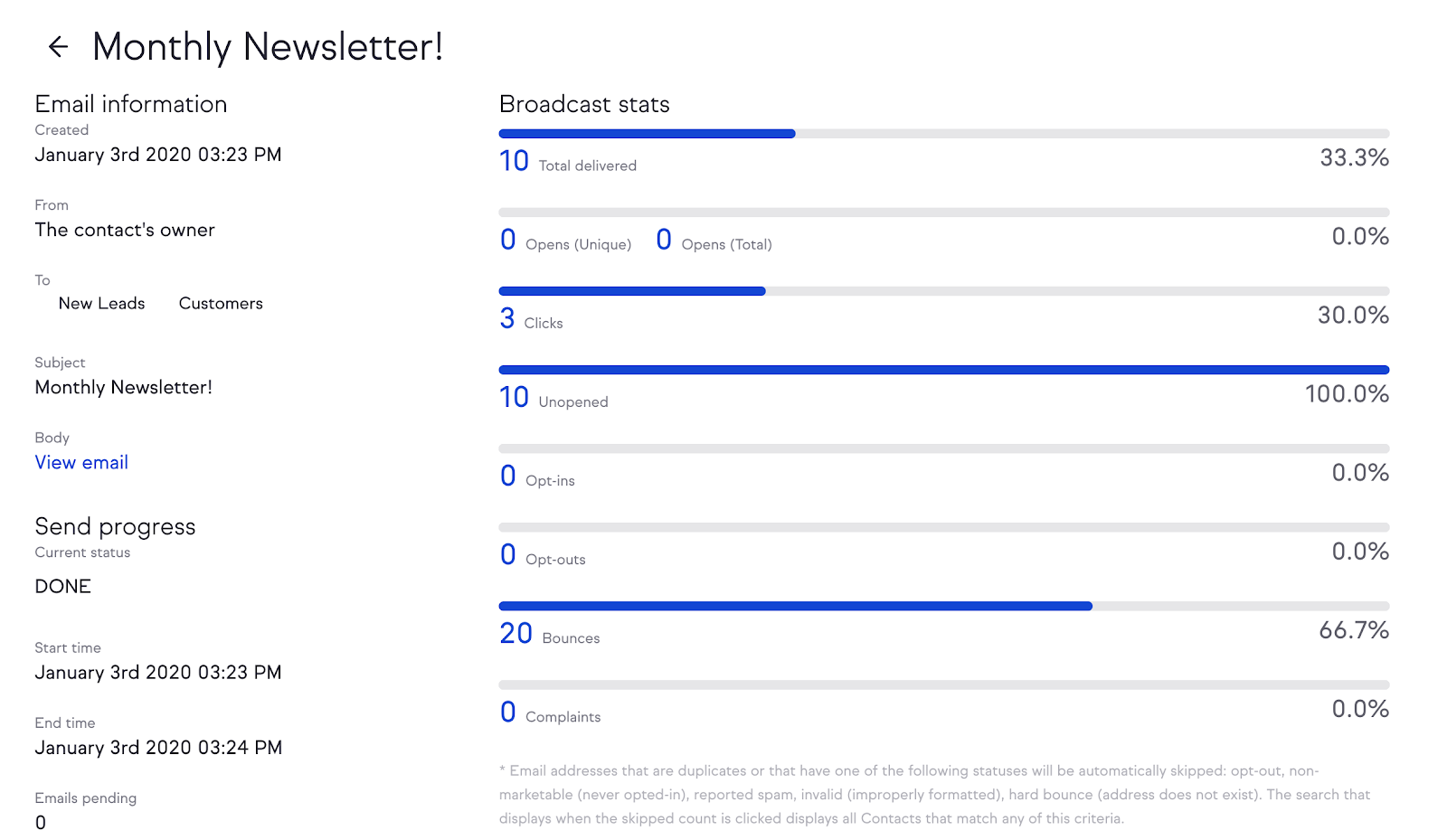
This feature is especially helpful for sending out emails to specific groups, like new leads or existing customers.

Next, you’ll see the Pipeline tab. This is where you build the core of your customer journey.

Once you click on the Pipeline tab, you’ll see four basic panels: new, qualifying, contacting, and negotiating. These are the stages that you’ll go through when converting a new prospect.
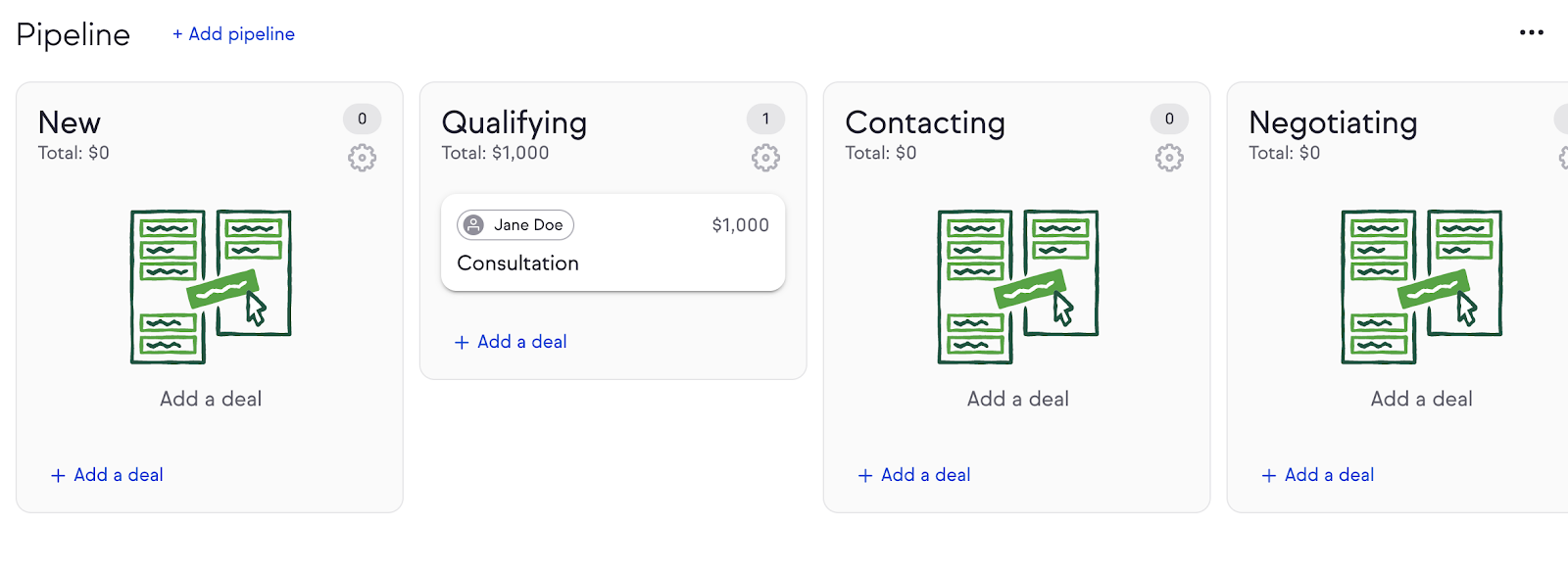
This is also where a lot of the automation happens that will save you tons of time and money. I’ll go into detail on this later on in the article, but for now, just remember this pipeline structure.

The Campaigns tab is a full-featured campaign manager that allows you to follow up with leads, track unpaid invoices, simplify scheduling, and much more. (You can also automate a lot of things here.)

Finally, the Reports tab helps you stay on top of your sales. Here you can also track important metrics like email engagement and campaign progression.

Take another look at all of these features. This is what I mean by all-in-one. A CRM should allow you to interact with your clients in any way you need to. You shouldn’t have to jump from software to software to create a great experience for your clients.

Now that we’ve looked at some basic elements of a good CRM, let’s look at one of the must-haves: automation.

Automation

Automation is hands down one of the most important features I look for in a CRM.

Why?

Because running a business is a lot of work, and the more you can automate, the better.

Automating is usually straightforward, but when it comes to automating client interactions, you have to be careful.

People love personal interactions, and that’s why you should do your best to deliver. If your automation is dry and corporate, your clients will notice.

So what do you do?

The trick is to personalize your automation as much as possible.

In other words, your automation should have a human touch.

If this sounds counterintuitive, I totally understand. “Personalized automation” seems like an oxymoron.

But it’s not. In fact, it works pretty well.

Take a look at this email I recently sent:
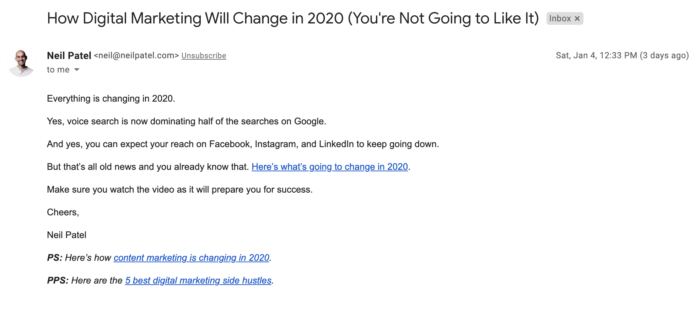
Believe it or not, this is a template.

The reason this works so well is that it doesn’t read like a template. It reads like an email I sat down and wrote myself.

Of course, you can automate way more than just emails.

Most automation actually happens behind the scenes, so you need a CRM that’s capable of seamlessly automating everything from client data to scheduling and beyond.

Let’s say I want to email a lead when they move from stage to stage in my pipeline. This is a great technique to keep leads engaged but often you have to do it manually.

With Keap, it’s simple. First I head to the Pipeline tab and find the specific lead. Then I click the gear icon and select “Configure automation.”
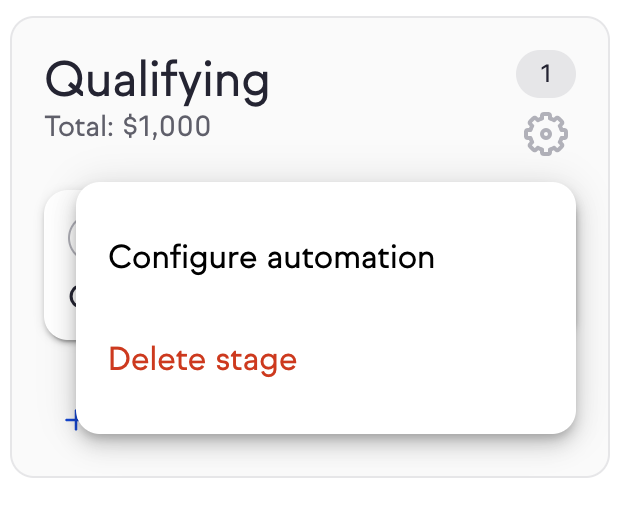
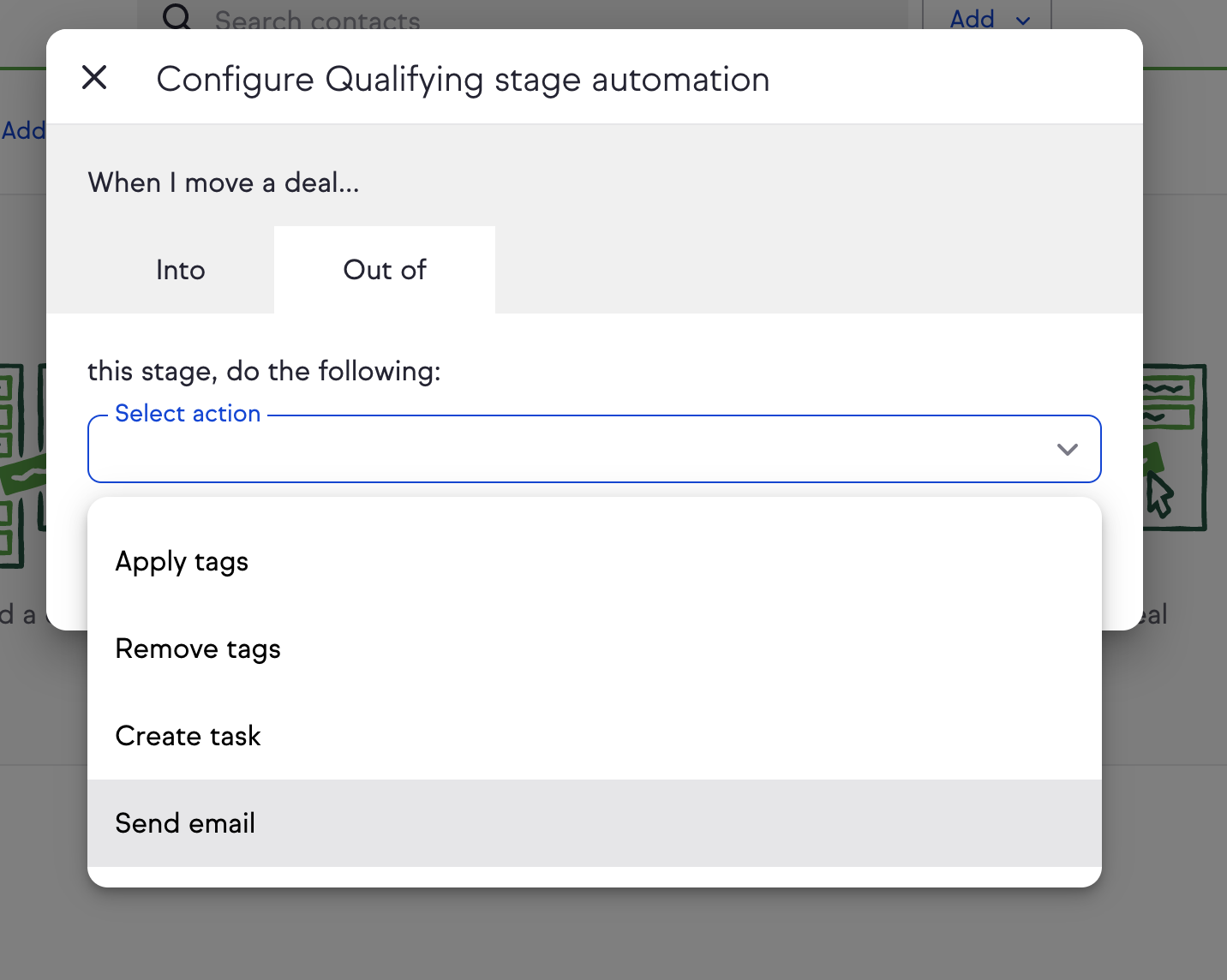
I now select when I want the email to trigger: either moving into or out of a stage. For this example, I’ll have it trigger when the lead moves out of the qualifying stage (where the lead currently is).

Then I select “send email” from the drop-down menu.
Now all I have to do is write the email.
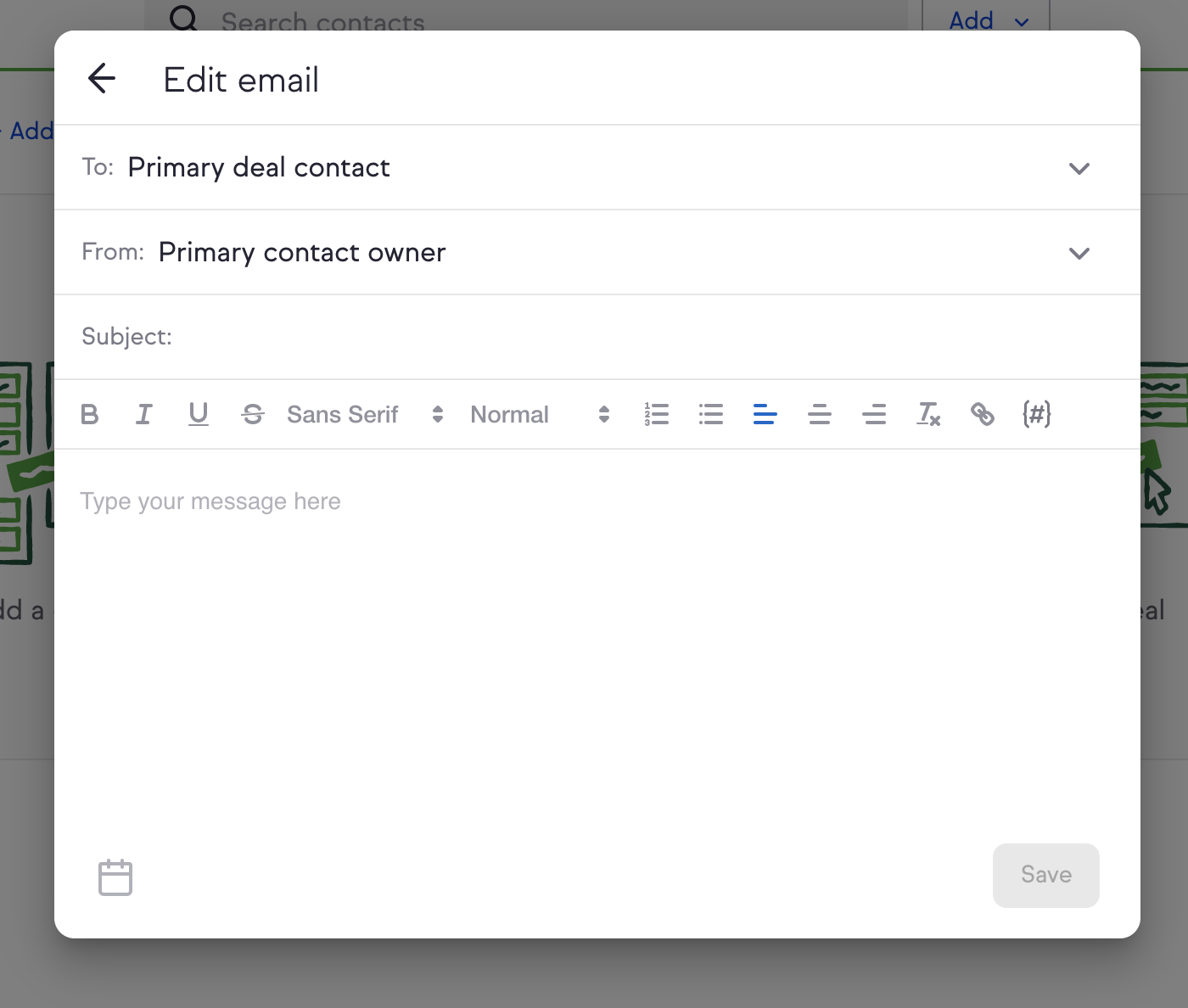
Of course, you can use personalized templates here to maximize your efficiency even more. You can even personalize the email with this form by clicking on the pound sign on the right to open up the merge fields drop-down menu.
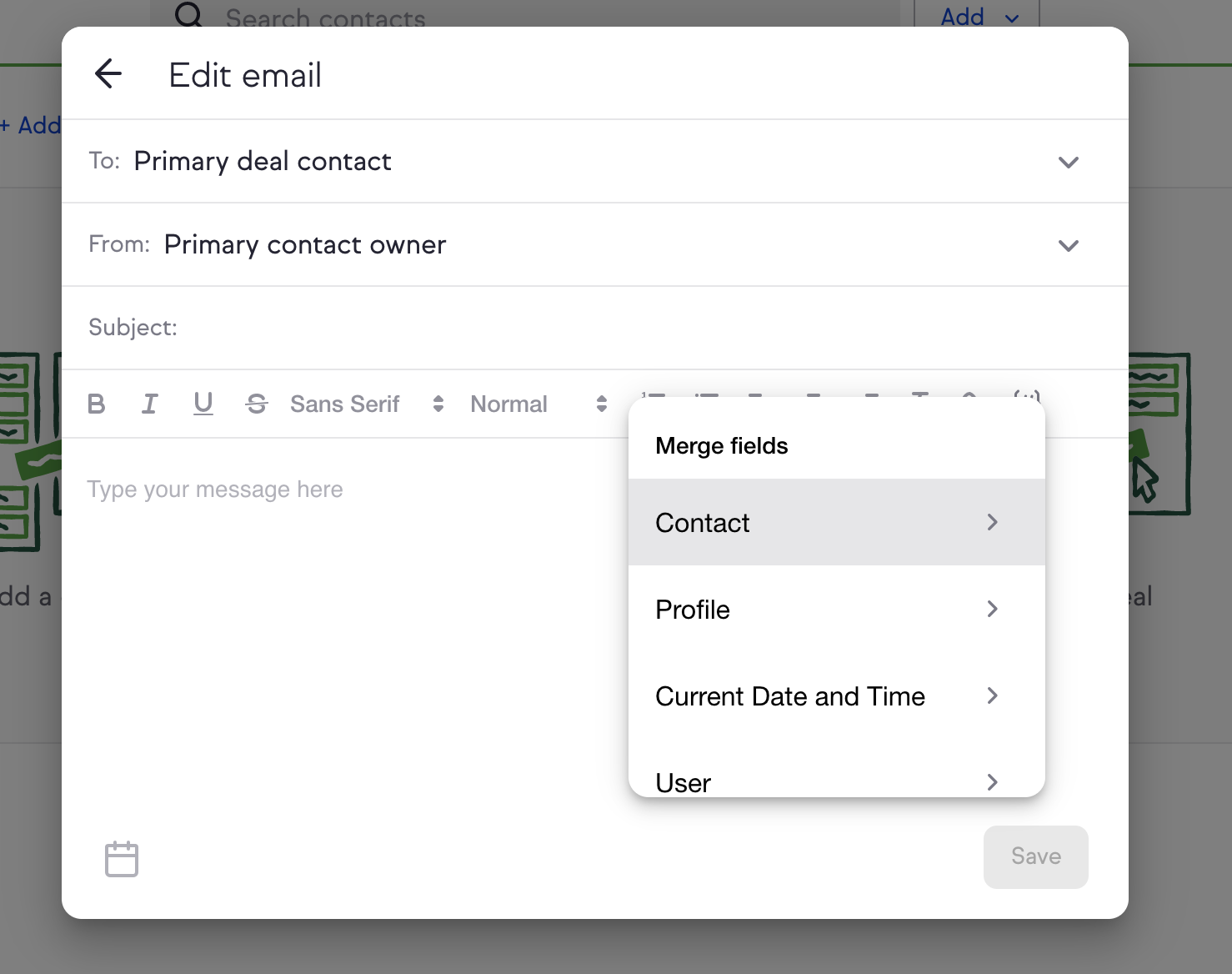
This all takes just a couple of minutes and it’s all completely contained within Keap.

See why automation is so important? It’s one of those features I can’t go without.

And I like easy automation. I’m super busy, so the easier something is, the better. I don’t want to have to go through a million menus just to shoot an email.

All of this said, there are definitely right and wrong ways to automate. You want your automation to make your business as efficient as possible and that means creating dependable processes that you can repeat without even thinking about it.

Creating Processes With a CRM

CRMs are useful for a lot of things from qualifying leads to creating entire marketing campaigns.

But there’s a common thread that runs through all of these features: the ability to create processes.

Processes are invaluable because they save you time, effort, and often money.

They also help your business operate more smoothly. Relying on processes is much easier than having to do everything manually.

That begs the question: What kinds of processes should you create?

The short answer is that you should have a process for everything. And I mean everything

Responding to client emails? Make a process for it. Dealing with new leads? Set up a workflow for qualifying them. You get the picture.

This is critical. If you want to increase your sales, you have to be able to handle increased sales in the first place. Having processes to depend upon will allow you to take on more volume without any unnecessary friction.

As a rule of thumb, if you can automate something in your business, you probably should.

The exception (like I mentioned above) is anything based around human interaction. It’s best to stay as hands-on as possible when it comes to this.

The idea is to make your business run like clockwork so you can pay more attention to your clients and deliver a better experience.

And that’s a win-win for everyone involved.

But let’s get specific and talk about certain processes that you should make sure you have.

Lead Flow

This is a big one.

A lot of marketers focus on lead generation but not enough people talk about what should happen after you’ve got a lead.

If you don’t move your lead forward, your efforts are as good as wasted.

That’s why automating your lead flow process is critical. You don’t want to be doing this by hand––that takes hours.

Instead, let your CRM do it for you.

Create multiple stages along your pipeline and trigger unique email sequences for each stage. This means that you can keep your lead moving forward at all times.
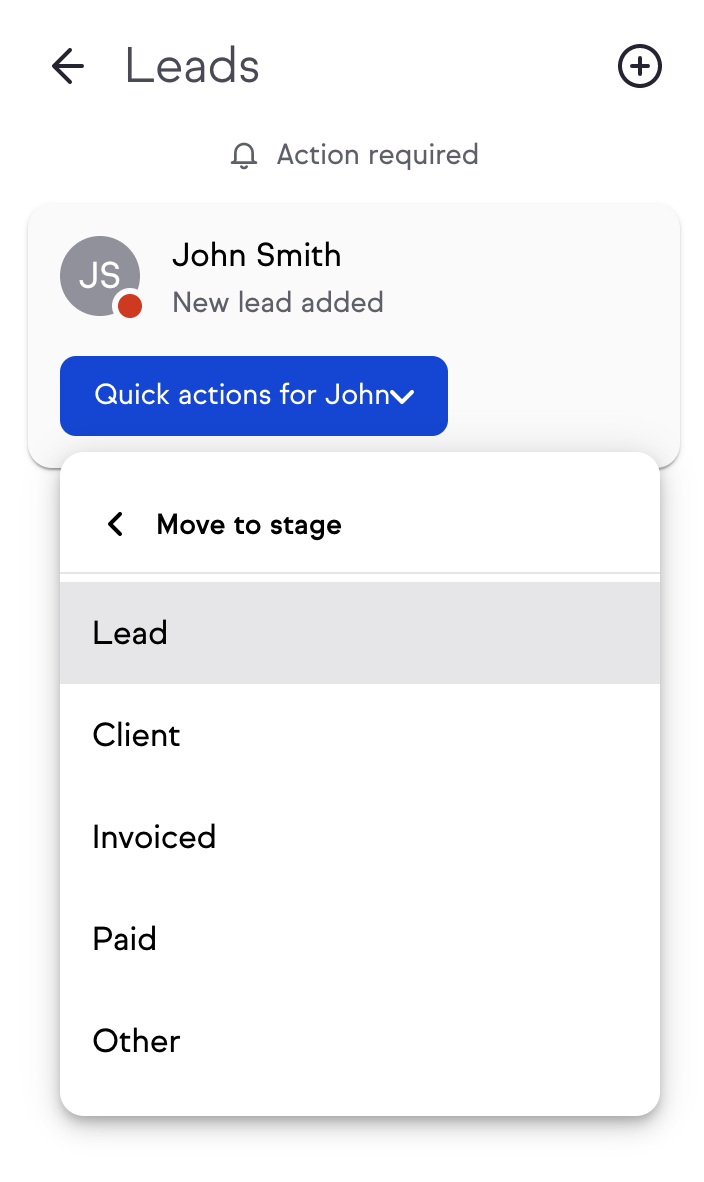
This way, you won’t overlook anything. You don’t have to worry about forgetting to follow up or missing an important email.

So let the CRM do the heavy lifting so you can focus on providing a better service for your customers.

Marketing Emails

With a CRM, it’s possible to automate all of your marketing emails, and in my opinion, this should be one of the first things you automate.

Why? Because emails can take up lots of time without you even noticing.

According to the Litmus 2017 State of Email report, more than 68% of businesses spend a week or more on the production of just one email.
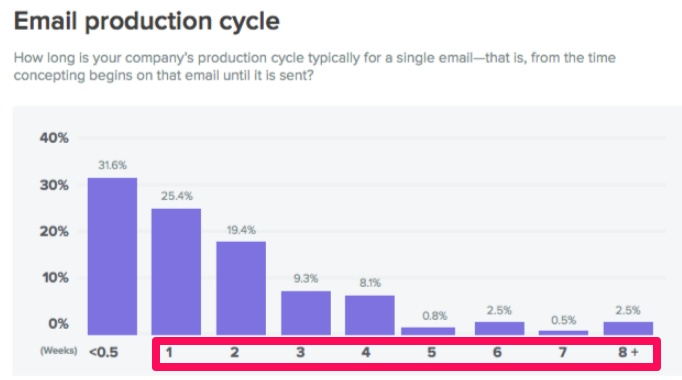
Automation allows you to cut back on that time so you’re not working on the same task for days on end. You’re able to spread out your time and attention on other things that need to be handled.

And by automating your email, you’re making your email work for you instead of the other way around.

For example, whenever you get a new lead, you need to take action as swiftly as possible.

With the right CRM, this is a snap. All you need to do is automate it so that a new lead receives an email as soon as they sign up.

That way, you’re able to contact a warm lead immediately and you don’t have to do anything manually.

You can track them right from the Broadcasts tab:
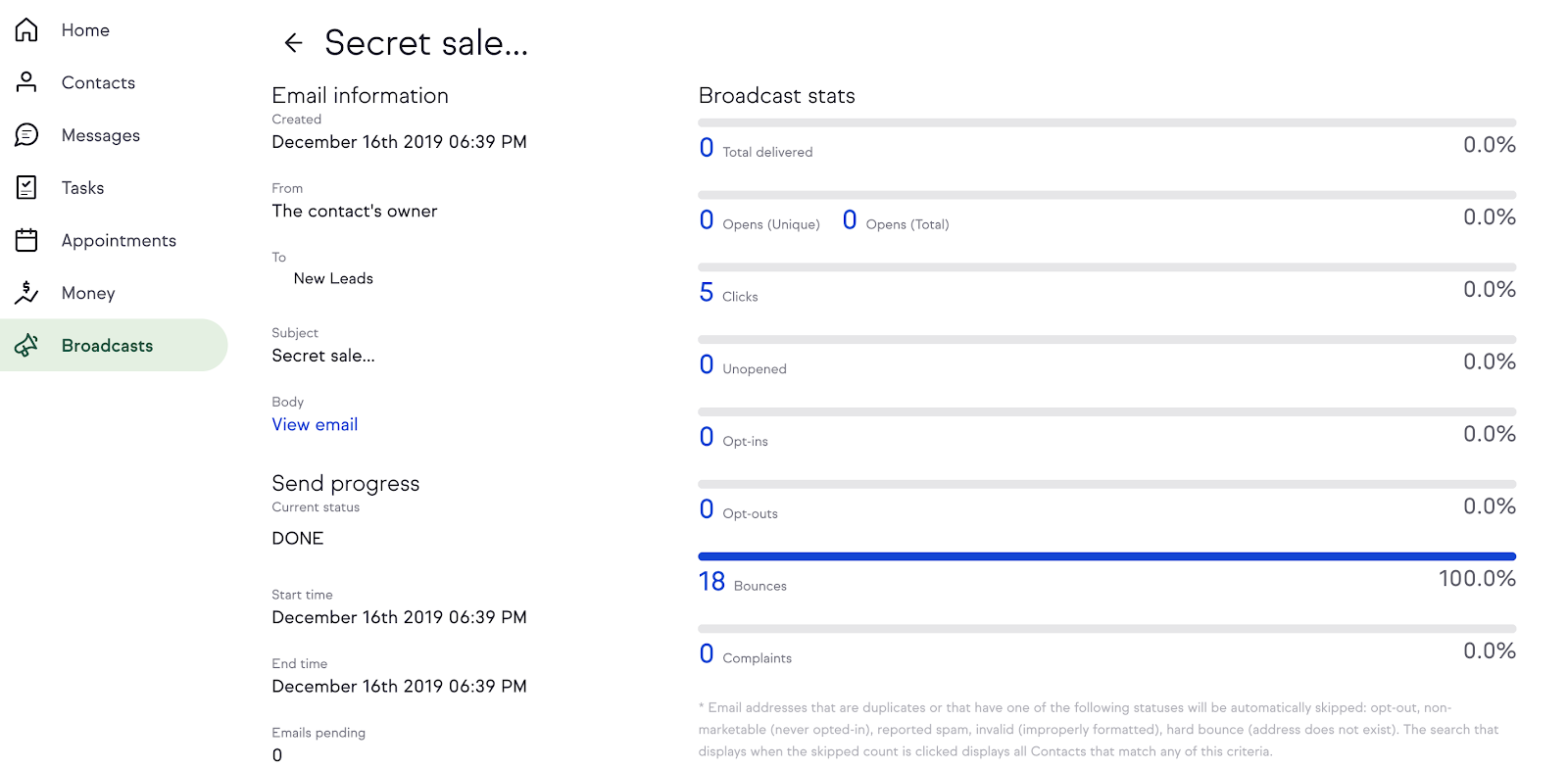
This means you can also create autoresponder campaigns to get more clients in the door.

You can then move them down your pipeline, which brings me to the next thing you need to do: build a robust pipeline.

Building a Streamlined Sales Pipeline

If you’ve ever wondered what’s stopping your site from raking in the sales, chances are it’s probably your pipeline.

Now, I could talk for hours about building an effective pipeline, but for the purposes of this article, I’m going to condense the information down to the essentials.

So here’s everything you need to know about pipelines.

Common Pipeline Mistakes

Most pipeline errors that cost you precious time and money are easily preventable, which is why you should take the time now to make sure your pipeline is seamless from start to finish.

Ironically, one of the most common pipeline mistakes is simply not spending enough time on your building it out initially.

Your pipeline is the lifeblood of your business. It’s what helps you turn leads into clients. So if it’s not optimal, your sales won’t be either.

Another mistake is not moving leads quickly enough.

The data shows that the sooner you nurture your leads, the better. Wait too long, and your leads will turn cold, which could cost you a sale.

Did you know that as much as 50% of sales go to the first vendor?
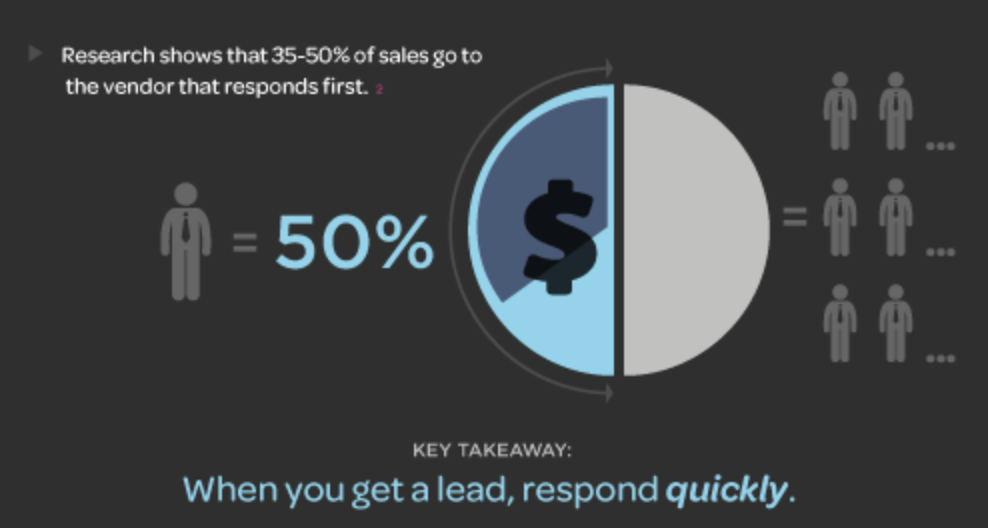
Every second matters when you get a new lead.

By baking automation into your pipeline, you can nurture a new lead immediately. The software will take care of that for you, and you’ll be one step closer to making a sale.

Likewise, it’s important to keep this engagement steady throughout your pipeline. Being present at every step will greatly increase your chances of closing the sale.

The best way to do this? Surprise––it’s CRM automation.

But no matter what CRM you’re using, don’t make these costly mistakes.

Organizing Your Pipeline

Now that I’ve talked about what not to do, I’ll tell you what you should do.

First, make sure you have your priorities right at each touchpoint.

To put it another way, your pipeline needs to be doing the right things at the right time.

For example, when you first get a lead, your top priority should be nurturing that lead. You don’t want to hit them over the head with a big sales pitch––you just want to increase brand awareness.

Also, remember that a pipeline is essentially a bunch of leads going through a sales funnel. Use that framework to create your process and automations.

Your CRM can help you create a cohesive pipeline that keeps leads moving through your funnel and ensures that the appropriate actions are taken when necessary.

First of all, the four stock categories that Keap starts you out with (new, qualifying, contacting, negotiating) are great, but you can always add more if you need to.

Just scroll all the way to the right and click the “Add a stage” text field:
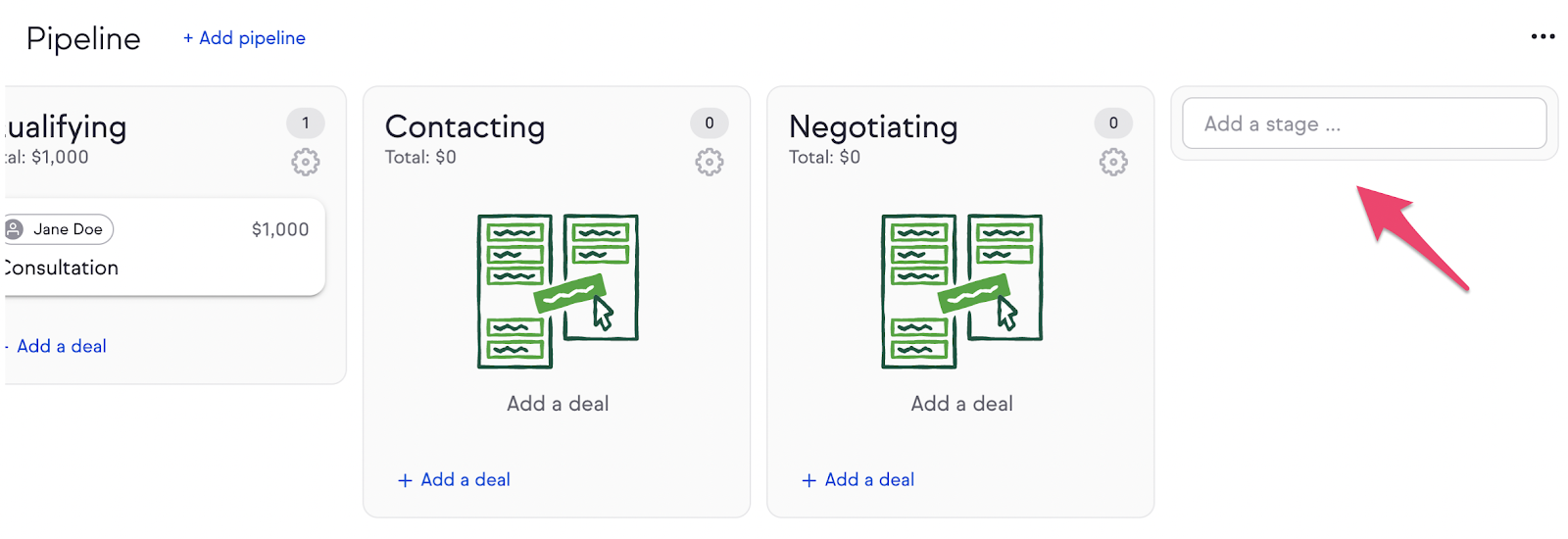
For instance, you could add a Completed stage for leads that you’ve successfully converted and are moving forward with.
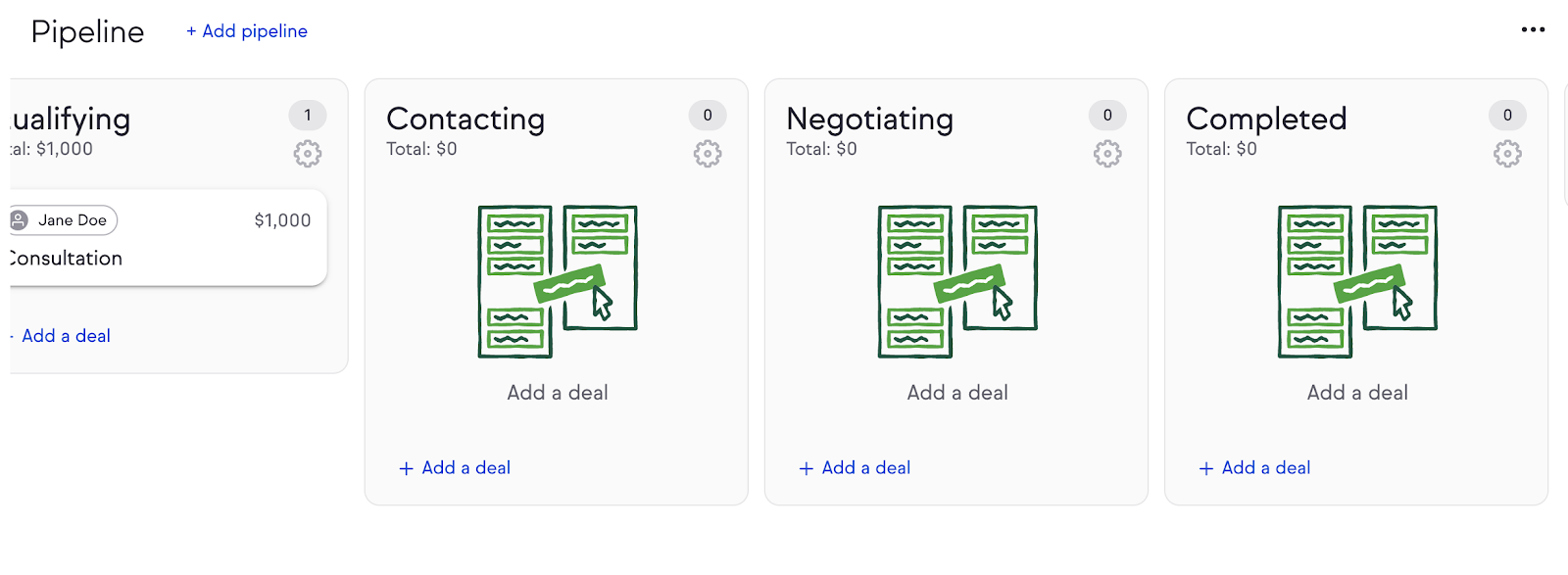
The way you organize your pipeline might take some trial and error, as most companies have unique workflows.

However, I would recommend having at least three different stages so you can engage your lead at the beginning, middle, and end of your pipeline.

Next, the key is to use automation to make your pipeline as hands-off as possible.

Start by automating your email sequences as I showed above to help move your leads from stage to stage and keep them engaged. Again, these emails need to be personalized. There’s no point in using boilerplate templates that are stiff and boring. Take the time to make each email feel personal.

Next, add automation to your campaigns. This will ensure specific actions are taking within your CRM as leads move from stage to stage. These step-by-step tutorials on automation can help you get up and running.

Now, I won’t lie to you––this is going to take some trial and error. You aren’t going to have a perfect pipeline on day one.

So be sure to test your pipeline before you take it out in the real world.

Plug some fake clients and numbers into your CRM and use a few burner emails to test out your CRM’s capabilities. This will give you the chance to identify and remedy problems before you go live.

This extra step goes a long way. Sure, your pipeline still might have some errors once you start using it for actual clients, but you’ll have minimized the risk involved.

Conclusion

You’re almost at the finish line! It won’t be long until you’re putting your shiny new pipeline to good use.

But first, we have to put all the pieces together, so let’s recap what we’ve gone over.

1. The importance of a robust CRM. You want software that will allow you to manage all of your customers in one place, automate your business process, and track important metrics and interactions.

2. Putting processes in place. Having processes to depend upon is crucial for every business. Doing everything by the seat of your pants leads to inconsistency and often costs you.

3. Automation. If you can automate an internal process, you probably should. You can also automate a fair amount of client interactions without losing a human touch.

The final step is to synthesize all of these steps into one unified approach.

Remember, you’re doing all this to optimize your site for sales. You’re building a strong foundation that will support you as you scale.

After all, your site is the sum of its parts, so make those parts awesome.

Choose a CRM that meets your needs and that’s flexible so it will grow with you. Then create processes that will take the weight off your shoulders––and don’t be afraid to change these processes over time as your business evolves.

And there you have it — everything you need to start turning your site into an automation workhorse.

Before you know it, you’ll be seeing some of the amazing effects of automation and hopefully bringing in more sales than ever before.

Do you use a CRM that has helped turn your website into a sales machine?

The post How to Turn Your Site into an Automated Sales Machine appeared first on Neil Patel.

Tuesday, January 7, 2020

Do High DA Backlinks From Blog Comments Help Rankings?

If you have ever left a comment on NeilPatel.com, you’ll notice that there is no URL field.

Why?

Well, a few years ago, blog commenting exploded. I was literally getting thousands of spam comments a day from people just leaving a comment for the purpose of link building instead of providing value to the community.

Sure, there are spam plugins like Akismet, but it doesn’t catch everything.

Now, most blog comments contain the nofollow attribute in which they tell Google not to follow the link or drive any “SEO value” to that URL.

But still, people still leave blog comments for the purpose of link building.

So, over the past 7 months, I’ve been running an interesting experiment to answer the age-old question…

Do backlinks from blog comments actually help rankings?

Experiment rules

First off, for this experiment, we used “domain score,” which is similar to domain authority.

If you want to know your domain score, the backlinks report in Ubersuggest will tell you what it is.

With this experiment, I sent out an email to a part of my list looking for participants and had 794 websites apply.

From there, I set the following criteria:

  1. English-only sites – It’s easier to rank on many of Google’s international search engines even without building links. I removed non-English speaking sites as I didn’t want to skew the results.
  2. Low-authority sites – I removed any website with a domain score greater than 20 and any site with more than 20 backlinks. The reason being is when a site has a lot of authority, they tend to rank easily for new keywords, even if they don’t build any new links.
  3. No subdomains – I didn’t want a WordPress.com site, a Blogspot site, or even a Tumblr site. Again, this would skew the results so I removed them.

After eliminating the sites that didn’t meet the above criteria, I was left with 314 sites.

Of those 314 sites, many dropped off because they didn’t complete the required work on their part (which was to write a blog post), so I was left with 183 sites at the end that participated.

How the experiment worked

Similar to my previous link building experiment and my on-page SEO experiment,  I had these websites write a 1,800 to 2,000-word blog post on whatever subject that was relevant to their site.

The websites had 2 weeks to publish their content and then after 30 days, I looked up their URL in Ubersuggest to see how many keywords each URL ranked for in the top 100 spots, top 50, spots, and top 10 spots.

As I have mentioned in the past, Ubersuggest has a big database of keywords. We are currently tracking 1,459,103,429 keywords.

Now, most of these keywords are barely searched but a decent amount of them get hundreds, if not thousands, of searches per month. A much smaller percentage of keywords generate hundreds of thousands or even millions of searches per month.

In other words, the majority of the keywords people are searching for are long-tail phrases.

We then spent a month building links and then waited another 3 months to see what happened to each site’s rankings.

But here’s the thing: We didn’t build the same type of links to all sites. Instead, we broke the 183 sites into 4 groups (roughly 46 sites per group).

Here were the groups:

  1. Control – we didn’t build any links to these sites, we just wanted to see what happened to their rankings over time with no focus on link building.
  2. Nofollow high domain score blog comment links – with this group, we built 10 links through blog comments. The links pointed to the newly written post and they were from blogs that had a domain score of 50 or higher and they all contained a nofollow attribute.
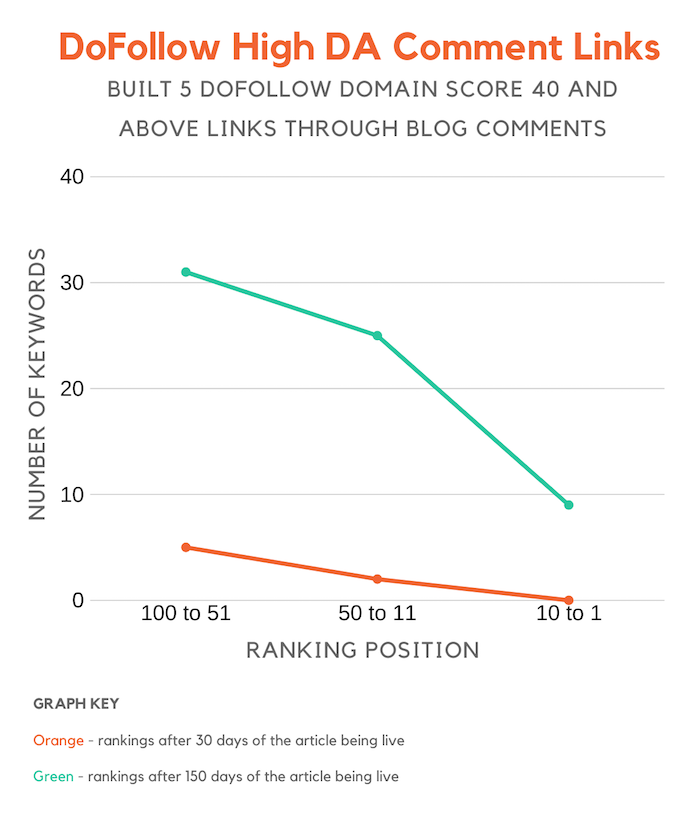
  3. Dofollow high domain score blog comment links – with this group, we built 5 links through blog comments. The links pointed to the new post and were dofollow from blogs with a domain score of 40 or higher. (I reduced the domain score criteria for this category and the link quantity as we struggled to find a large number of high authority blogs that pass link juice in the comment section.)
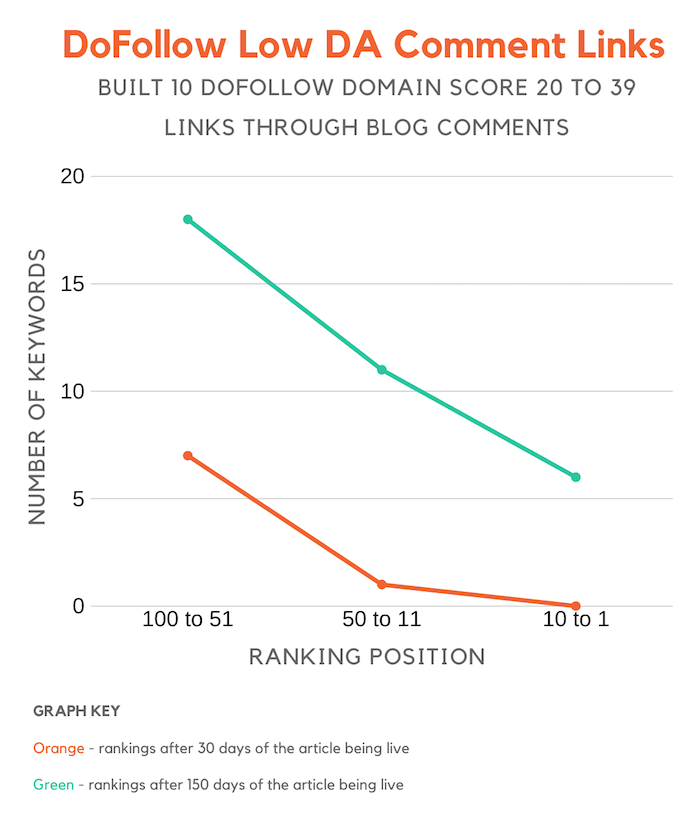
  4. Dofollow low domain score blog comment links – with this group, we built 10 links through blog comments. Each link pointed back to the article and it was from a blog that contains a domain score of at least 20 but no higher than 39. (I was able to build more links here as there are many more low domain score blogs than high domain score ones.)

Keep in mind with the link building for groups 2, 3 and 4, there was no specific anchor text agenda. Because the links were built through blog comments, it was too hard to control the anchor text as we didn’t want to be spammy.

And each comment left on the blog contained at least 75 words as we wanted to ensure that each comment provided value and the core purpose wasn’t just link building.

Alright, so let’s dive into the results.

Control group

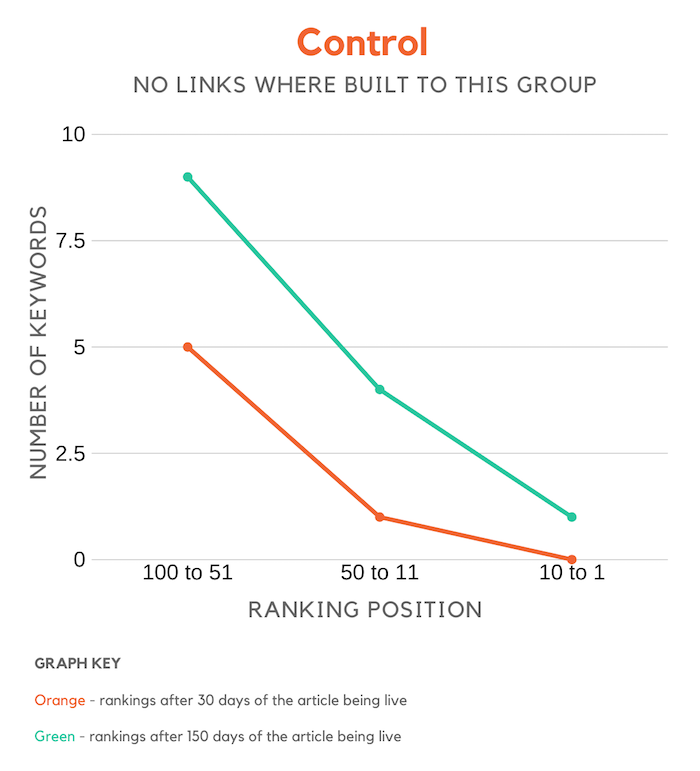
Do you really need links to rank on Google? Well, the chart below says a lot…

As you can see over time, you will naturally grow your search rankings even if you don’t build any links.

Of course, if your content is amazing and you do on-page SEO, you’ll rank higher, but still not growing your link count doesn’t mean you will rank for anything out there… instead, you will still rank for long-tail terms that aren’t too competitive.

Nofollow high domain score blog comment links

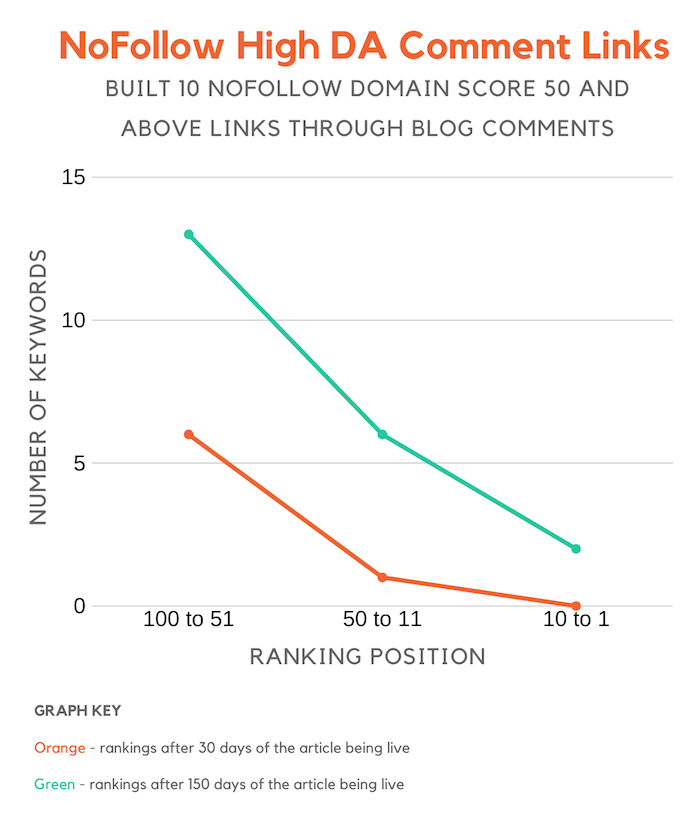
Now the results from this group were interesting…

As you can see, the sites in this group had better results than the control group even though the links were nofollowed.

Keep in mind, though, that it could be many variables that caused this, such as the content quality may have been better.

Overall, the sites did perform better than the control group but not by a substantial amount.

Dofollow high domain score blog comment links

Google is sophisticated, they are able to know if a link is from user-generated content (such as blog comments), so I assumed even though the links where dofollow they still wouldn’t have much (if any) impact.

But, shockingly, sites in this group had the largest gains.

As you can see from the chart above, links from high authority sites, even if it is through user-generated content, help with rankings. They just have to be dofollow.

Dofollow low domain score blog comment links

With this last group, we were able to build more dofollow links because we focused on sites with lower authority.

And as you can see from the chart above, it did help with rankings more than building nofollow links but it didn’t help nearly as much as getting links from blogs with higher domain scores.

We built 10 links instead of 5, but the quantity didn’t help as much as having high domain score links. This group increased their rankings by 337% versus 828% that group 3 experienced even though they had half the links.

Again, we still saw gains, just not as large as the previous group.

Conclusion

Who would have thought that building links through blog comments still helps?

Now, if you are going to use this tactic, you’ll want to focus on blogs that have dofollow comments.

If you aren’t sure how to find them, you can perform a Google search for the following:

  • “title=”CommentLuv Enabled”” KEYPHRASE – this will showcase blogs that have CommentLuv enabled which means they pass link juice.
  • “dofollow blogs” – you find a lot of blog articles listing out blogs that have dofollow links. Some of them look like this but you will have to double-check each site as many are nofollow even though bloggers claim they are dofollow.
  • Followlist – this is a directory of blogs that have dollow links.

When building links, focus on higher domain scores as it has a bigger impact on rankings.

In addition to that, you’ll only want to leave a comment if you can provide value. Don’t stress the anchor text, focus on the quality of your comment as you don’t want to be a spammer.

Posting spammy links will just cause your comment to be removed.

Lastly, don’t just leave a valuable comment for the sake of generating a link. Make sure it is on relevant blogs as well. And if that means the blog doesn’t have as high of a domain score that’s fine because the data above shows that even low domain score links still help (just not as much).

So, have you thought about leaving more comments on other blogs? It’s a great way to get your brand out there, generate referral traffic, and boost your rankings.

The post Do High DA Backlinks From Blog Comments Help Rankings? appeared first on Neil Patel.
Tuesday, December 17, 2019

Ubersuggest 7.0: The Ultimate Keyword Research Tool

Believe it or not, I’ve been working on Ubersuggest for almost 3 years now.

I bought it on February 13, 2017, for $120,000 dollars as a test to see if I could get more traffic from a tool than traditional content marketing or SEO.

Since then the tool has come a long way, in which I’ve added tons of features that competitors charge $100 a month or even more for.

But I’ve finally got Ubersuggest to a point where I can start releasing features that my competition don’t even have.

So before, you head on over to Ubersuggest to work on your SEO, make sure you read everything below because I’ve just changed up how you are going do keyword research (in a good way).

On top of that, I’ve also released a few other features as well related to link data and traffic estimations.

Here’s what’s new:

More keyword data

The biggest problem I had with keyword research was how to find the right keyword.

Sure, there are metrics like CPC data, SEO difficulty, or even search volume, but assuming you find keywords with a high CPC, low SEO difficulty, and high search volume, it still doesn’t mean it is a good keyword to go after.

And there are a few reasons why…

  • Mobile searches aren’t worth as much – first off, if the keyword mainly gets searched from on mobile devices the conversion rate will be lower. It doesn’t mean mobile traffic is useless, it just typically means the keyword won’t be as valuable.
  • High search volume doesn’t guarantee lots of organic clicks – what happens if the keyword gets a ton of searches but no clicks? This sounds crazy, but it actually happens a lot. For example, when people search for “weather” in the United States, roughly 60% of the people don’t click any results.
  • Not all searchers are worth the same – some keywords get searched heavily by teenagers. Some keywords get searched heavily by people who are in their 30s or 40s. If the majority of the searches for a given keyword happen by a really young audience, chances are they won’t have a credit card and they won’t convert into a customer.

Because of all of this, I decided to change how the industry does keyword research.

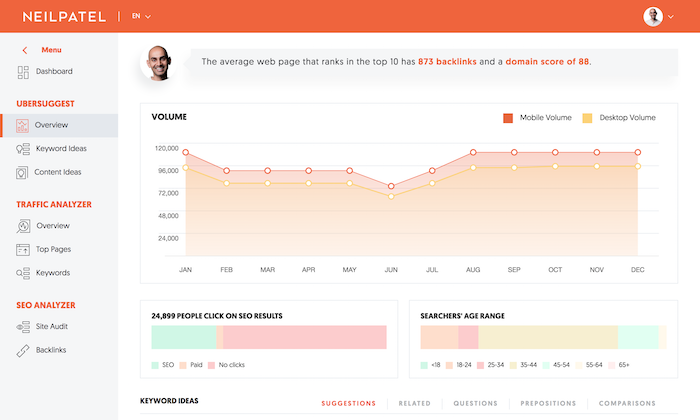
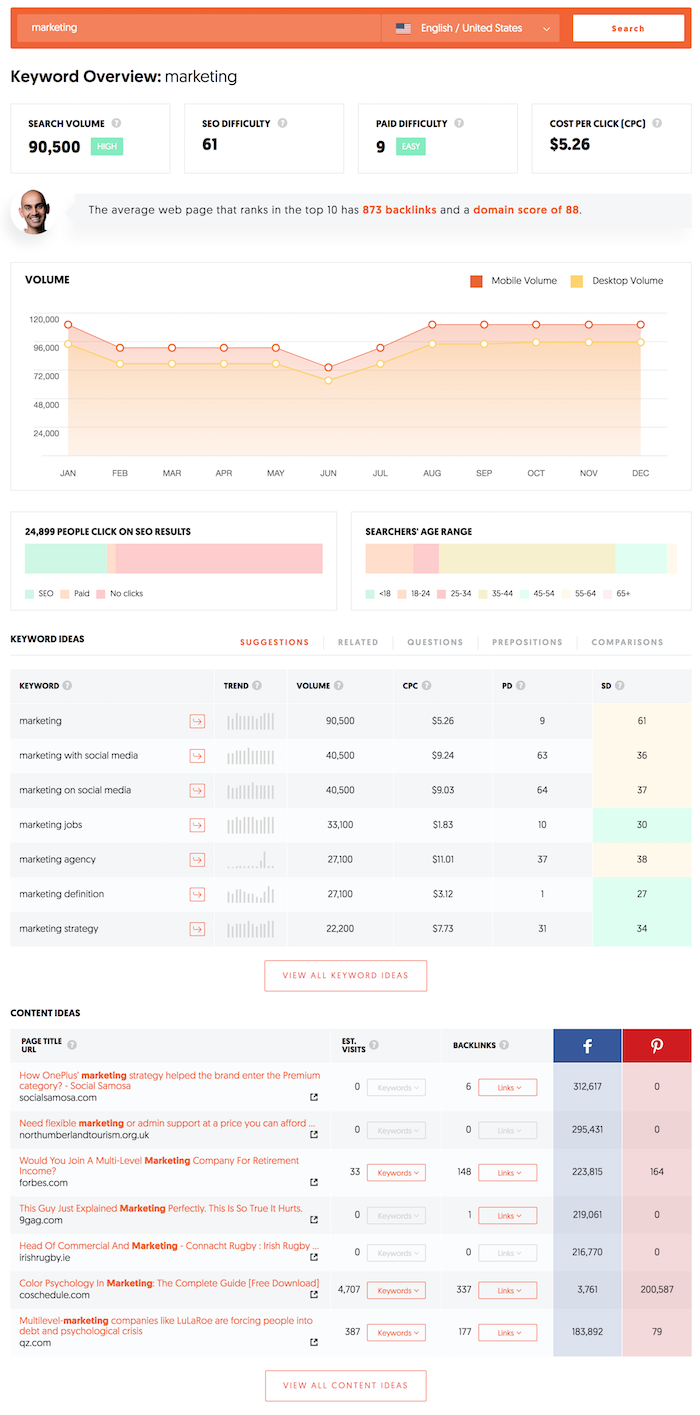
Now when you type in a keyword like “marketing” into Ubersuggest, you’ll see this:

If you have been using Ubersuggest for the last year or so you may notice some differences… but if you haven’t let me break down what’s new.

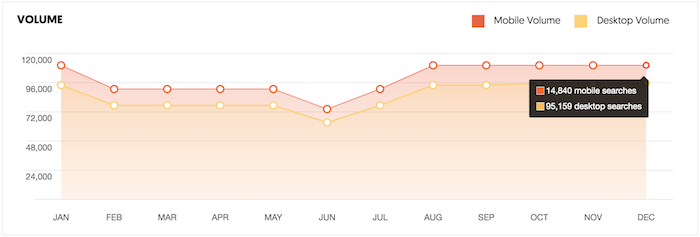
First off, for any given keyword you will see what percentage of the searches are taking place from mobile devices or desktop devices.

For example, with the term “marketing” you can see that the majority of the searches are coming from desktop devices.

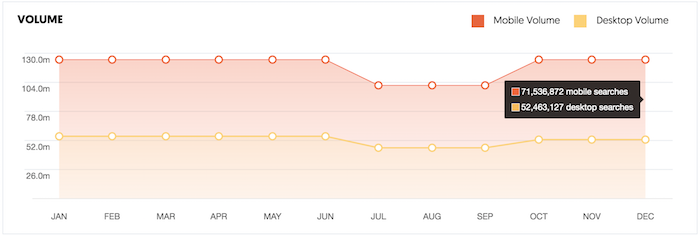
On the flip side, if you use Ubersuggest to look at the term “weather” you’ll notice that the majority of the searches happen on mobile devices.

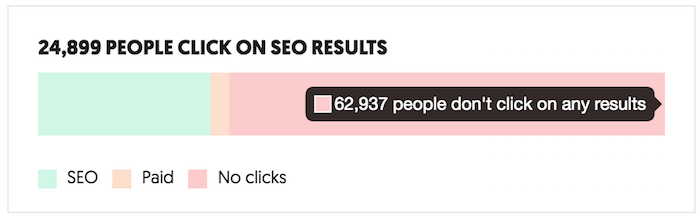
And with any given keyword you can also see what percentage of the people even click on the SEO or paid results.

I love this bar chart because it tells me if I should even go after a specific keyword. Just because a term has tons of searches doesn’t mean you are going to get tons of clicks, even if you rank at the number 1 spot.

If you leverage paid ads, this bar chart is also helpful because it will give you a sense of how many people click on the paid ads as well.

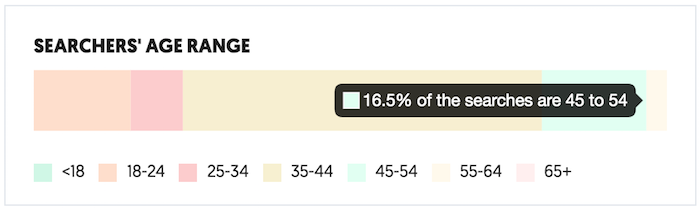
Another chart that I’ve added is one that breaks down the age range of each searcher.

As you can see from the above image, Ubersuggest now shows what percentage of the searches take place between each age range.

This is really important if you know the persona of your ideal customer, as you only want to target keywords that your ideal buyer is searching for.

What’s also cool is this data is available for all countries within Ubersuggest and for almost all of the keywords within our database.

Now before you head off to Ubersuggest and test it out, there are a few more features that I’ve just released.

More backlink data

Over the last few months, I’ve gotten feedback that our link database isn’t as big as you would like, so we have been working on fixing this.

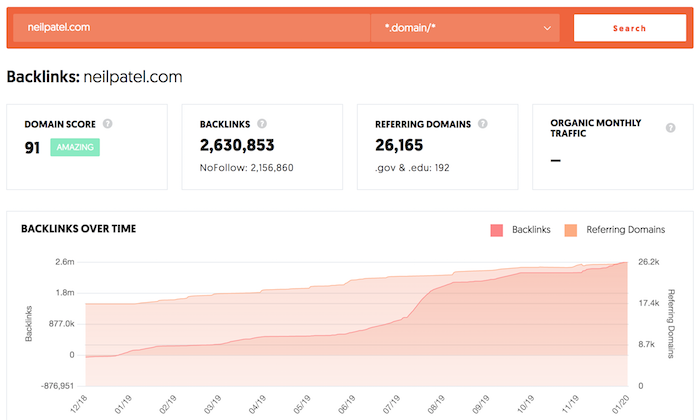
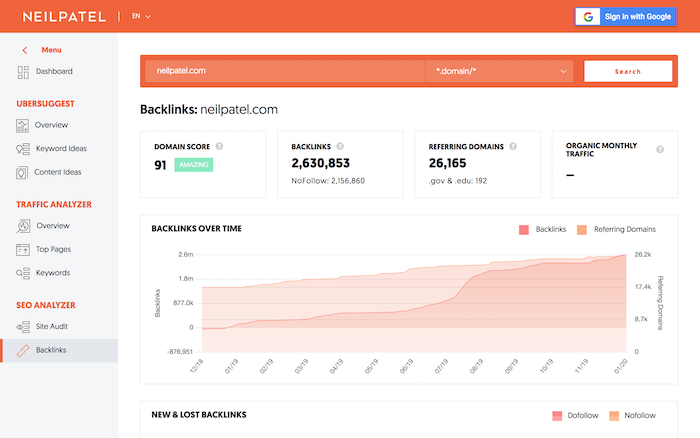
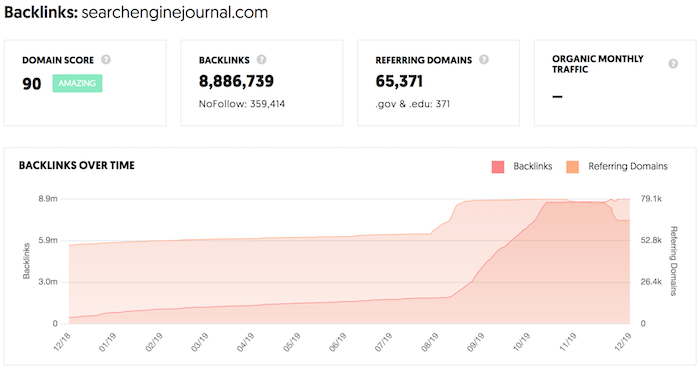
First off, whenever you do a backlink search in Ubersuggest, you’ll start seeing stats on historical backlink data.

This chart will quickly show you if a site is growing in backlink and referring domain count over time or if they are declining.

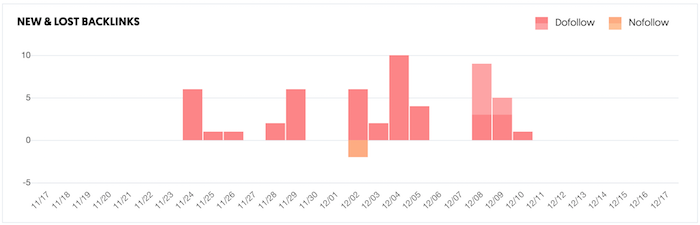
On top of that, we are even showing the daily new and lost link count for a given site.

I know the new and lost link count chart looks a bit off, but keep in mind we started having Ubersuggest crawl more pages around the web faster and more frequently. Hence you are seeing a big spike in new and lost links.

But over the next 4 weeks, it should normalize, and you’ll see an accurate representation of new and lost links.

This will help you identify new link opportunities more easily. Especially because you can now clearly see where your competitors are focusing their link building efforts.

Better traffic estimations

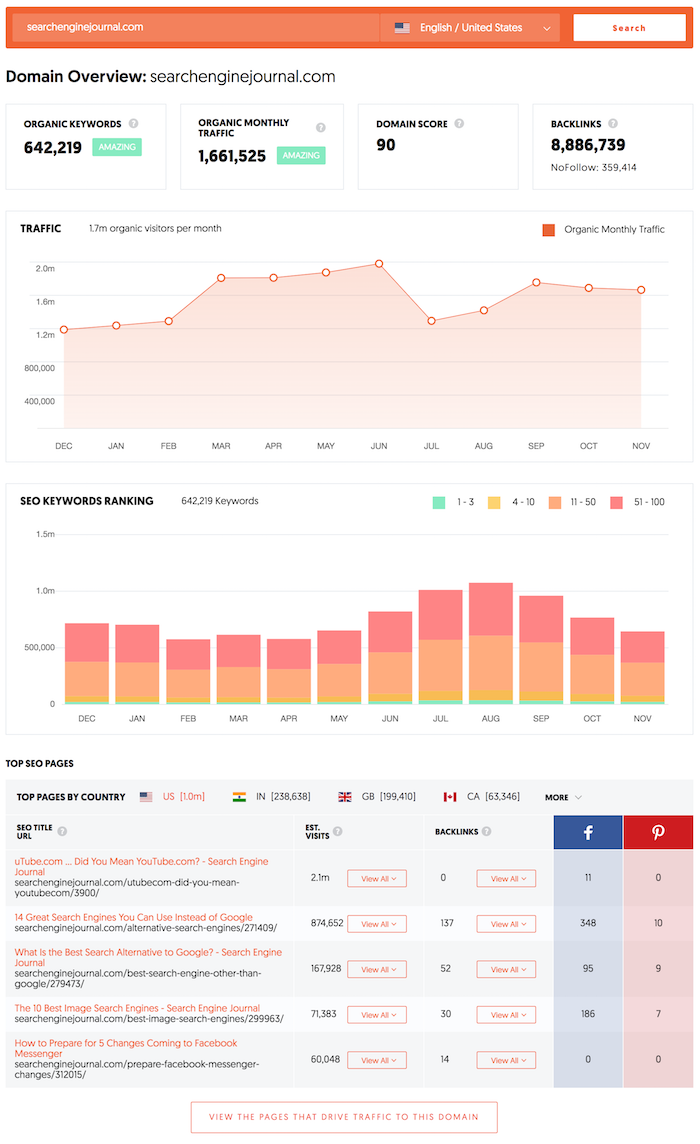
Lastly in Ubersuggest, you can also enter in a URL and get data on any given domain.

From its estimated monthly search traffic to the number of keywords a domain ranks for to even its top pages based on link and traffic count.

We haven’t fully finished creating our new algorithm when it comes to traffic estimations, but the chart you’ll see now is much more accurate than the older one.

Even though this is a big improvement from our older charts, give it another 3 months and it should be extremely accurate.

When you are using the traffic analyzer report in Ubersuggest, keep in mind that this will give you a directional guide on how you are doing versus your competition.

Conclusion

I hope you enjoy the new changes to Ubersuggest.

I’ve made them in order to give you a leg up on your competition as the data in the tool is now something that most of you have never seen before.

And over the next two months, you’ll see some big launches in Ubersuggest. From a chrome extension to even more accurate traffic estimations to even an Alert system that will notify you when things are wrong with your site.

So, go to Ubersuggest and try out the new keyword features as well as traffic estimation and backlink features.

What do you think about the new features?

The post Ubersuggest 7.0: The Ultimate Keyword Research Tool appeared first on Neil Patel.
Tuesday, December 10, 2019

How to Get More Organic Traffic Without Doing Any SEO (Seriously)

You all know SEO is a long-term game… at least when it comes to Google.

And yes, who doesn’t want to be at the top of Google for some of the most competitive terms? But the reality is, we don’t all have the budget or time.

So then, what should you do?

Well, what if I told you there were simple ways to get more organic traffic and, best of all, you don’t have to do one bit of SEO?

Seriously.

So, what is it? And how can you get more organic traffic?

Well, this story will help explain it…

The old days

When I first started my journey as an SEO, I got really good at one thing.

Getting rankings!

Now to be fair, this was back in 2003 when it wasn’t that hard to rank on Google (or any other search engine for that matter).

Stuff some keywords into your page, your meta tags, and build some spammy rich anchor text links and you were good to go.

You could literally see results in less than a month.

SEO wasn’t too complicated back then. So much so, that I even started an SEO agency and created a handful of sites.

I was starting to rank my sites at the top of Google but they didn’t make a dollar. Literally, not a single dollar.

In fact, I was actually losing money on them because I had to pay for the domain registration expenses and hosting.

So, one day I decided that I was tired of losing money and I was going to do something about it. I took the keywords that I was ranking for and started to type them into Google to see who was paying for ads for those terms.

I hit up each of those sites and tried to get a hold of the owner or the person in charge of marketing.

I asked them how much they were paying for ads and offered them the same exact traffic for a much lower price. I was able to do this because I already had sites that ranked for those keywords.

In other words, I offered to rent out my website for a monthly fee that was a fraction of what they were paying for paid ads.

Next thing you know I was collecting 5 figures in monthly checks and my “renters” were ecstatic because they were generating sales at a fraction of the costs compared to what they were spending on paid ads.

So, what’s the strategy?

Well, it’s simple. Back in the day, I used to rent out my websites… the whole site.

These days I’ve learned how to monetize my own site, so I don’t rent them out.

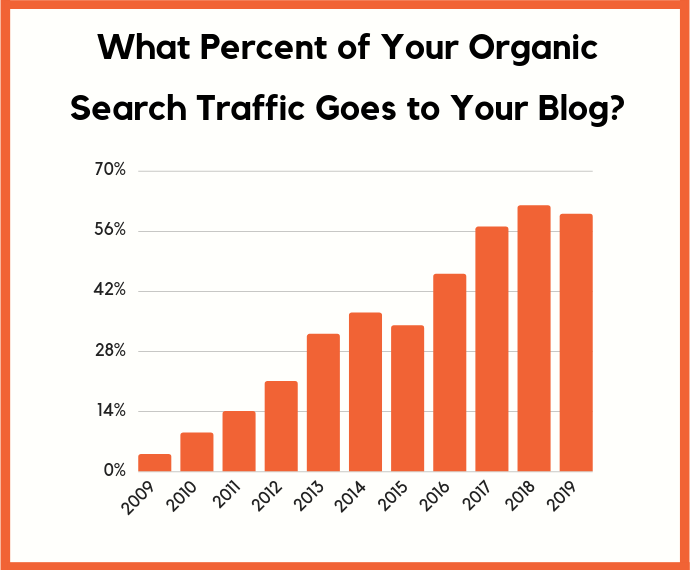
But you know what, most of the sites that rank on Google are content-based sites. Over 56% of a website’s organic traffic is typically going to their blog or articles.

So why not rent a page on someone else’s site? From there, modify that page a bit to promote your products or services?

I know this sounds crazy, but it works. I have one person that just reaches out to site owners asking if we can rent out a page on their site. We do this for all industries and verticals… and when I look at how much we are spending versus how much income we are generating, it’s crazy.

Here are the stats for the last month:

Rental fees: $24,592

Outreach costs: $3,000

Legal costs: $580

Copywriting and monetization costs: $1,500

Total monthly cost: $29,672 

Now guess what my monthly income was?

It was $79,283.58.

Not too bad.

Now your cost on this model won’t be as high as mine because you can do your own outreach, monetize the page you are renting on your own, and you probably don’t need a lawyer.

And don’t be afraid of how much I am spending in rental fees as you can get away with spending $0 in the first 30 days as I will show you exactly what to do.

Remember, it’s also not what you are spending, it’s about profit and what you are making. If it won’t cost you any money in the first 30 days and you can generate income, your risk is little to none.

Here are the exact steps you need to follow:

Step #1: Find the terms you want to rank for

If you already know the terms you want to rank for, great, you can skip this step.

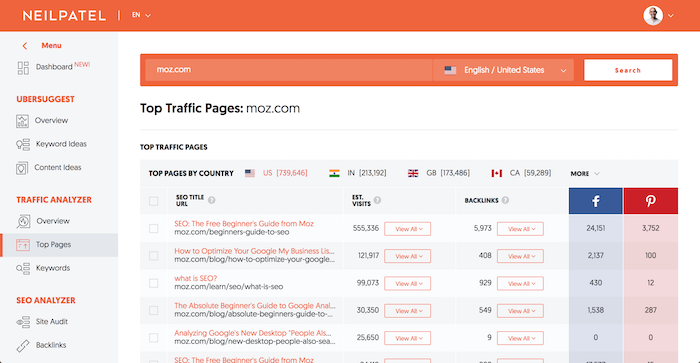
If you don’t, I want you to head to Ubersuggest and type in a few of your competitors’ URLs.

Head over to the top pages report and look at their top pages.

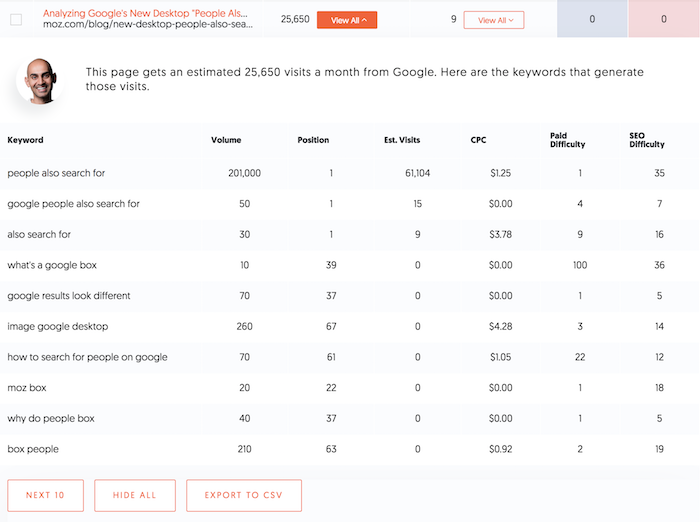
Now click on “view all” under the estimated visits column to see a list of keywords that each page ranks for.

I want you to create a list of all of the keywords that contain a high search volume and have a high CPC. Keywords with a high CPC usually mean that they convert well.

Keywords with a low CPC usually mean they don’t convert as well.

When you are making a list of keywords, you’ll need to make sure that you have a product or service that is related to each keyword. If you don’t then you won’t be able to monetize the traffic.

Step #2: Search for the term

It’s time to do some Google searches.

Look for all of the pages that rank in the top 10 for the term you ideally want to rank for.

Don’t waste your time with page 2.

What I want you to look for is:

  • Someone who isn’t your competitor. Your competition isn’t likely to rent out a page on their site to you.
  • A page that isn’t monetized. Not selling a product or service. (If the page has ads, don’t worry.)
  • A site owned by a smaller company… a publicly-traded company isn’t likely to do a deal. A venture-funded company isn’t likely to do a deal either (Crunchbase will tell you if they are venture-funded).

Step #3: Hit up the website

Typically, through their contact page, they should have their email addresses or phone number listed. If they have a contact form, you can get in touch that way as well.

If you can’t find their details, you can do a whois lookup to see if you can find their phone number.

What’ll you want to do is get them on the phone. DO NOT MAKE YOUR PITCH OVER EMAIL.

It just doesn’t work well over email.

If you can’t find their phone number, email them with a message that goes something like this…

Subject: [their website name]

Hey [insert first name],

Do you have time for a quick call this week?

We’ve been researching your business and we would like to potentially make you an offer.

Let me know what works for you.

Cheers,

[insert your name]

[insert your company]

[insert your phone number]

You want to keep the email short as I have found that it tends to generate more calls.

Once you get them on the phone, you can tell them a little bit about yourself. Once you do that, tell them that you noticed they have a page or multiple pages on their website that interest you.

Point out the URL and tell them how you are interested in giving them money each month to rent out the page and you wouldn’t change much of it… but you need some more information before you can make your offer.

At this point, you’ll want to find out how much traffic that page generates and the keywords it ranks for. They should have an idea by just looking at their Google Analytics (you’ll find most of these sites don’t use Google Search Console).

Once you have that, let them know that you will get in touch with them in the next few days after you run some numbers.

Go back, try to figure out what each click is worth based on a conservative conversion rate of .5%. In other words, .if 5% of that traffic converted into a customer, what would the traffic be worth to you after all expenses?

You’ll want to use a conservative number because you can’t modify the page too heavily or else you may lose rankings.

Once you have a rough idea of what the page is worth, get back on the phone with them and say you want to run tests for 30 days to get a more solid number on what you can pay them as you want to give them a fair offer.

Typically, most people don’t have an issue because they aren’t making money from the page in the first place.

Step #4: Monetize the page

If you are selling a product, the easiest way to monetize is to add links to the products you are selling.

For example, if you are selling a kitchen appliance like a toaster, you can add links from the article to your site.

Just like this article.

The easiest way to monetize a blog post is to add links to products or services you are selling.

Don’t delete a lot of the content on the page you are modifying… adding isn’t too much of an issue but when you delete content sometimes you will lose rankings.

As for a service-based business, linking out to pages on your site where people can fill out their lead information is great.

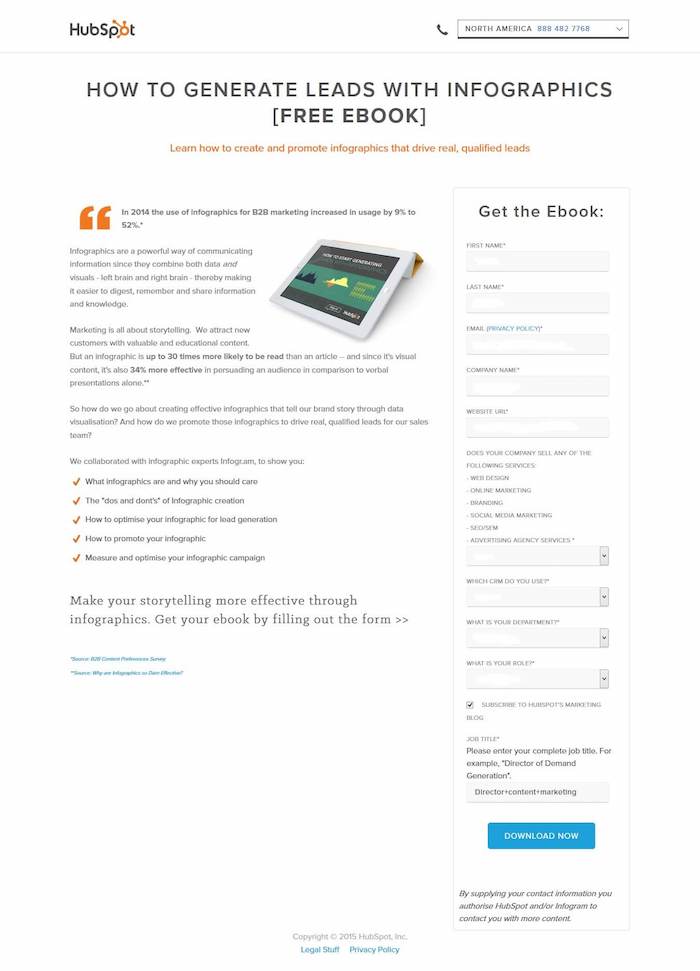
Or you can just add lead capturing to the page you are renting out. Kind of like how HubSpot adds lead forms on their site.

I’ve actually found that they convert better than just linking out to your site.

When monetizing the page you are renting, keep in mind that you will need disclaimers to let people know that you are collecting their information for privacy purposes. You also should disclose you are renting out the page.

Once you are monetizing the page for a bit, you’ll have a rough idea of what it is worth and you can make an offer on what you’ll page.

I recommend doing a 12-month contract in which you can opt-out with a 30-day notice.

The reason you want a 12-month agreement is that you don’t want to have to keep renegotiating. I also include the 30-day opt-out notice in case they lose their rankings, you can opt-out.

And to clarify on the op-out clause, I have it so only I can opt-out and they are stuck in the agreement for a year.

Conclusion

SEO isn’t the only way you can get more organic traffic.

Being creative, such as renting pages that already rank is an easy solution. Best of all, you can get results instantly and it’s probably cheaper than doing SEO in the long run.

The only issue with this model is that it is really hard to scale.

If I were you, I would do both. I, of course, do SEO on my own site because it provides a big ROI. And, of course, if you can rent out the pages of everyone else who ranks for the terms you want to rank for, it can provide multiple streams of income from SEO.

The beauty of this is model is that you can take up more than one listing on page 1. In theory, you can take up all 10 if you can convince everyone to let you rent their ranking page.

So, what do you think of the idea? Are you going to try it out?

The post How to Get More Organic Traffic Without Doing Any SEO (Seriously) appeared first on Neil Patel.
Tuesday, December 3, 2019

The One Thing Every Marketer Should Do

Marketers tend to be very reactive.

And it makes sense because every time a search engine or a social network changes their algorithm we jump as marketers.

We are conditioned to be very reactive. Whether it’s your boss who is pissed that your traffic dips or even yourself… everyone hates when sales and income drop because of something you can’t fully control.

And even when you try to be proactive, you are probably planning ahead from a 3-month period to a year max.

But that’s not how you win. You win by making bold bets that take time and can’t be done in a few months or a year… you win by doing what your competition isn’t willing to do.

So how do you come up with these bold bets?

You unplug!

Here’s how I come up with my ideas

Once a year I try to unplug. Just like right now, as I am writing this I don’t have cell reception and there is no WiFi.

I’m on a ranch in the middle of nowhere.

No matter where I look, there are no neighbors. All you have is nature in its rawest form. Just like how lightning kept going on for hours.

By unplugging and just being one with nature, you truly realize what’s important.

See, we all have problems and issues… especially in business. But how bad are your problems? Do they even matter in the grand scheme of things?

Look, I’ll be honest with you. I am not a big nature person… I’m actually quite the opposite.

I live in a modern, cold feeling house in a heavily congested city. I’m so OCD that I have a full-time cleaner come just because I’m afraid of getting dirty (seriously).

Heck, I won’t even go through airport security without having booties in my briefcase, just in the rare chance they make me take off my shoes. There is no way I can have my socks touch that dirty ground.

Yes, I am crazy when it comes to cleanliness and hygiene.

But even me, I go to places that are full of nature and wild animals… or in my case, cows, bears, deer, snakes, mountain lions, etc… being there really helps put things into perspective.

Because when you aren’t surrounded by noise caused by us humans, it allows you to clearly focus and think about what’s important.

For me, spending 3 days a year usually does the trick.

It allows me to forget about the bullshit we all have to deal with on a daily basis and come up with ideas about what I need to do over the next 5 (or even 10) years to win.

I know that sounds like a really long time… and it is. But again, to win you need to think long term and make bold bets that your competition wouldn’t dare to copy.

Just look at what I did with Ubersuggest.

I came up with that idea a few years ago by disconnecting (just like I described above).

Companies like Moz would constantly post their revenue stats and their competitors decided to also talk about their financials. So while being disconnected, I came up with an idea on how I could win and the first step was acquiring a tool like Ubersuggest.

And since then I’ve executed a few of the steps in my plan, but I still have a long way to go.

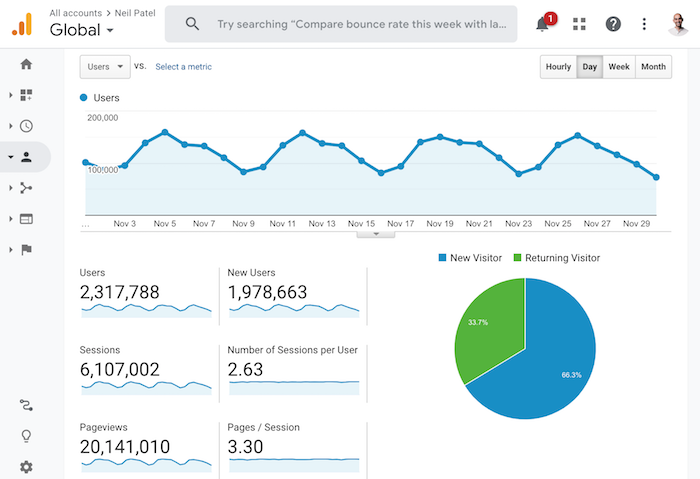
None-the-less, those steps have paid off. Just look at my traffic numbers.

So what I am going to do over the next 5 to 10 years?

I am going to turn SEO upside down again.

It hit me on this trip that we all have to go to sites like Ubersuggest, SEMrush, Ahrefs, or even Moz to get data.

But why is that?

It’s not natural in our workflow. Wouldn’t it just be easier to see this data as you browse the web?

Like when you search Google for any query sure you can use browser extensions like Keywords Everywhere to get some data or SEOquake or the Mozbar… but what you can’t get is that Ahrefs or SEMrush experience when you are just on a Google Search results page.

What will that look like? I have no clue yet, but I will figure that out over time.

Will that kill the traffic I generate to Ubersuggest over time?

Yes!!!!!!

But that is what needs to be done. I obsess about providing an amazing experience to my customers, even if that will kill off my existing business.

And no, that won’t take 5 years to do… I will probably do it over the next 6 months. I will first roll out a basic plugin like Keywords Everywhere and, eventually, I will add the functionally so you can get that type of Ubersuggest or Ahrefs experience right on Google or on your competitor’s site.

What will happen over the next 5 years though, is that I will be able to build something that gets you more traffic. Just like a light switch. Something that simple.

Why can’t we automate most of our marketing tasks? Why does SEO have to be manual when I can add a piece of JavaScript to a website and automate most of it? Why do I have to send out a blog post every time I release a new post or a push notification?

It should all be automated.

And no, I don’t mean in a templatized way. I manually send out emails every time I write a blog post because I know I can write custom copy that generates a 30% open rate and a high click rate.

But again, it should all be automated. And not just for English based sites, it should be done on a global level and work for every site in any language or country.

So how can you figure out what to focus on?

You may not be able to disconnect like me and spend the money that it costs to go to a ranch in the middle of nowhere.

And that’s fine… you don’t have to.

When I first started off, I didn’t have the resources or money, and I did just fine within my constraints.

For example, roughly 5 years ago I came up with the concept that I needed to go after global markets and compared to any of my competitors in the digital marketing realm, I’ve crushed all of them when it comes to global marketing.

Most of my competitors just translated their site or translated some of their content. Me on the other hand, I have 7 offices and teams in 18 different countries. And I’ll continue to expand so I can keep beating my competition when it comes to grabbing international attention.

But that idea didn’t come to me when I was in nature, being disconnected.

At that time, I was in my condo in the middle of Seattle and I disconnected my Internet for a few days.

Before I disconnected my Internet, I went and got food so I didn’t have to leave my house, and then I turned off all my gadgets… from my TV to phone and anything that was a distraction.

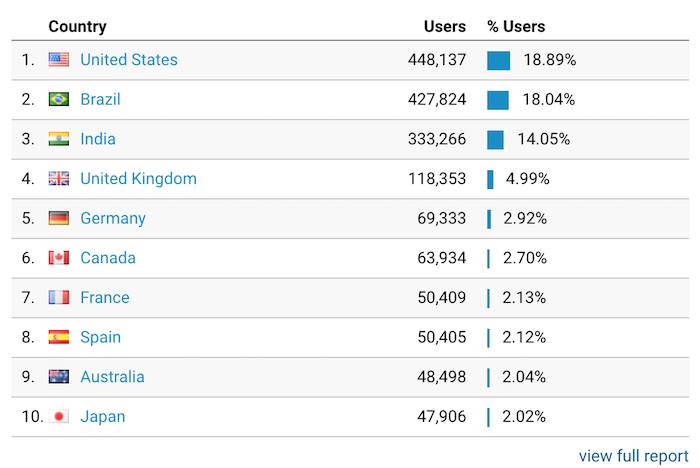
It worked well because now only 18.89% of my traffic is from the United States compared to 57% before I started to expand globally.

In other words, you can disconnect no matter where you are. You just literally have to disconnect your router, turn off your phone, and unplug your TV… it really is that simple.

If you do that for a few days, you’ll start realizing what is important and what isn’t. You’ll be able to strategize and start thinking more long term.

Conclusion

The key to winning long term isn’t by being reactive every time there is an algorithm update or even proactive and preparing for each algorithm update.

Because some of those things are simply out of your control.

Instead, you need to think long term and how you can disrupt your market to make a long-term bet that your competition isn’t willing to make.

Nike wasn’t built by SEO.

Airbnb wasn’t built through paid advertising.

American Express wasn’t built through social media marketing.

Tesla wasn’t built through content marketing.

Doing something disruptive or better than the competition is how you win.

Ubersuggest gets 1,668,233 visitors and 9,136,512 page views a month from people just coming directly. Not through SEO, marketing, or anything like that… I just focus on the future instead of being reactive.

That’s how I win.

Now, the real question is, how are you going to win?

The post The One Thing Every Marketer Should Do appeared first on Neil Patel.